Domain 3: Information Systems Acquisition, Development and Implementation
Arrow keys or space to move, F for full screen. Read the notes
Information Systems Acquisition, Development and Implementation
27 topics · Project management · Development · Testing · Implementation · Application controls
D3Project Roles and Governance
Who does what on an IT project, how a project is kept under control from start to finish, the three ways to organise a project team, and the auditor's place in it.
Everyone has a job
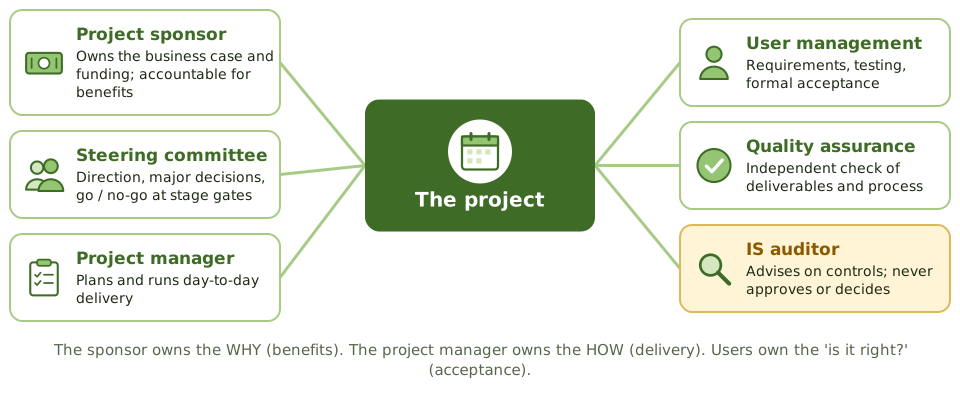
An IT project is like building a house. Someone pays and decides what they want (the sponsor), a site manager runs the work (the project manager), the future residents say what they need and check the result (the users), and an inspector checks it's built properly (QA).
When these roles blur, projects drift, overspend or deliver the wrong thing.
Who decides what
| Decision | Who makes it |
|---|---|
| Should we fund this project? | Senior management / sponsor |
| Approve a big change in scope or budget | Steering committee, with the sponsor |
| Go / no-go at a stage gate | Steering committee |
| Day-to-day scheduling and staffing | Project manager |
| Does the system meet our needs? | User management (acceptance) |
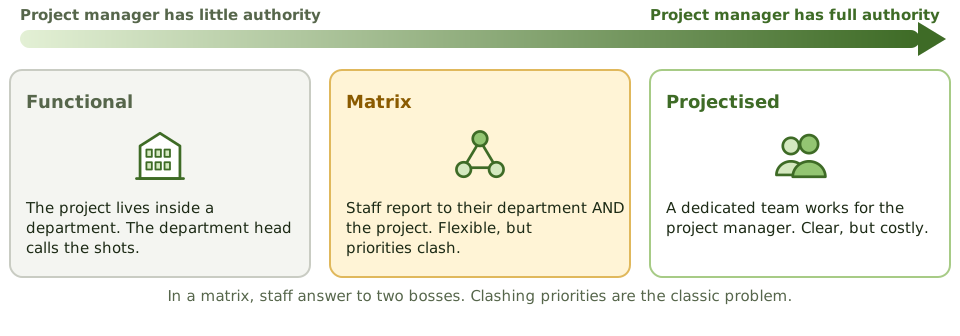
Three ways to organise a project
Keeping a project under control
- 1 Business case Approved before real money is spent.
- 2 Stage gates Is the project still worth it? Ready for the next stage?
- 3 Change control Scope, budget and time changes approved at the right level.
- 4 Status reports Honest progress, risks and issues.
- 5 Closure Acceptance, handover, lessons learned.
The auditor on a project
How the exam asks about it
| If the question asks… | Answer |
|---|---|
| Who is accountable for project benefits | The project sponsor |
| Who approves major scope changes | Steering committee, with the sponsor |
| Who accepts the system | User management |
| The auditor's role on a project | Advise and review; never decide |
| Main risk of a matrix structure | Clashing priorities between two bosses |
Key takeaways
- ✓The project sponsor owns the business case and funding, and is accountable for the project delivering its benefits.
- ✓The steering committee gives direction and makes the big decisions: scope, budget, and go or no-go at stage gates.
- ✓The project manager plans and runs day-to-day delivery within the agreed limits.
- ✓User management defines requirements, takes part in testing, and formally accepts the system.
- ✓Quality assurance independently reviews deliverables and process.
- ✓The IS auditor advises on controls and reviews risk, without making management decisions.
- ✓Projects can be organised functionally, as a dedicated team (projectised), or as a matrix; matrix splits authority and causes priority clashes.
Exam traps
- !The sponsor, not the project manager, is accountable for business benefits.
- !The steering committee decides on major changes; the project manager proposes them.
- !Acceptance is the users' decision, not IT's.
- !An auditor who signs off a project deliverable loses independence.
- !In a matrix structure, conflicting priorities between department and project managers are the main risk.
PMBOK Phases
The five groups of project management activity, the scope-time-cost balancing act, and the project documents and controls an auditor looks for.
The shape of every project
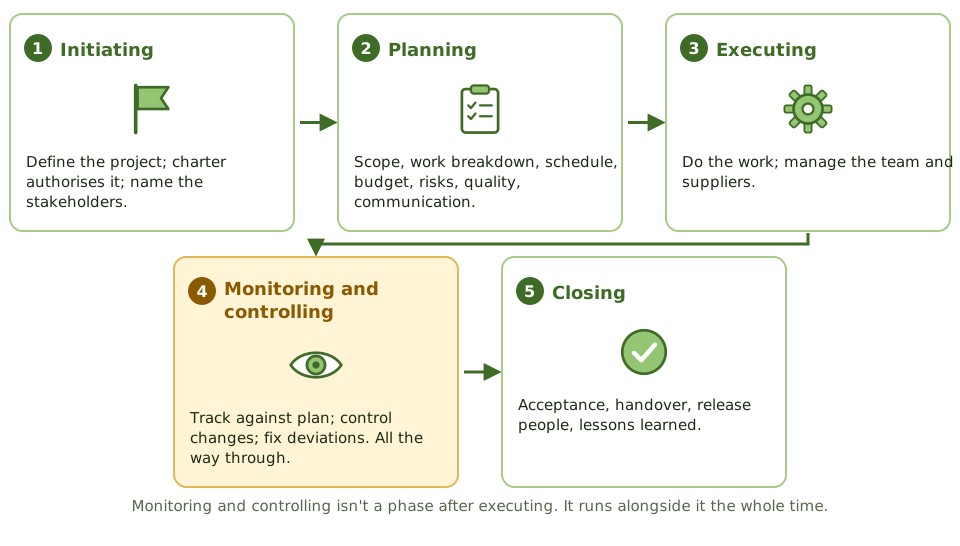
Whether you're building a house, organising a wedding or replacing a payroll system, projects follow the same pattern: decide to do it, plan it, do it while keeping an eye on it, and wrap it up.
The PMBOK (Project Management Body of Knowledge) calls these the five process groups.
The triple constraint
Key project documents
| Document | What it's for |
|---|---|
| Project charter | Formally authorises the project; names sponsor and project manager |
| Scope statement | What's in and out |
| Work breakdown structure | Deliverables broken into manageable work packages |
| Schedule and budget | Baselines for time and money |
| Risk register | Risks, owners, responses |
| Change log | Requested and approved changes |
PRINCE2 in one slide
What the auditor checks
A project shows green status every month, but the auditor finds the baseline schedule was quietly reset three times without steering committee approval.
How the exam asks about it
| If the question asks… | Answer |
|---|---|
| Document that formally authorises a project | Project charter |
| Tool that breaks deliverables into work packages | Work breakdown structure |
| Cause of scope creep | Changes accepted without change control |
| Final project activity | Formal closure, including lessons learned |
| When monitoring and controlling happens | Throughout the project |
Key takeaways
- ✓PMBOK groups project management into initiating, planning, executing, monitoring and controlling, and closing.
- ✓Monitoring and controlling runs alongside execution throughout the project, not after it.
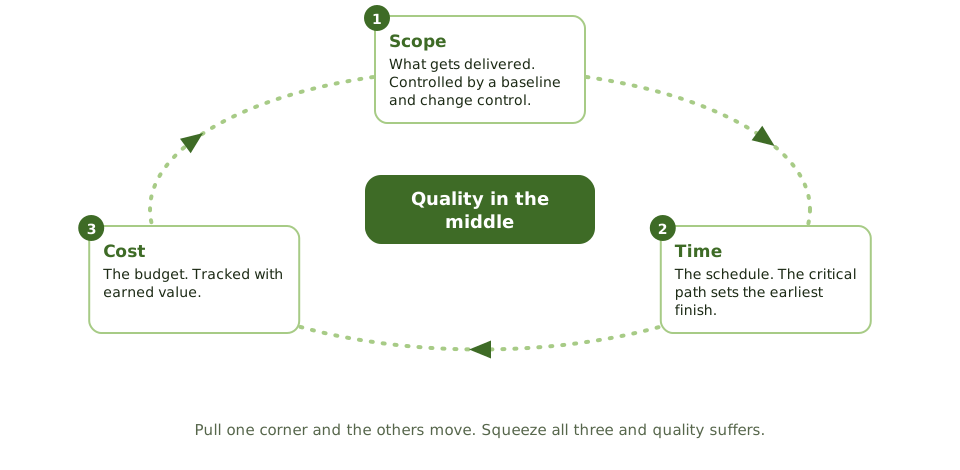
- ✓The triple constraint is scope, time and cost; changing one affects the others, and quality.
- ✓Key planning outputs: the project charter, scope statement, work breakdown structure, schedule, budget, risk and communication plans.
- ✓Proper closure includes formal acceptance, releasing resources, and a lessons-learned review.
- ✓PRINCE2 is an alternative method built on business justification, defined roles and management by stages.
Exam traps
- !The project charter formally authorises the project and names the project manager; it's an initiating output.
- !A work breakdown structure breaks down deliverables; it isn't a timeline.
- !Scope creep happens when changes skip change control.
- !A project isn't properly closed without formal acceptance and lessons learned.
Gantt, PERT, Critical Path
Three scheduling tools explained with one small project: Gantt charts to show the timeline, PERT to estimate uncertain tasks, and the critical path to find which delays really matter.
Scheduling a project
Imagine making Sunday lunch. The roast takes 2 hours; the vegetables take 30 minutes; you can't carve before the roast is done. Some jobs can happen at the same time, some must wait for others, and one long chain decides when lunch is ready.
Project schedules work the same way. Three tools help: Gantt charts, PERT and the critical path.
Gantt charts
A Gantt chart shows each task as a bar along a timeline, often with milestones and how far along each task is. Easy to read and great for tracking progress. Its weakness: you can't easily see which tasks depend on which, so you can't tell which delays will push out the end date.
PERT estimates
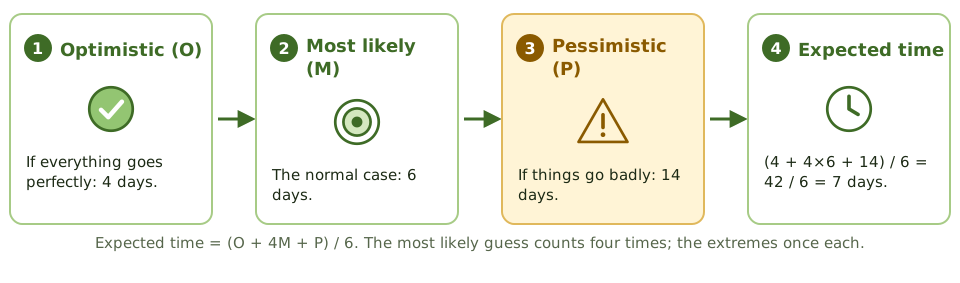
When you're unsure how long a task will take, PERT asks for three guesses and weights them.
The critical path
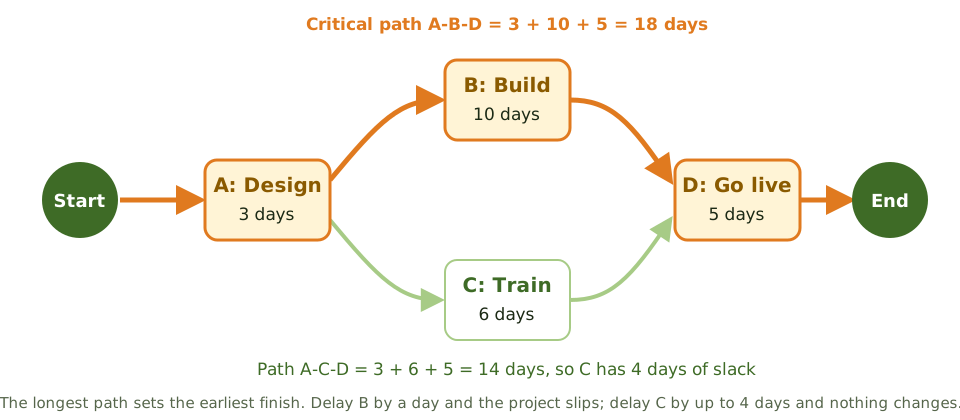
Speeding things up
How the exam asks about it
| If the question asks… | Answer |
|---|---|
| What the critical path is | The longest path; it sets the minimum project duration |
| Slack on critical-path tasks | Zero |
| Technique using three time estimates | PERT |
| Weakness of a Gantt chart | Doesn't clearly show dependencies or the critical path |
| Technique that fixes time and varies scope | Timebox management |
Key takeaways
- ✓A Gantt chart shows tasks as bars on a timeline; good for tracking progress, weak at showing which tasks depend on each other.
- ✓PERT uses three estimates per task (optimistic, most likely, pessimistic): expected time = (O + 4M + P) / 6.
- ✓The critical path is the longest chain of dependent tasks; its length is the shortest possible project duration.
- ✓Tasks on the critical path have zero slack: any delay delays the project.
- ✓Tasks off the critical path have slack (float): they can slip a bit without delaying the project.
- ✓Timeboxing fixes the deadline and adjusts scope to fit, as in agile and RAD.
Exam traps
- !The critical path is the LONGEST path, not the shortest.
- !Speeding up a task that isn't on the critical path doesn't finish the project sooner.
- !PERT handles uncertainty with three estimates; CPM uses one estimate per task.
- !A Gantt chart alone doesn't show which delays matter.
Function Point Analysis
Estimating how big a system is from what it does for users, before any code exists, and why that beats counting lines of code for early estimates.
How big is this system?
Before you can estimate cost and time, you need to know how big the job is. A builder estimates a house by floor area, not by counting bricks after it's built.
Function points are the 'floor area' of software: a measure of how much it does for its users, which you can count from the requirements before any code exists.
The five things you count
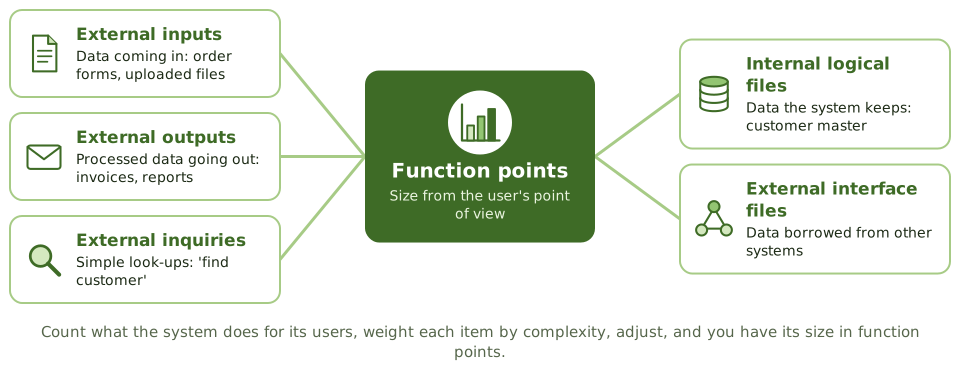
From count to estimate
- 1 Count The five components, from requirements.
- 2 Weight Low, average or high complexity.
- 3 Adjust For things like performance needs or complex processing.
- 4 Function points The system's size.
- 5 Effort and cost Using past productivity, e.g. hours per function point.
Function points vs lines of code
| Function points | Lines of code | |
|---|---|---|
| Measures | What the system does for users | How much code was written |
| Depends on language? | No | Yes |
| Available early? | Yes, from requirements | No, only after coding |
| Best for | Early estimates; comparing productivity | Late-stage sizing; maintenance |
How the exam asks about it
| If the question asks… | Answer |
|---|---|
| Estimation based on user functionality | Function point analysis |
| Main advantage over lines of code | Can be done early; language-independent |
| What FPA counts | Inputs, outputs, inquiries, internal files, interface files |
| Why lines of code is poor early on | No code yet; size depends on the language |
Key takeaways
- ✓Function point analysis (FPA) measures software size by the functionality delivered to users, regardless of programming language.
- ✓It counts five things: external inputs, external outputs, external inquiries, internal logical files and external interface files.
- ✓Each is weighted by complexity, and the total can be adjusted for general system characteristics.
- ✓Function points can be counted from requirements, so FPA supports early estimates.
- ✓Lines of code (SLOC) depends on the language and is only known late, so it's poor for early estimates.
- ✓Size becomes effort and cost using historical productivity data.
Exam traps
- !FPA measures size from the user's perspective, not the code's.
- !You can't count lines of code before the code is written.
- !Function points measure size; turning size into effort needs historical data.
Earned Value and Project Risk
Why 'we've spent half the budget' tells you nothing about progress, how earned value fixes that (with worked numbers), and how project risks are managed.
Spending isn't progress
'We've spent half the budget and we're halfway through the schedule.' Sounds fine. But what if only a third of the work is done?
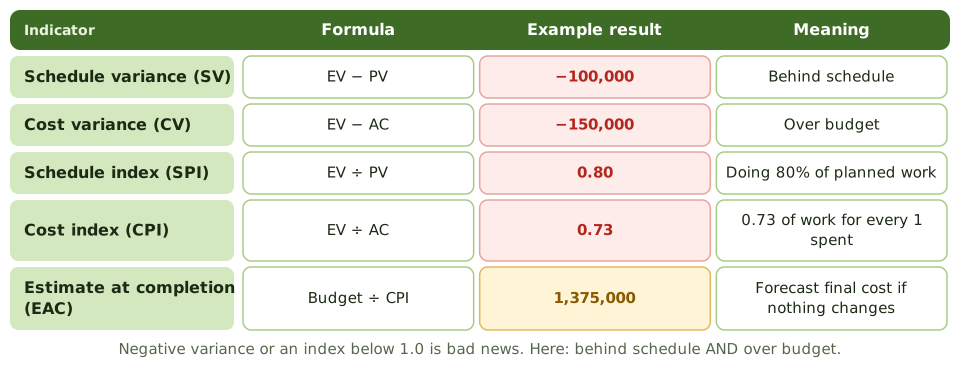
Earned value management answers the real question: how much work have we actually done, compared with the plan and with what we've spent?
Three numbers
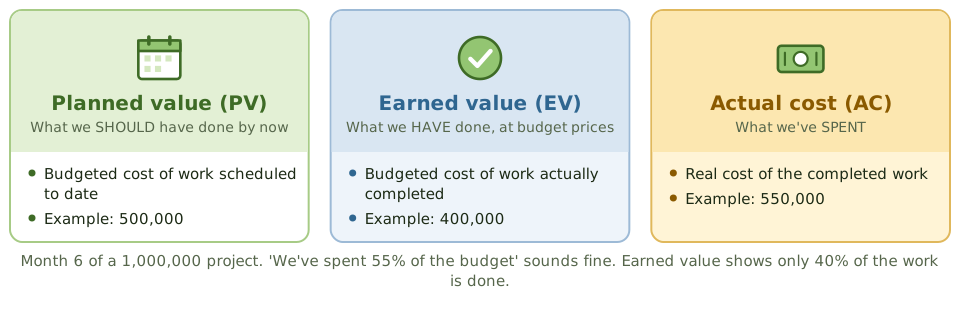
Reading the results
Managing project risk
- 1 Identify Early and often: workshops, past lessons.
- 2 Assess How likely, how bad.
- 3 Respond Avoid, mitigate, transfer, accept; contingency.
- 4 Assign owners Someone responsible for each risk.
- 5 Monitor Risk register reviewed at steering meetings.
Warning signs auditors look for
How the exam asks about it
| If the question asks… | Answer |
|---|---|
| Best measure of project progress | Earned value: work done vs plan and cost |
| SPI of 0.8 means | Behind schedule: 80% of planned work done |
| CPI below 1.0 means | Over budget for the work done |
| Formula for cost variance | EV − AC |
| When project risks are assessed | Throughout the project |
Key takeaways
- ✓Earned value management compares planned value (PV), earned value (EV) and actual cost (AC) to measure schedule and cost performance.
- ✓Schedule variance = EV − PV; cost variance = EV − AC. Negative means behind schedule or over budget.
- ✓SPI = EV ÷ PV and CPI = EV ÷ AC. Below 1.0 is bad.
- ✓Estimate at completion is often budget ÷ CPI: today's cost performance projected to the end.
- ✓Project risks are identified early, rated, given owners and responses, and tracked in a risk register.
- ✓Money spent says nothing about progress; earned value ties spending to work actually done.
Exam traps
- !A project that has spent 50% of its budget isn't necessarily 50% complete.
- !Positive variance is good; an index above 1.0 is good.
- !Earned value is the BUDGETED cost of work done, not the actual cost.
- !Project risk management is continuous, not a one-off at the start.
Business Case and Feasibility
The document that justifies spending money on a project, the five feasibility questions, and why the business case gets checked again at every stage.
Why should we spend this money?
Before buying a car, you'd think about why you need it, what you could afford, the running costs as well as the price, and whether a bike or the bus would do instead.
A business case does the same for an IT project. It's owned by the sponsor and it's the reason the project exists.
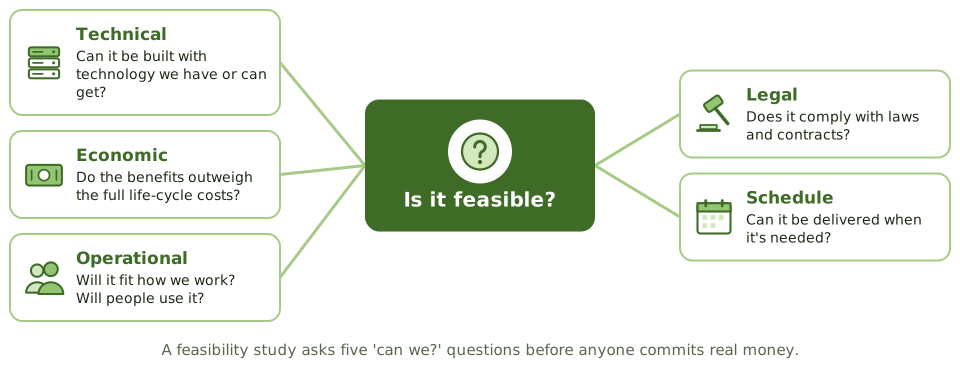
The five feasibility questions
The business case through the project
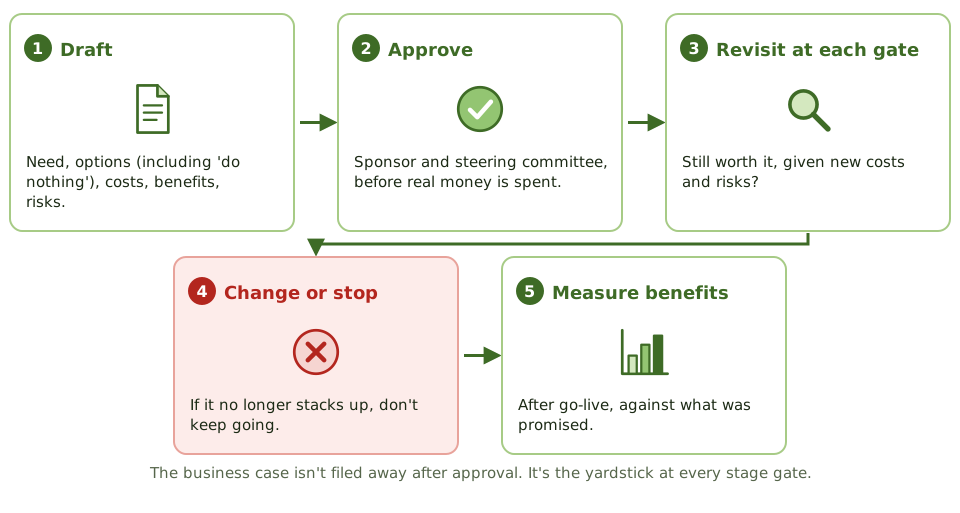
When the case stops adding up
A warehouse system was approved at 1.2 million, promising 400,000 a year in savings. Halfway through, costs are forecast at 2.5 million and half the warehousing has been outsourced, halving the savings.
How the exam asks about it
| If the question asks… | Answer |
|---|---|
| Who owns the business case | The project sponsor |
| When the business case is reviewed | At each stage gate, and when things change |
| Business case no longer valid | Change or stop the project |
| Cost often left out | Running, maintenance and retirement costs |
| Feasibility about fit and user acceptance | Operational feasibility |
Key takeaways
- ✓The business case justifies an investment: the need, the options, costs, benefits, risks, and how benefits will be measured.
- ✓It's approved before significant money is committed and reviewed at each major stage gate.
- ✓A feasibility study checks whether a solution is technically, economically, operationally, legally and schedule feasible.
- ✓Options should include 'do nothing', and alternatives such as buying, building or outsourcing.
- ✓Financial measures include return on investment, net present value, payback period and total cost of ownership.
- ✓If the business case is no longer valid, the project should be changed or stopped.
Exam traps
- !The business case isn't a one-off document; it's revisited throughout the project.
- !Costs must cover the whole life: running, maintaining, training and retiring the system, not just building it.
- !Intangible benefits still need a way to be measured or evidenced.
- !The sponsor owns the business case, not the project manager or IT.
Benefits Realization
Making sure a project actually delivers the value its business case promised, not just a working system: owners, baselines, measurement after go-live.
A working system isn't the goal
Buying a gym membership doesn't make you fit. Going to the gym does. In the same way, a new system working perfectly doesn't deliver value until people use it and the business changes how it works.
Benefits realisation is about making sure the promised value actually shows up.
From promise to proof
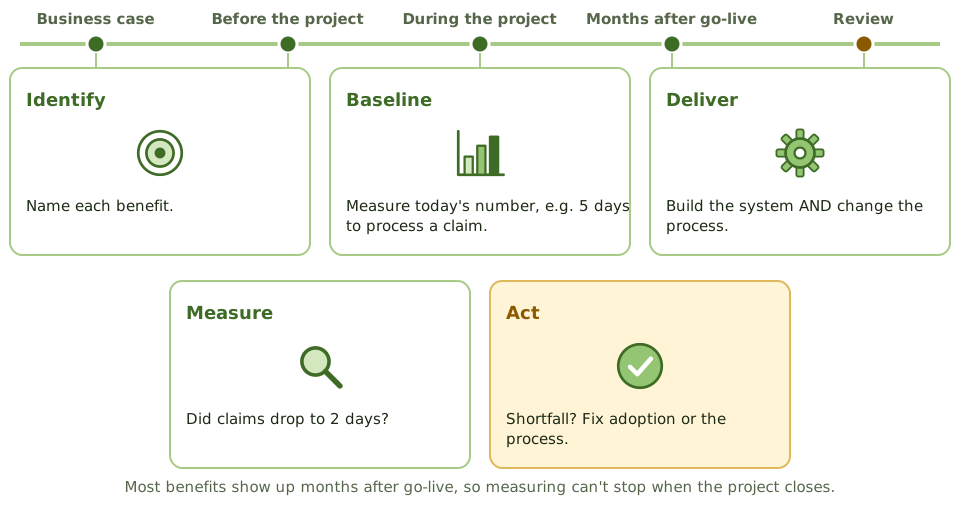
What makes a benefit measurable
Why benefits go missing
| Cause | Example |
|---|---|
| Scope cut during the project | Automatic matching dropped to hit the deadline |
| Low adoption | Staff keep working in spreadsheets |
| Process didn't change | The old manual approvals kept alongside the new workflow |
| Nobody owns it | No one tracks or pushes the benefit after go-live |
How the exam asks about it
| If the question asks… | Answer |
|---|---|
| Who is responsible for realising benefits | Business owners / the sponsor |
| What's needed to measure a benefit | A baseline, a target and an agreed measure |
| When benefits are assessed | After implementation, often in a post-implementation review |
| On time and budget, but no value | Benefits weren't realised: check adoption and process change |
Key takeaways
- ✓Benefits realisation makes sure the benefits in the business case are actually achieved after implementation.
- ✓Each benefit needs a business owner, a baseline, a measurable target and a date.
- ✓Many benefits arrive after the project closes, so measurement continues beyond go-live.
- ✓The post-implementation review compares actual benefits with those promised.
- ✓Benefits are lost through scope cuts, poor adoption, or the old process carrying on.
Exam traps
- !On time and on budget isn't the same as benefits delivered.
- !IT doesn't own business benefits; business owners do.
- !Without a baseline measured before the change, nobody can prove an improvement.
SDLC Phases Overview
The life of a system from idea to review: the phases of the system development life cycle, the key control in each, and why controls belong at the very start.
The life of a system
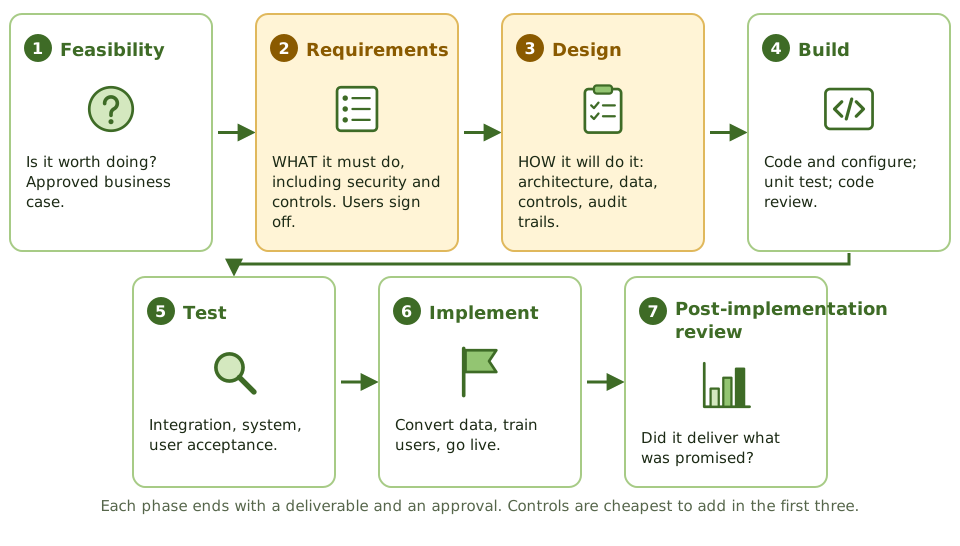
Building a system is like building a house: you decide if it's worth it, agree what rooms you need, draw the plans, build, inspect, move in, and later check it's what you wanted.
The system development life cycle (SDLC) is that same sequence for software.
The key control in each phase
| Phase | Key control or output |
|---|---|
| Feasibility | Approved business case |
| Requirements | User-approved requirements, including security and control needs |
| Design | Design review; controls and audit trails specified |
| Build | Coding standards, code review, version control |
| Test | Test plans, independent testing, user acceptance sign-off |
| Implement | Data conversion reconciled, go-live approved, rollback plan |
| Post-implementation review | Results compared with objectives and the business case |
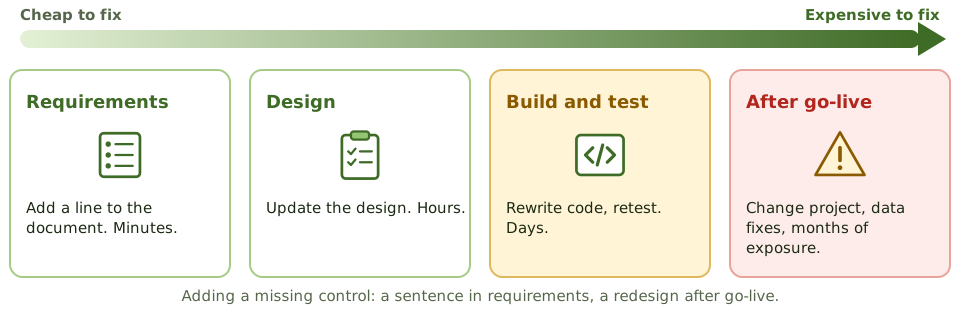
Why early is cheaper
The auditor at each phase
How the exam asks about it
| If the question asks… | Answer |
|---|---|
| Cheapest phase to build in controls | Requirements / design |
| Phase where user involvement matters most | Requirements (and acceptance testing) |
| Risk if users don't approve requirements | The system won't meet business needs |
| Phase that checks benefits were achieved | Post-implementation review |
| Best time for the auditor to get involved | Early, from requirements |
Key takeaways
- ✓A typical SDLC: feasibility, requirements, design, build, test, implement, and post-implementation review.
- ✓Controls and security should be built in from the requirements phase, because adding them later costs far more.
- ✓In traditional models each phase ends with a deliverable and an approval before the next starts.
- ✓User involvement matters most in requirements and acceptance testing.
- ✓The auditor reviews controls at each phase; getting involved early is most cost-effective.
- ✓Errors found in requirements cost far less to fix than errors found after go-live.
Exam traps
- !The cheapest time to build in controls and audit trails is the requirements and design phases.
- !Requirements without user sign-off are a major project risk.
- !Testing doesn't create quality; it confirms quality that was designed in.
- !The post-implementation review is part of the SDLC, not optional.
Requirements Definition
Writing down what a system must do and how well, making sure security and controls aren't forgotten, getting users to sign off, and tracing every requirement to a test.
Agreeing what to build
If you ask a builder for 'a nice kitchen', you'll get their idea of nice. Ask for 'a 4-metre worktop, a double sink under the window, and space for a dishwasher', and you'll get what you want.
Requirements are that precise list for a system. Most failed projects trace back to requirements that were vague, incomplete or never really agreed.
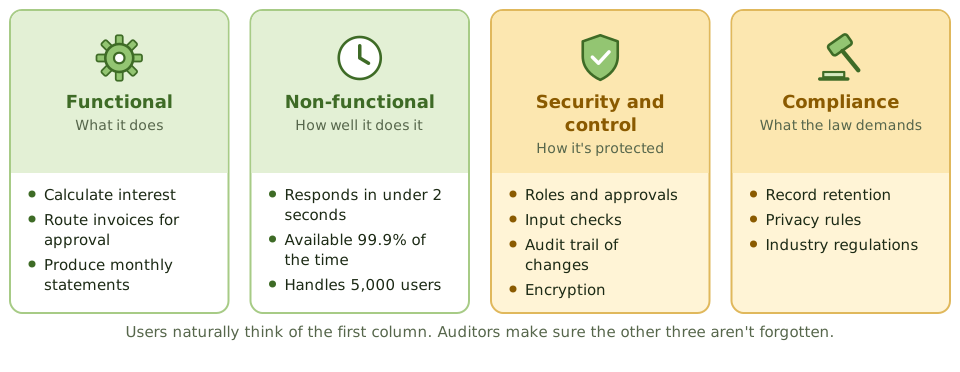
Four kinds of requirement
Vague vs testable
Gathering and approving
- 1 Find stakeholders Users, owners, security, compliance, operations.
- 2 Gather Interviews, workshops, observation, prototypes.
- 3 Write down Clear, testable statements or user stories.
- 4 Check with users Complete and accurate?
- 5 Sign off and baseline Later changes through change control.
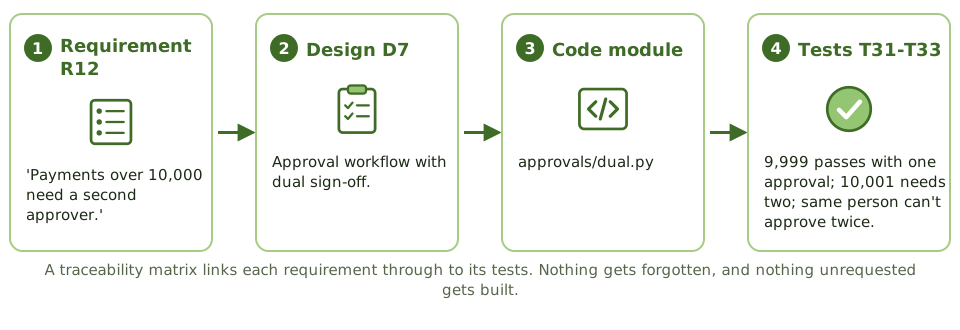
Tracing requirements to tests
How the exam asks about it
| If the question asks… | Answer |
|---|---|
| Most common cause of project failure | Poorly defined or changing requirements |
| Who approves requirements | User / business management |
| Tool linking requirements to tests | Requirements traceability matrix |
| Requirements missing security controls | Add them now; it's cheapest at this stage |
| What makes a requirement verifiable | It's specific and testable |
Key takeaways
- ✓Requirements describe what the system must do (functional) and how well (non-functional: speed, security, availability, usability).
- ✓Security, control, audit trail and regulatory requirements must be included explicitly.
- ✓Users and business owners define and approve requirements; IT helps document and analyse them.
- ✓Good requirements are clear, complete, consistent, testable and traceable.
- ✓A requirements traceability matrix links each requirement to design, code and test cases.
- ✓Changes to approved requirements go through change control.
Exam traps
- !Unclear or incomplete requirements are the most common cause of project failure and overruns.
- !A requirement that can't be tested can't be verified.
- !Users approve requirements, not developers.
- !Leaving security requirements until design or build is too late.
System Design
Turning agreed requirements into a blueprint: what design produces, why controls must be specified here, design reviews, and how design works when you buy software instead.
From wish list to blueprint
Requirements are the wish list: 'three bedrooms, a big kitchen'. Design is the architect's blueprint: where every wall, pipe and socket goes.
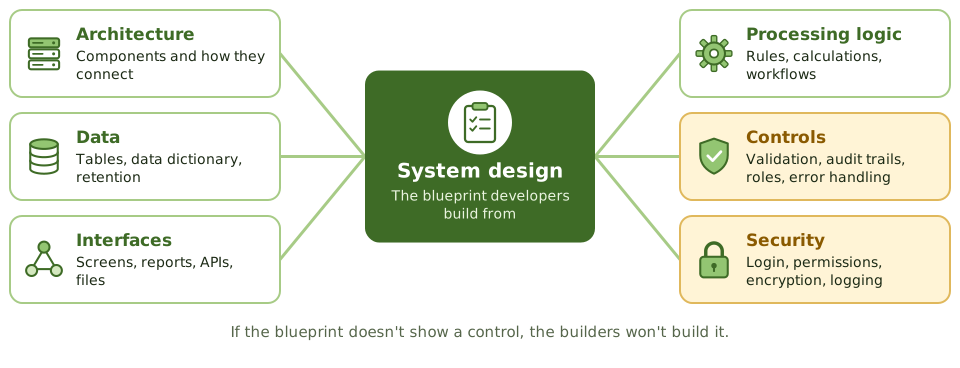
Builders follow the blueprint. If it doesn't show a smoke alarm, nobody fits one. Software is the same: if the design doesn't specify a control, developers won't build it.
What design produces
Controls the auditor looks for in design
- 1Input, processing and output controls for critical data.
- 2Audit trails: who did what and when, with before and after values for sensitive changes.
- 3Access roles that support segregation of duties.
- 4Error handling and exception reports.
- 5Interface controls such as record counts and control totals.
The design review
Before coding starts, users, QA, security, operations and sometimes the auditor review the design against the requirements.
Gaps found here cost a meeting. Once approved, the design becomes a baseline, and later changes go through change control.
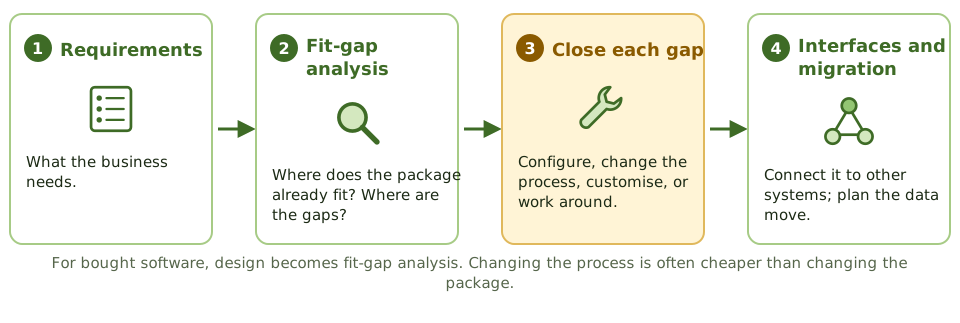
When you buy instead of build
How the exam asks about it
| If the question asks… | Answer |
|---|---|
| When audit trails should be designed | During system design |
| Main purpose of a design review | Confirm the design meets requirements, including controls |
| Risk of heavily customising a package | Higher maintenance cost and hard upgrades |
| Design work for purchased software | Fit-gap analysis and configuration design |
Key takeaways
- ✓Design translates requirements into a technical solution: architecture, data structures, interfaces, processing logic and controls.
- ✓Controls such as input validation, processing checks, audit trails and access roles are specified during design.
- ✓A formal design review, with users, QA, security and possibly the auditor, catches gaps before coding.
- ✓The design should be traceable to requirements; anything unmet is identified before build.
- ✓For purchased software, the equivalent work is fit-gap analysis and configuration design.
- ✓Design decisions affect testability, maintainability and security for the system's whole life.
Exam traps
- !Design approval should come before coding starts.
- !Audit trails that aren't designed in are rarely added later.
- !Customising purchased software heavily increases upgrade cost and risk.
- !The auditor reviews whether controls are designed, not the code itself.
Waterfall vs. Iterative vs. Prototyping
The traditional ways to run development (waterfall, V-model, iterative, spiral and prototyping), when each one fits, and the control risks the exam links to each.
Different routes to the same place
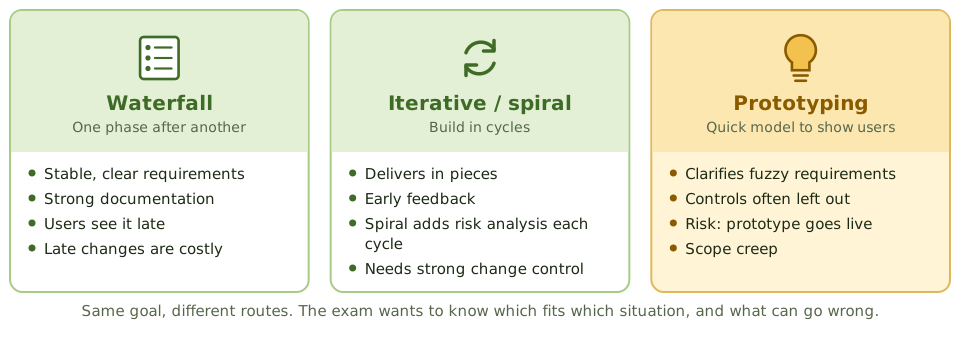
Think of planning a wedding. You can plan everything up front and execute the plan (waterfall). You can sort it out in rounds, venue first, then food, then music, adjusting as you go (iterative). Or you can do a tasting first so everyone knows what they actually like (prototyping).
Development models are these same choices, applied to building software.
Waterfall
Each phase finishes and is approved before the next starts: requirements, design, build, test, implement.
It gives clear structure, strong documentation and defined approvals, which suits stable requirements and regulated work. The catch: users only see the system near the end, and changing requirements late is expensive.
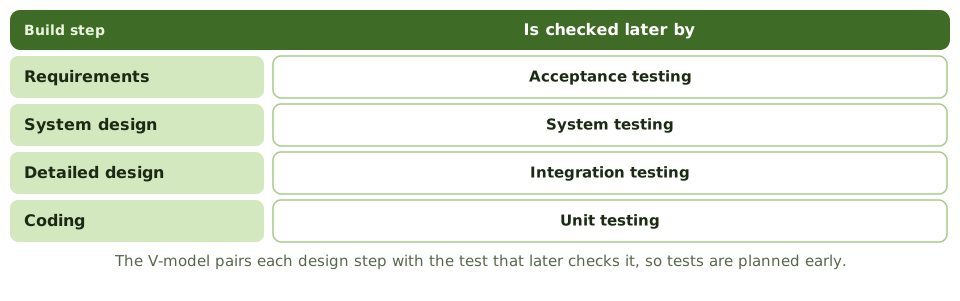
The V-model
Iterative and spiral
Prototyping and its risks
A quick working model lets users react to something real, which clarifies fuzzy requirements. But prototypes are built fast and loose.
- 1Controls, security and audit trails are left out.
- 2The prototype gets put into production as-is.
- 3Scope creep from endless feedback.
- 4Users expect the real system as fast as the prototype.
How the exam asks about it
| If the question asks… | Answer |
|---|---|
| Approach for stable, well-defined requirements | Waterfall |
| Approach to clarify unclear requirements | Prototyping |
| Greatest risk of prototyping | Controls missed; prototype goes to production |
| Model driven by risk analysis each cycle | Spiral |
| Main weakness of waterfall | Inflexible to change; users see it late |
Key takeaways
- ✓Waterfall runs phases in sequence, each completed and approved before the next; best when requirements are stable and well understood.
- ✓Iterative and incremental approaches deliver the system in pieces, refining requirements as they go.
- ✓The spiral model is iterative and risk-driven, with risk analysis in each cycle.
- ✓Prototyping builds a working model quickly to clarify requirements with users.
- ✓The V-model pairs each development phase with a test level.
- ✓Prototyping's main risks: controls get overlooked, the prototype becomes the final system, and scope expands.
Exam traps
- !Waterfall's main weakness: requirements are fixed early, and changes are expensive later.
- !Prototypes often lack security, controls and documentation; they shouldn't go to production as-is.
- !In prototyping, users may expect the final system to arrive as fast as the prototype did.
- !Iterative doesn't mean uncontrolled: each iteration still needs approval and testing.
Agile
Building software in short sprints with constant user feedback: Scrum's roles and events, the control risks agile creates, and how an auditor adapts.
Small steps, constant feedback
Imagine renovating a house one room at a time. You finish the kitchen, live with it for a couple of weeks, then decide what the bathroom needs based on what you've learned. That's agile.
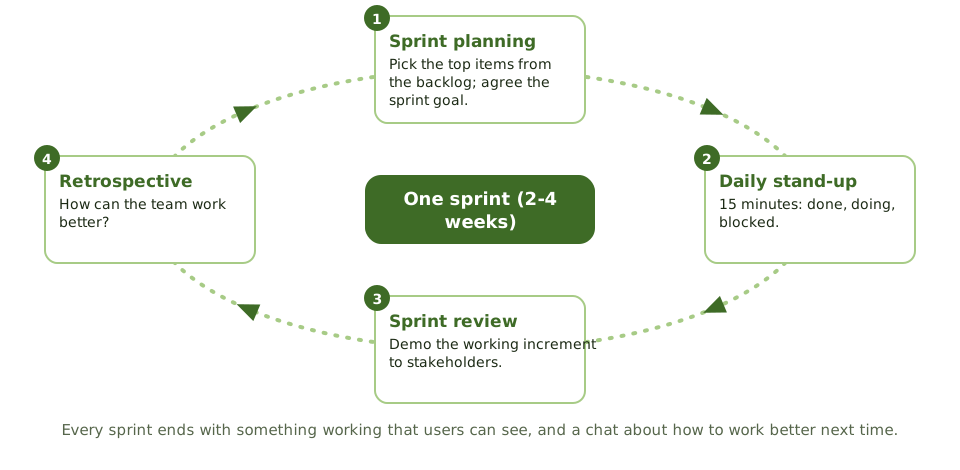
Instead of one big delivery at the end, the team delivers working software every two to four weeks (a sprint), and users steer what comes next.
Agile vs waterfall
| Waterfall | Agile | |
|---|---|---|
| Requirements | Fixed early | Evolve in a prioritised backlog |
| Delivery | One release at the end | Working piece every sprint |
| User involvement | Mainly start and end | Continuous, through the product owner |
| Documentation | Extensive | Just enough |
| Change | Costly and formal | Expected, managed in the backlog |
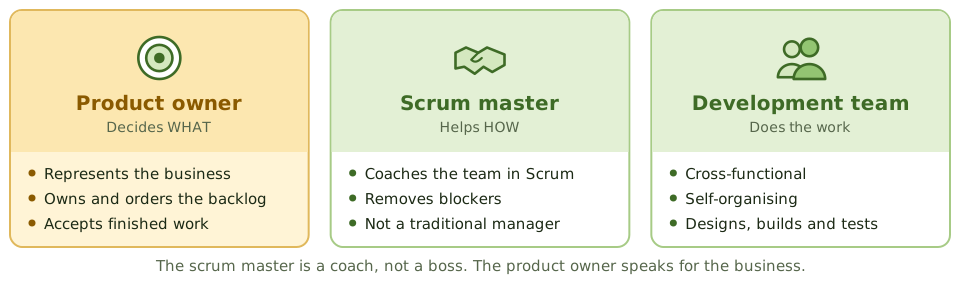
Who's who in Scrum
One sprint
Where controls slip, and the fix
| Risk | Control |
|---|---|
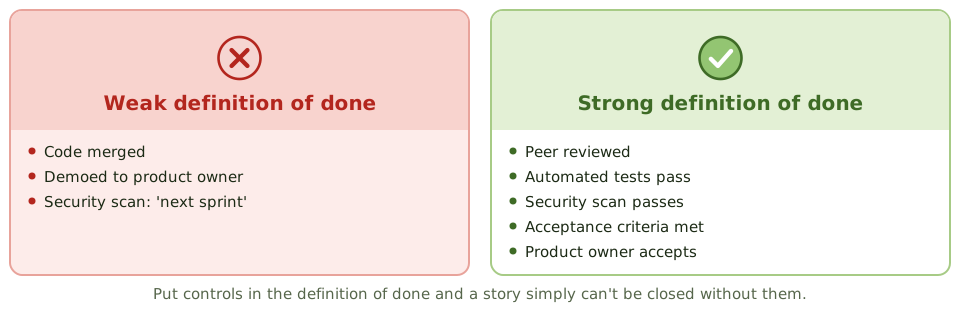
| Security skipped to hit sprint goals | Security in acceptance criteria and definition of done |
| Little documentation for audit | Backlog, ticket history, automated test results |
| Frequent changes to production | Automated pipeline with review, testing and approval |
| Architecture drift and technical debt | Architecture guidance; debt tracked in the backlog |
| Unclear accountability | Product owner accepts; clear release approval |
The definition of done
How the exam asks about it
| If the question asks… | Answer |
|---|---|
| Who prioritises the backlog | Product owner |
| Role that removes impediments | Scrum master |
| Biggest control concern in agile | Controls and documentation skipped under time pressure |
| How to embed security in agile | User stories, acceptance criteria, definition of done |
| Event that demos work to stakeholders | Sprint review |
Key takeaways
- ✓Agile delivers working software in short iterations (sprints), with continuous user involvement and adaptation to change.
- ✓Scrum roles: product owner (prioritises the backlog, represents the business), scrum master (facilitates, removes obstacles), development team (builds).
- ✓Scrum events: sprint planning, daily stand-up, sprint review (demo to stakeholders), sprint retrospective (process improvement).
- ✓Documentation is lighter, but controls still need evidence: acceptance criteria, definition of done, approvals, test results.
- ✓Security and control requirements belong in the backlog and the definition of done.
- ✓The auditor adapts by reviewing controls per sprint or release and relying more on automated evidence.
Exam traps
- !Agile doesn't mean no documentation or no controls; it means just enough, at the right time.
- !The product owner accepts work for the business; the scrum master isn't a project manager with authority over the team.
- !Without a definition of done that includes security and testing, controls can be skipped to finish sprints.
- !Frequent releases still go through change management, often automated.
DevOps and DevSecOps
Shipping small changes often through an automated pipeline: what CI/CD means, how segregation of duties survives when one team builds and runs, and how security gets built into every step.
From big releases to a conveyor belt
Old-style IT shipped software like a removal van: a huge load every few months, packed by one team and driven by another. DevOps works more like a conveyor belt in a factory: small items move along constantly, and every one passes through the same automated checks.
Development and operations work as one team, and automation does the repetitive, error-prone work.
CI, CD and CD
The pipeline
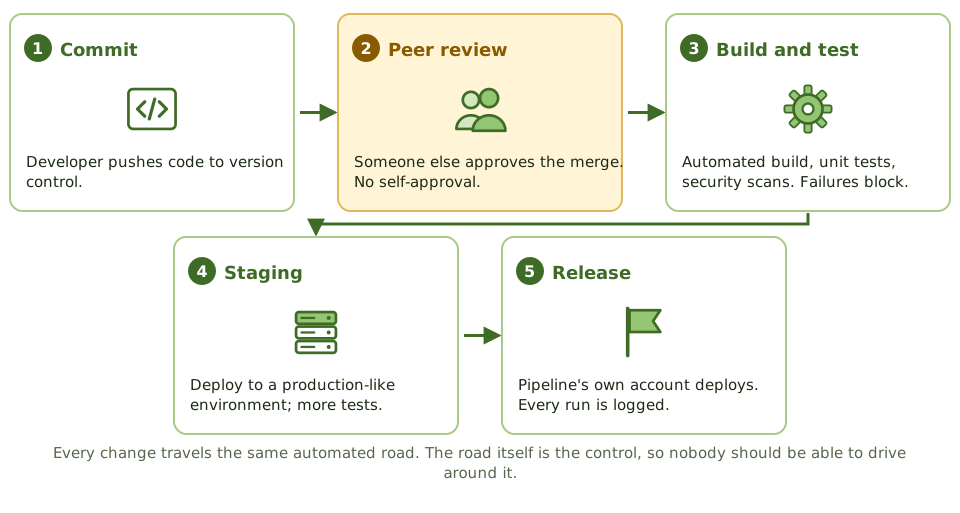
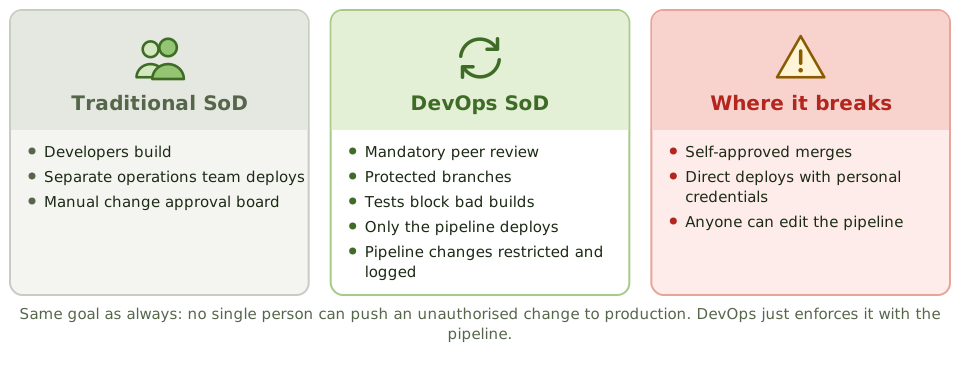
Segregation of duties, the DevOps way
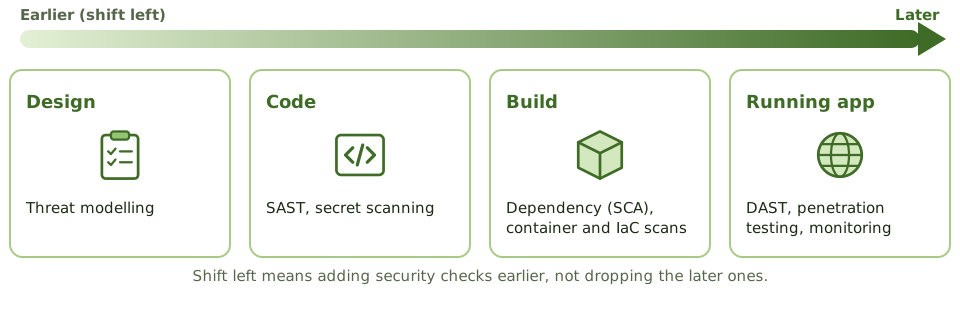
DevSecOps and shift left
How the exam asks about it
| If the question asks… | Answer |
|---|---|
| How SoD is kept in DevOps | Peer review, branch protection, deploy only via pipeline |
| Greatest risk in CI/CD | Bypassing the pipeline or self-approving changes |
| Control to find vulnerable libraries | Software composition analysis |
| Who may change pipeline configuration | A restricted group; changes approved and logged |
| Meaning of shift left | Security and testing earlier in development |
Key takeaways
- ✓DevOps combines development and operations to deliver changes frequently and reliably, using automation.
- ✓Continuous integration merges and tests code often; continuous delivery keeps code always deployable; continuous deployment releases automatically.
- ✓In DevOps, segregation of duties is often achieved through the pipeline: peer review, automated tests and controlled deployment accounts.
- ✓DevSecOps builds security into every stage: static and dynamic testing, dependency scanning, secrets management, infrastructure-as-code checks.
- ✓The pipeline itself becomes a critical control; changes to it need strict control.
- ✓Auditors test pipeline configuration and evidence rather than individual manual approvals.
Exam traps
- !DevOps doesn't remove the need for SoD; it changes how it's enforced.
- !If developers can bypass the pipeline and deploy directly, the automated controls are worthless.
- !Who can change the pipeline configuration is a key access question.
- !Secrets hard-coded in source code are a common DevOps finding.
- !Shift left means testing earlier, not skipping later testing.
RAD, CASE, Low-Code
Tools and methods for building faster (rapid application development, CASE tools, 4GLs, low-code platforms and reusable components), and why the usual controls still apply.
Building faster
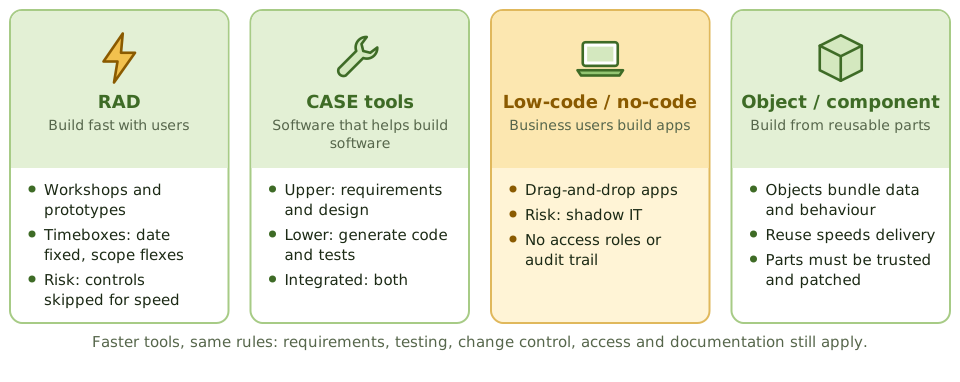
A flat-pack wardrobe goes up much faster than one a carpenter builds from raw timber. But if you skip the instructions and the wall bracket, it still falls over.
RAD, CASE tools, low-code platforms and reusable components are all ways to build software faster. Every one of them still needs requirements, testing, change control, access control and documentation.
Rapid application development
RAD delivers quickly through user workshops, iterative prototypes, small skilled teams, reusable parts and timeboxing: the delivery date is fixed and scope flexes to fit.
CASE tools
| Type | Helps with |
|---|---|
| Upper CASE | Requirements and design: data and process models |
| Lower CASE | Code generation, test data, debugging |
| Integrated CASE | Both, keeping models and code in sync |
Low-code and shadow IT
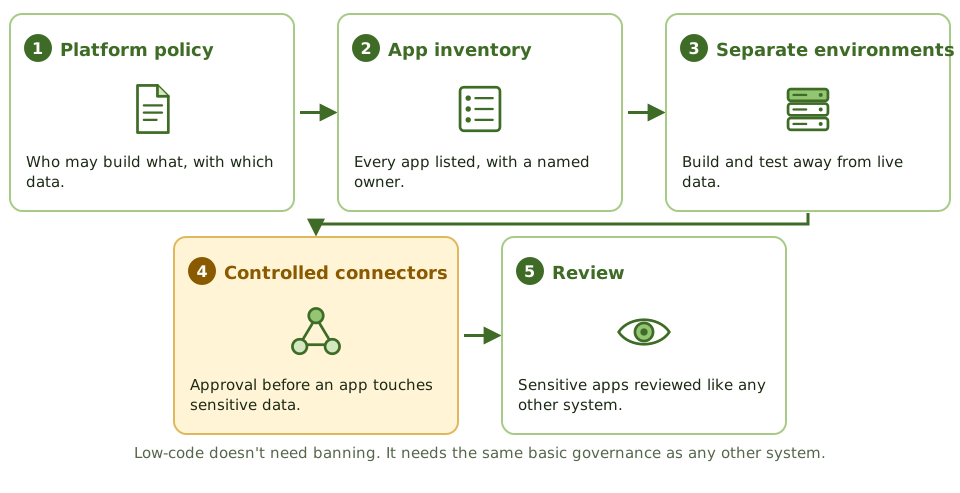
Low-code and no-code platforms (the modern form of 4GLs) let business users build apps by dragging and dropping. That's powerful, and risky: apps appear outside IT's SDLC with no access roles, no audit trail, no separate test environment and live connections to sensitive data.
Governing low-code
How the exam asks about it
| If the question asks… | Answer |
|---|---|
| Main risk of RAD | Controls and documentation sacrificed for speed |
| Tool that generates code from designs | Lower CASE |
| Main risk of low-code platforms | Apps built outside SDLC controls (shadow IT) |
| Benefit of object-oriented development | Reuse and easier maintenance |
| Does tool-generated code need testing? | Yes |
Key takeaways
- ✓Rapid application development (RAD) delivers quickly using prototyping, timeboxes, small teams and heavy user involvement.
- ✓RAD's risks: controls and documentation sacrificed for speed, and weak scalability or integration.
- ✓CASE tools automate parts of the SDLC: upper CASE for requirements and design, lower CASE for code generation, integrated CASE for both.
- ✓Low-code and no-code platforms let business users build applications, raising end-user computing and shadow IT risks.
- ✓Object-oriented development uses encapsulated objects and reuse; component-based development assembles reusable components.
- ✓Whatever the tool, the same SDLC controls apply: requirements, testing, change control, access and documentation.
Exam traps
- !CASE tools don't guarantee quality; they automate what's been specified, including errors.
- !Low-code apps built by business users often skip security, testing and change control.
- !RAD suits systems with clear business owners and modest complexity, not large safety-critical systems.
- !Code generated by tools still needs review and testing.
Build, Coding Standards, Code Review
The controls that apply while code is being written: coding standards, secure coding habits, version control, review by a second pair of eyes, and keeping production code locked down.
Writing it right
A newspaper has a style guide so every article reads the same, and an editor who reads every piece before it's printed. Writers don't edit their own work, because you never spot your own mistakes.
Software works the same way: coding standards are the style guide, and code review is the editor.
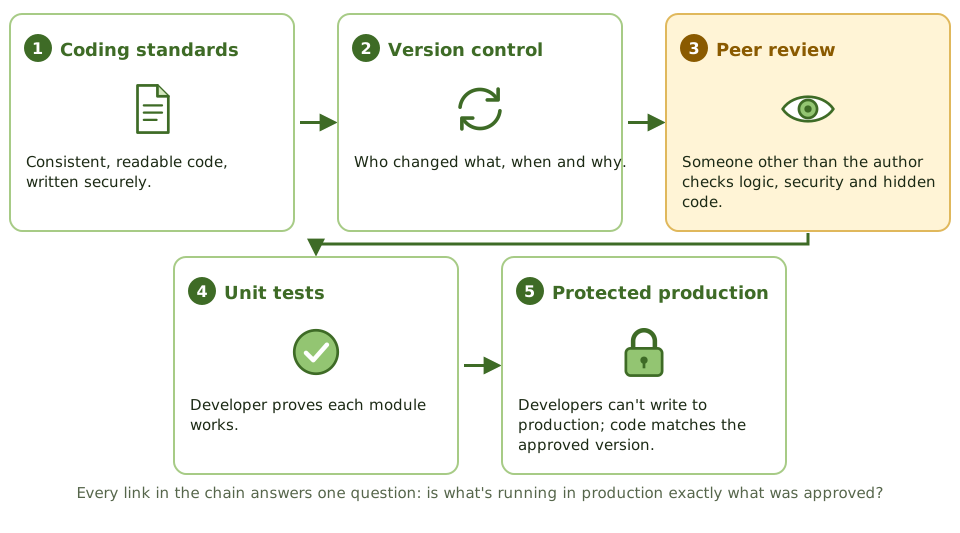
The build-phase control chain
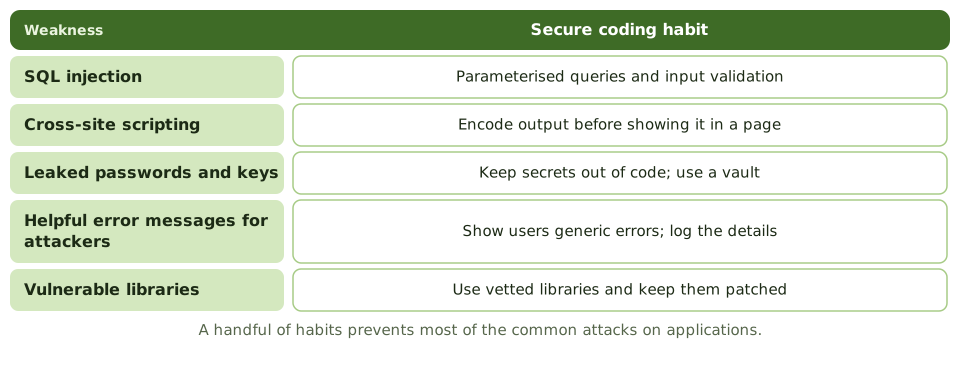
Secure coding habits
Code review
Review by someone other than the author finds logic errors, security holes, departures from standards, and unauthorised or malicious code such as back doors and logic bombs.
Protecting source code
- 1Restrict who can read and change source code.
- 2Version control records who changed what, when and why.
- 3Developers have no write access to production libraries.
- 4Production executables must match an approved source version.
- 5Source changes go through change management.
How the exam asks about it
| If the question asks… | Answer |
|---|---|
| Best control to find malicious code before release | Independent code review |
| Purpose of coding standards | Consistency, maintainability, fewer errors |
| Defence against SQL injection | Parameterised queries / input validation |
| Control showing who changed source code | Version control history |
| Who performs unit testing | Developers |
Key takeaways
- ✓Coding standards make code consistent, readable and maintainable, and reduce errors.
- ✓Secure coding practices address common vulnerabilities such as injection, broken authentication and insecure data handling.
- ✓Code review by someone other than the author finds defects and malicious or unauthorised code.
- ✓Version control tracks every change to source code: who, what, when and why.
- ✓Access to source code should be restricted; production source and executables must match.
- ✓Unit testing by developers verifies each module before integration.
Exam traps
- !Self-review by the author isn't an independent code review.
- !Automated scanners help but don't replace human review of logic.
- !Developers should not have write access to production libraries.
- !Comments and documentation are part of maintainability, not optional extras.
- !Hard-coded passwords and back doors are classic code review findings.
Testing Levels: Unit, Integration, System, UAT
The levels of testing from a single module up to user acceptance, who does each and what it proves, plus top-down versus bottom-up, load versus stress, and black-box versus white-box.
Testing in layers
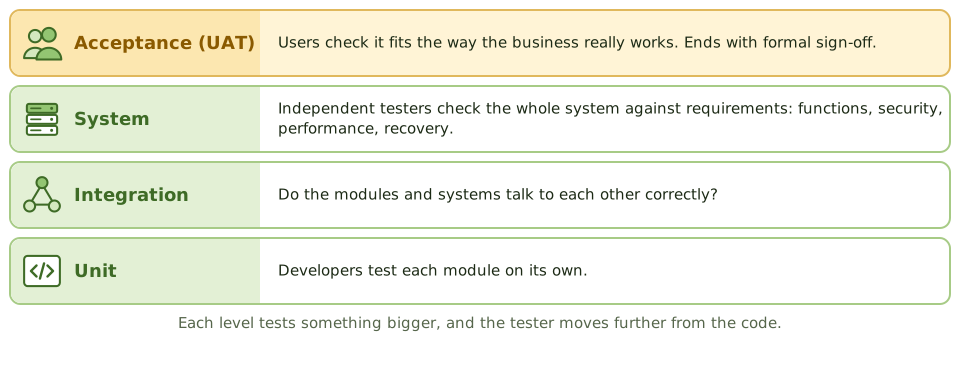
Think of a car factory. Each part is tested on its own (does the brake pad grip?), then parts are tested together (do the brakes stop the wheel?), then the whole car goes on a test track, and finally a customer test-drives it.
Software testing climbs the same ladder, and each level proves something different.
Who does what
| Level | Tests | Done by |
|---|---|---|
| Unit | One module | Developers (white-box) |
| Integration | Modules working together | Developers / test team |
| System | Whole system vs requirements | Independent testers (black-box) |
| Acceptance | Fit for business use | Users (UAT) and QA (QAT) |
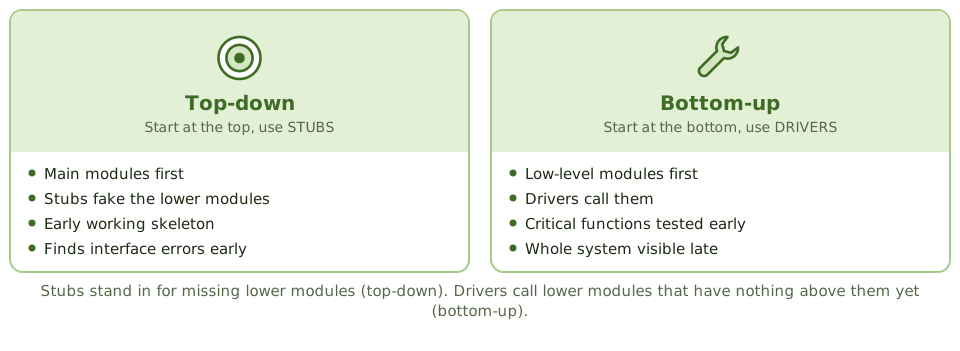
Top-down vs bottom-up integration
Kinds of system testing
User acceptance testing
Users run real business scenarios in a production-like environment, then user management formally signs off. That sign-off is a key go-live control. QA testing (QAT) covers the technical side: standards, documentation, operations.
White-box vs black-box
How the exam asks about it
| If the question asks… | Answer |
|---|---|
| Who performs UAT | Users / business representatives |
| Integration approach using stubs | Top-down |
| Test to find the breaking point | Stress testing |
| Concern with production data in testing | Confidentiality; mask it |
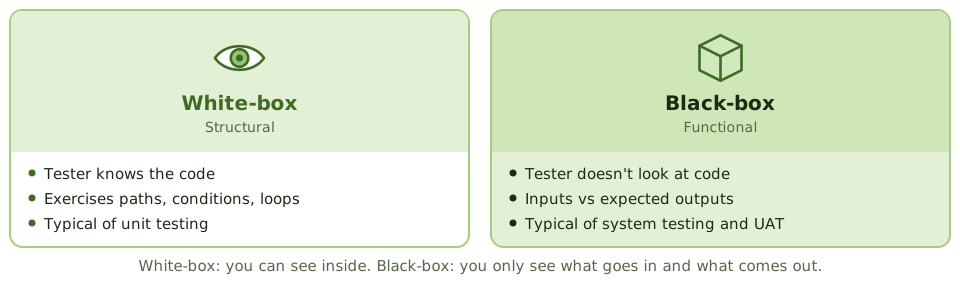
| Testing based on internal logic | White-box |
Key takeaways
- ✓Unit testing checks individual modules; integration testing checks interfaces between modules; system testing checks the whole system against requirements; UAT confirms it meets business needs.
- ✓Top-down integration uses stubs for lower modules and finds interface errors early; bottom-up uses drivers and tests critical low-level modules first.
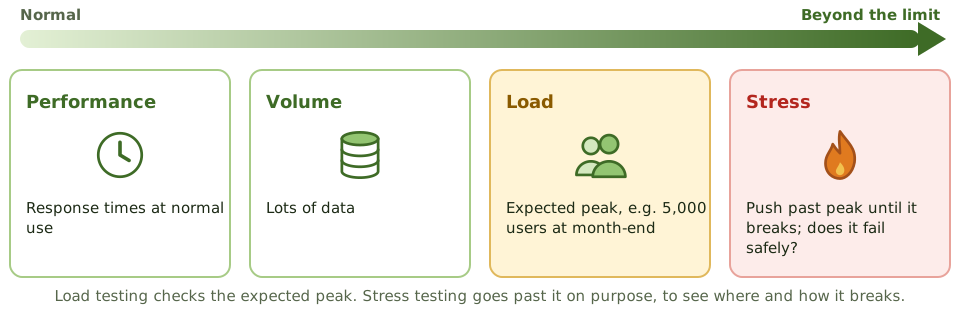
- ✓System testing includes functional, security, performance, load, volume, stress, recovery and interface testing.
- ✓User acceptance testing is done by users, against business requirements, in an environment like production, and ends with formal sign-off.
- ✓Quality assurance testing focuses on technical aspects; UAT focuses on functional fit.
- ✓White-box testing examines internal logic; black-box testing examines inputs and outputs without seeing the code.
- ✓Testing should use test data in a test environment, not live production data, unless masked.
Exam traps
- !UAT is done by users, not developers. Developer testing doesn't replace it.
- !Stress testing goes beyond expected peak to find the breaking point; load testing checks expected volumes.
- !Using unmasked production data for testing creates privacy and confidentiality risk.
- !Test plans should be prepared early (during requirements and design), not after coding.
- !Alpha testing is internal; beta testing is by a limited set of real users.
Regression, Sociability, Parallel, Pilot Testing
Four tests the exam loves to mix up, what question each one answers, and how to spot the right one in a scenario.
Four tests, four questions
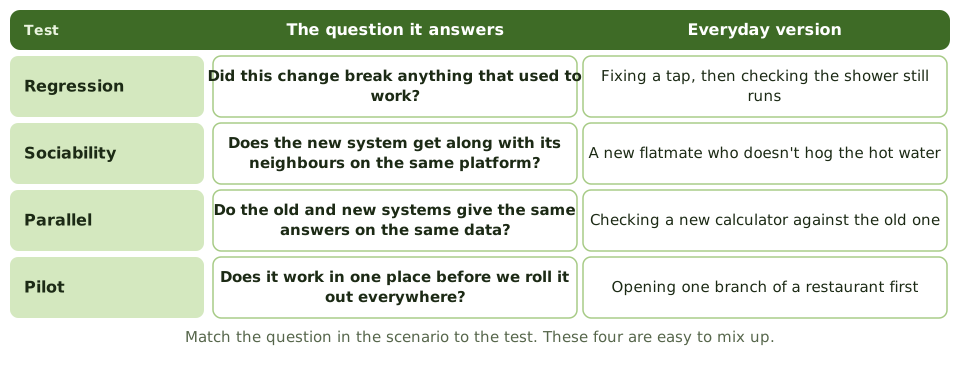
These four tests sound alike, but each answers a different question. In the exam, find the question hidden in the scenario and the answer follows.
Regression testing
After any change, rerun the earlier tests with the same data and the same expected results. Any difference means the change broke something.
Needed after every change: enhancements, bug fixes, patches, configuration changes, even emergency fixes. Automated test suites make it practical.
Sociability testing
Does the new or changed system live happily alongside the other systems on the same platform? It mustn't hog resources, clash over shared libraries or damage shared data.
This is about coexistence, not just the data passing between systems, which is interface or integration testing.
Parallel and pilot
How the exam asks about it
| If the scenario says… | The test is… |
|---|---|
| The change didn't affect existing functions | Regression |
| Doesn't harm other systems on the same platform | Sociability |
| Compare old and new results on the same data | Parallel |
| One branch first, then roll out | Pilot |
| Data used for regression testing | The same data as earlier tests |
Key takeaways
- ✓Regression testing checks that a change hasn't broken existing functionality; it reruns earlier tests after changes.
- ✓Sociability testing checks that a new or changed system works in its target environment without adversely affecting other systems.
- ✓Parallel testing runs the old and new systems with the same data and compares results.
- ✓Pilot testing implements the system in one location or for one group first, before full roll-out.
- ✓Regression test data should be the same as used in earlier tests, so results are comparable.
- ✓Interface, recovery and security testing complement these.
Exam traps
- !'Works with other systems in the environment' = sociability, not integration.
- !'Changes didn't introduce new errors' = regression.
- !'Compare old and new system outputs' = parallel.
- !'One branch or department first' = pilot.
- !Regression testing is needed after every change, including emergency fixes and patches.
Defect Management
What happens to a bug once testing finds it: logging, severity versus priority, fixing and retesting, who gets to close it, and how open defects affect the go-live decision.
Snagging list for software
When you buy a new flat, you walk round with a snagging list: cracked tile, door that sticks, missing socket. The builder fixes each one, and you check it yourself before ticking it off. You don't take the builder's word for it.
Defect management is the same discipline for software.
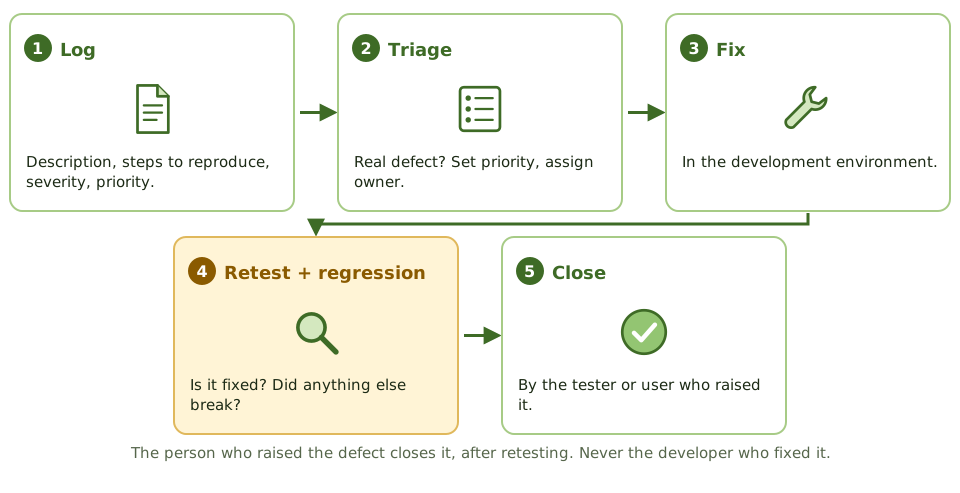
The defect life cycle
Severity vs priority
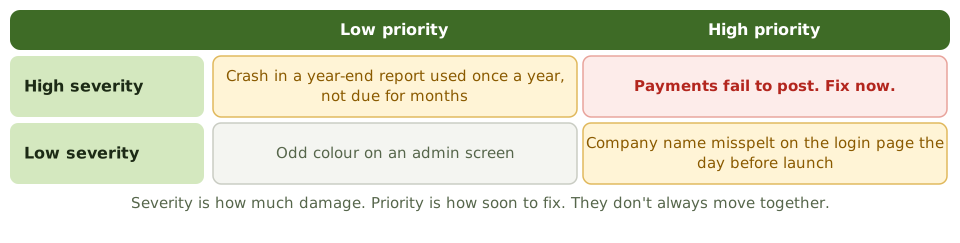
Going live with open defects
Test exit criteria set the limit, for example zero critical defects and only a few high ones with workarounds. If the business still wants to go live with known defects:
- 1Workarounds are documented and shared with users.
- 2The business owner formally accepts the risk.
- 3Fixes are scheduled.
Reading the numbers
How the exam asks about it
| If the question asks… | Answer |
|---|---|
| Who should close a defect | The tester or user, after retest |
| What follows a defect fix | Retest plus regression testing |
| Going live with critical defects | Only with a workaround and business risk acceptance |
| Severity vs priority | Impact vs urgency |
Key takeaways
- ✓Every defect found in testing is logged with severity, priority, steps to reproduce, owner and status.
- ✓Severity reflects impact on the system; priority reflects how urgently it must be fixed.
- ✓Fixes are retested, and regression testing confirms nothing else broke.
- ✓Go-live decisions consider open defects; critical defects normally block release unless a documented workaround and risk acceptance exist.
- ✓Defect trends (discovery rate, ageing, reopen rate) indicate quality and readiness.
- ✓Defects should be closed only by testers or users, not by the developer who fixed them.
Exam traps
- !A developer closing their own defect without retest is a control weakness.
- !Going live with known critical defects requires formal risk acceptance by the business owner.
- !A falling count of open defects can mean testing slowed down, not that quality improved.
- !Defects found in production go through incident, problem and change management, not the project defect log.
Data Migration and Conversion
Moving data from the old system to the new one without losing or changing anything: mapping, cleansing, trial runs, reconciling the totals, and who signs off that the data is right.
Moving house, for data
When you move house, you decide what to take, throw out the junk, label the boxes, and count them at the other end. If a box goes missing, you want to know before the van leaves.
Data conversion is moving house for data. A shiny new system is useless if the balances, customers or reference data arrive wrong or incomplete.
The steps
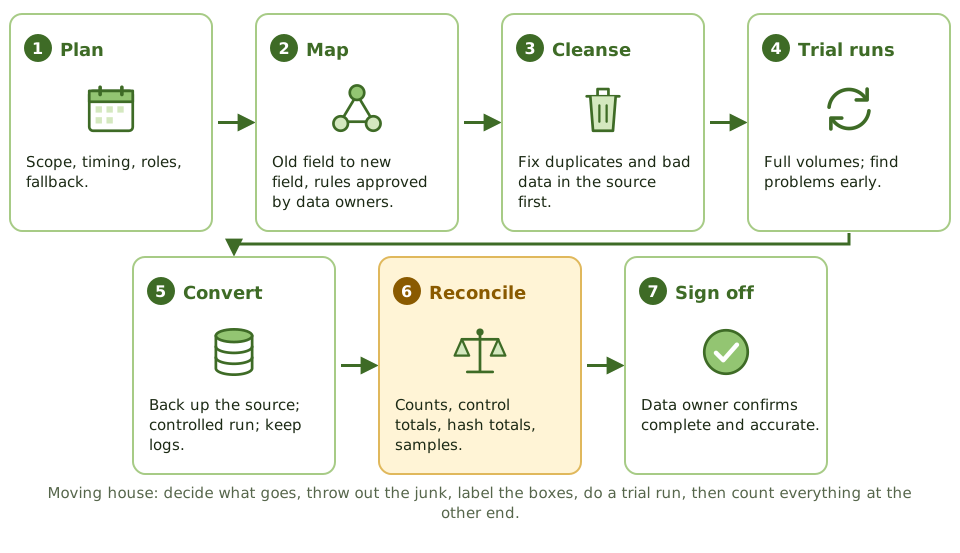
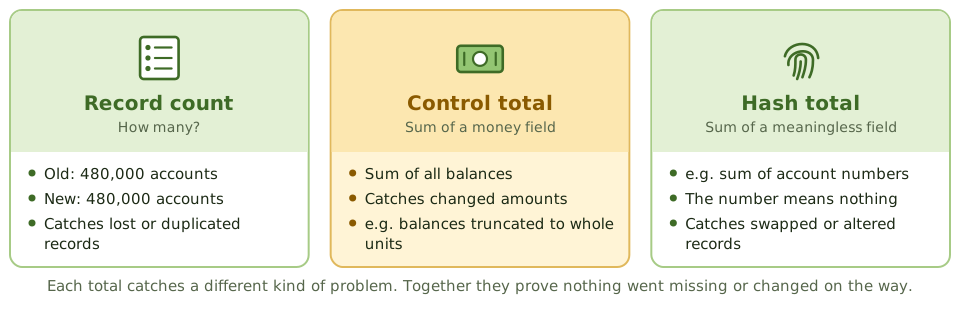
Reconciliation, the key control
Who signs off
IT runs the conversion. But the data belongs to the business, so the data owner reviews the reconciliation and signs off that the data is complete and accurate.
Dirty data should be cleaned in the source first. Migrating it just moves the mess into the new system.
After conversion
- 1Keep a backup of the source data and the conversion logs.
- 2They're needed for audit, legal retention and investigating differences.
- 3And for fallback, if the new system has to be abandoned.
- 4Conversion programs are programs: tested and change-controlled like any other.
How the exam asks about it
| If the question asks… | Answer |
|---|---|
| Most important conversion control | Reconcile record counts and control totals |
| Who signs off converted data | Data owner / user management |
| Dirty data before conversion | Cleanse it in the source |
| What to keep afterwards | Source data and conversion audit trail |
| Purpose of test conversions | Find and fix problems before cutover |
Key takeaways
- ✓Data conversion moves data from the old system to the new one; its main risk is incomplete or inaccurate data.
- ✓Key controls: data mapping, cleansing before migration, test conversions, reconciliation of record counts and control totals, and exception handling.
- ✓The most important control is reconciling converted data to the source: record counts, hash totals and financial totals.
- ✓Users (data owners) review and sign off that conversion is complete and accurate.
- ✓An audit trail of the conversion and a backup of the source data must be kept.
- ✓Unclean data should be fixed before conversion, not migrated and fixed later.
Exam traps
- !The data owner, not IT, signs off on conversion accuracy.
- !Test conversions should be run in advance, with full volumes, to find problems before cutover.
- !Keep the old data (and a way to access it) after conversion, for audit and fallback.
- !Converting dirty data simply moves the problem into the new system.
- !Conversion programs are themselves programs; they need testing and change control.
Change-Over: Parallel, Phased, Abrupt
The four ways to switch from an old system to a new one, how they trade risk against cost, and how to pick the right one from a scenario.
Switching from old to new
Think about switching to a new phone. You could carry both for a week until you trust the new one (parallel). You could move your contacts first, then photos, then apps (phased). Your partner could try the model first (pilot). Or you could drop the old phone in a drawer and go (abrupt).
Organisations face the same choice when a new system replaces an old one.
Risk vs cost
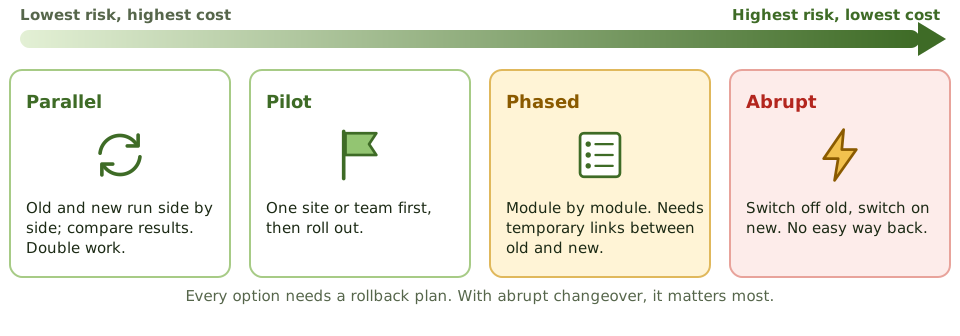
The four methods compared
| Method | Plus | Minus |
|---|---|---|
| Parallel | Lowest risk; old system is a fallback | Costly; double work |
| Pilot | Problems found with limited impact | Slower; pilot may not be typical |
| Phased | Risk spread over time | Temporary links between old and new |
| Abrupt | Cheapest and quickest | Highest risk; hard to go back |
Choosing a method
- 1How critical is the system? How much disruption can the business take?
- 2Can old and new physically run side by side?
- 3Is there budget and staff for double work?
- 4How many locations and users?
- 5Is the new system modular?
Always have a way back
Every changeover needs a written rollback plan, with the conditions for using it agreed in advance. It matters most for abrupt changeover, where the old system may be hard to restart once data has moved on.
Other go-live controls: a formal go/no-go decision, a cutover runbook with checkpoints, reconciled data before users start, extra support (hypercare), and clear user communication.
How the exam asks about it
| If the question asks… | Answer |
|---|---|
| Highest-risk changeover | Abrupt / direct |
| Lowest-risk changeover | Parallel |
| Main drawback of parallel | Cost and double workload |
| Main risk of phased | Interfaces between old and new parts |
| One branch first | Pilot |
Key takeaways
- ✓Parallel changeover runs old and new systems together until the new one is proven; lowest risk, highest cost.
- ✓Phased changeover introduces the new system in modules or stages; risk spread out, but interfaces between old and new are needed.
- ✓Pilot changeover implements in one location or group first, then rolls out.
- ✓Abrupt (direct, big bang, cutover) switches completely at once; cheapest and fastest, highest risk.
- ✓Whatever the method, a fallback or rollback plan is needed.
- ✓The choice depends on criticality, risk tolerance, cost and whether the systems can run in parallel.
Exam traps
- !Abrupt changeover has the highest risk because there's no fallback once the old system stops.
- !Parallel is safest but needs extra resources and double data entry.
- !Phased needs temporary interfaces between old and new parts, which add risk.
- !A rollback plan is needed even for parallel changeover, for example if data is corrupted.
Go-Live Readiness and Acceptance
What must be true before a system goes into production, who gets to say yes, and what the auditor checks in a pre-implementation review.
The pre-flight checklist
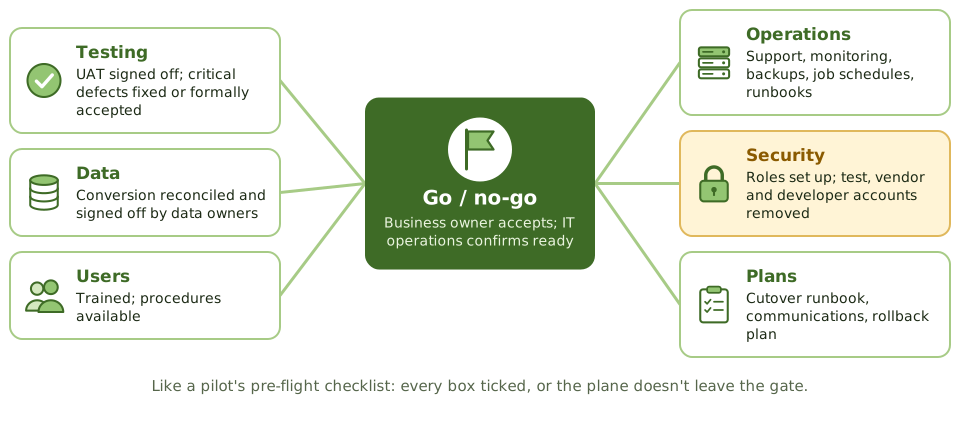
Before a plane leaves the gate, the crew runs a checklist: fuel, doors, controls, weather, flight plan. If any box isn't ticked, the plane doesn't go, however late it's running.
Go-live readiness is that checklist for a new system.
Who says yes
Security at go-live
Go-live is when test shortcuts become real risks. Check that:
- 1Production access matches approved roles.
- 2Test, vendor and developer accounts are removed or disabled.
- 3Default passwords are changed.
- 4The system is hardened.
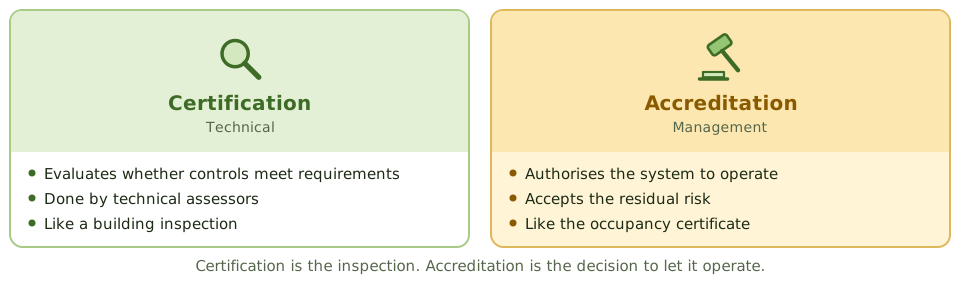
Certification and accreditation
The pre-implementation review
Before go-live, the auditor checks: control and security requirements met, testing adequate and signed off, conversion reconciled, access set up correctly, procedures documented, rollback plan in place.
A problem found now costs far less to fix than one found after go-live.
How the exam asks about it
| If the question asks… | Answer |
|---|---|
| Who approves a system for production | Business owner (with IT operations) |
| Most important go-live prerequisite | Successful UAT with user sign-off |
| Common security issue at go-live | Test, vendor or developer accounts left in production |
| Management accepting residual risk | Accreditation |
| Benefit of pre-implementation review | Issues fixed before go-live, cheaper |
Key takeaways
- ✓Go-live requires completed testing with user acceptance sign-off, successful data conversion, trained users, ready operations, and an approved implementation and rollback plan.
- ✓The business owner (with IT operations) approves go-live; the project team can't approve its own work.
- ✓Operational readiness covers support procedures, monitoring, backups, job schedules, documentation and service desk briefing.
- ✓Security readiness covers access provisioning based on approved roles, removal of test and developer accounts, and hardening.
- ✓Certification (technical evaluation) and accreditation (management acceptance of residual risk) are formal readiness steps in some environments.
- ✓The auditor's pre-implementation review checks that controls are in place before go-live, when fixes are still cheap.
Exam traps
- !Go-live pressure doesn't justify skipping UAT sign-off.
- !Test accounts, default passwords and developer access left in production are classic go-live findings.
- !Accreditation is management's acceptance of risk; certification is the technical assessment.
- !Without a rollback plan, a failed go-live can become a business outage.
Post-Implementation Review
Looking back once the dust has settled: what a post-implementation review checks, when it's done, who does it, and why an auditor who helped build the system shouldn't.
Was it worth it?
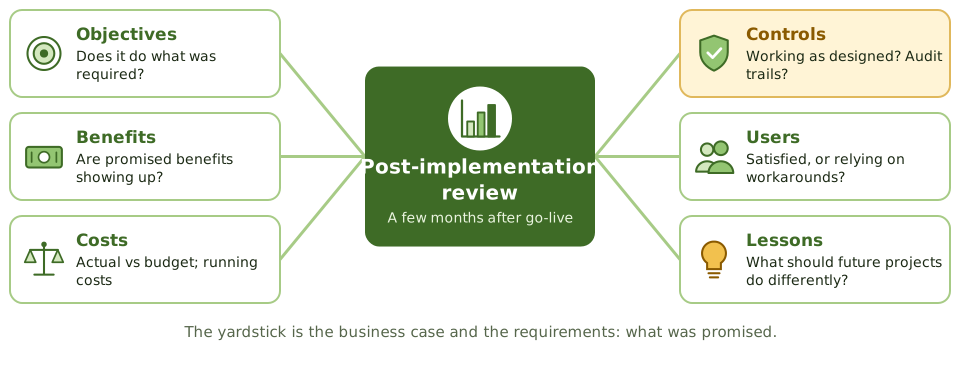
A few months after a kitchen renovation, you know whether it was worth it. Do the drawers still stick? Do you actually cook more? Did it cost what the builder quoted?
A post-implementation review (PIR) asks the same questions about a new system, using the business case and requirements as the yardstick.
When to do it
Who does it
The project office, an independent team or internal audit. Whoever it is must be independent of the project.
An auditor who helped design the system's controls, or approved it, shouldn't review it. That would be marking their own homework.
What comes out
- 1An assessment against the business case and requirements.
- 2Issues and corrective actions, each with an owner.
- 3Lessons learned, fed back into the SDLC and project methodology.
How the exam asks about it
| If the question asks… | Answer |
|---|---|
| Primary purpose of a PIR | Were objectives and benefits achieved; are controls adequate? |
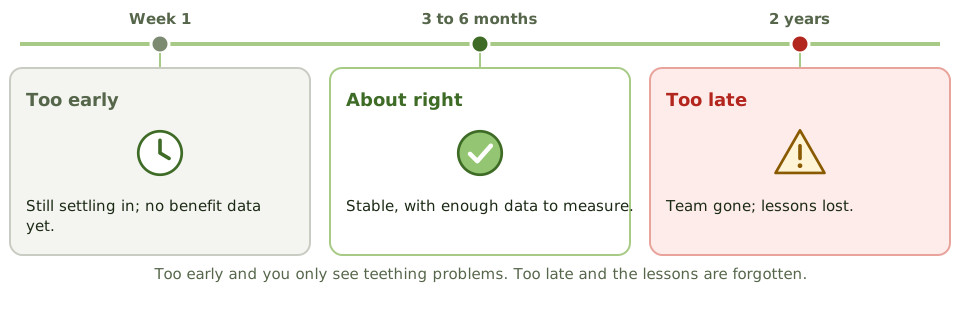
| When to perform a PIR | Once stable, often several months after go-live |
| Baseline for a PIR | Business case and requirements |
| Auditor who designed the project's controls | Shouldn't perform the PIR |
Key takeaways
- ✓A post-implementation review (PIR) evaluates whether the system meets its objectives, delivers expected benefits, and has adequate controls.
- ✓It's typically done some months after go-live, once the system has stabilised and benefits can be measured.
- ✓It compares actual costs, benefits and performance with the business case.
- ✓It also evaluates the project process itself, capturing lessons learned.
- ✓The IS auditor may perform or contribute to a PIR, but shouldn't review a project they helped design or approve.
- ✓Findings lead to corrective actions and improvements to future projects.
Exam traps
- !Doing the PIR immediately after go-live is too early to measure benefits.
- !A PIR isn't only about benefits; control adequacy and user satisfaction are also assessed.
- !An auditor who was part of the project team shouldn't perform its PIR.
- !Lessons learned only help if they're fed into the methodology for future projects.
Input Controls
Stopping bad data at the door: input authorisation, batch totals, the full set of validation edits with a way to spot each one in a scenario, and what happens to rejected data.
Stopping bad data at the door
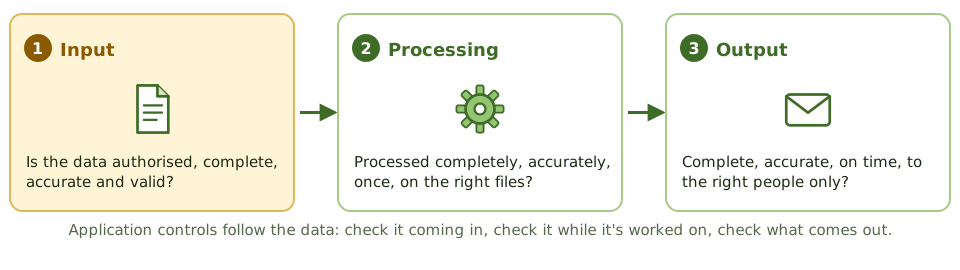
A nightclub bouncer checks every guest at the door: on the list? old enough? already inside? It's much easier than finding troublemakers once they're on the dance floor.
Input controls are the bouncer for an application. They make sure only authorised, complete, accurate and valid data gets in, which is far cheaper than finding bad data later.
Who's allowed to enter it?
- 1Signatures or approval on source documents.
- 2Access controls, so only authorised users can enter each transaction type.
- 3Unique user IDs, so every entry can be traced to a person.
- 4Workflow approval by a supervisor above set thresholds.
- 5Terminal or location restrictions for sensitive inputs.
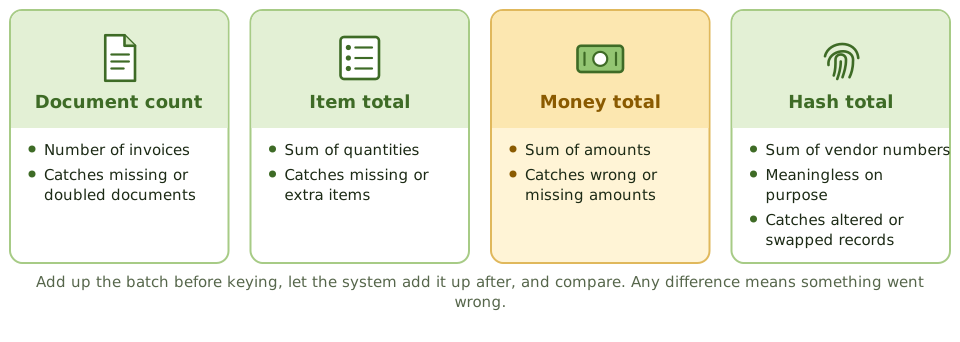
Batch totals
The validation edits
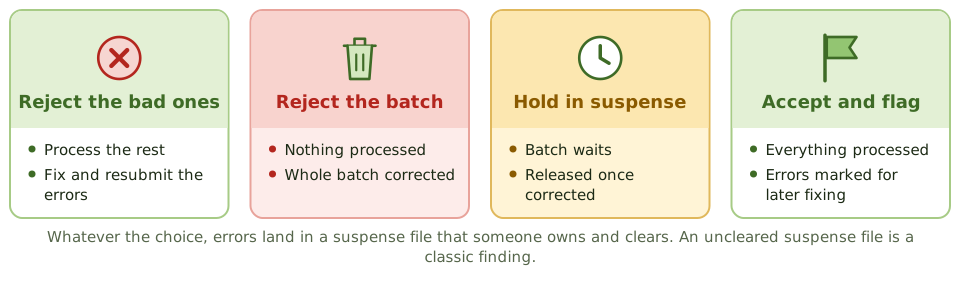
When input fails
How the exam asks about it
| If the question asks… | Answer |
|---|---|
| Transposed digits in an account number | Check digit |
| Value must fall between two limits | Range check |
| Missing numbers in a document series | Sequence check |
| Meaningless total of account numbers | Hash total |
| Vendor ID must exist before payment | Existence check |
| Only authorised transactions entered | Input authorisation / access controls |
Key takeaways
- ✓Input controls make sure only complete, accurate, valid and authorised data enters the system.
- ✓Authorisation can be by signatures on source documents, online access controls, unique passwords or supervisory approval in workflow.
- ✓Batch controls compare totals before and after input: total monetary amount, total items, total documents and hash totals.
- ✓A hash total is a meaningless total of a non-financial field (such as account numbers) used to detect lost or altered records.
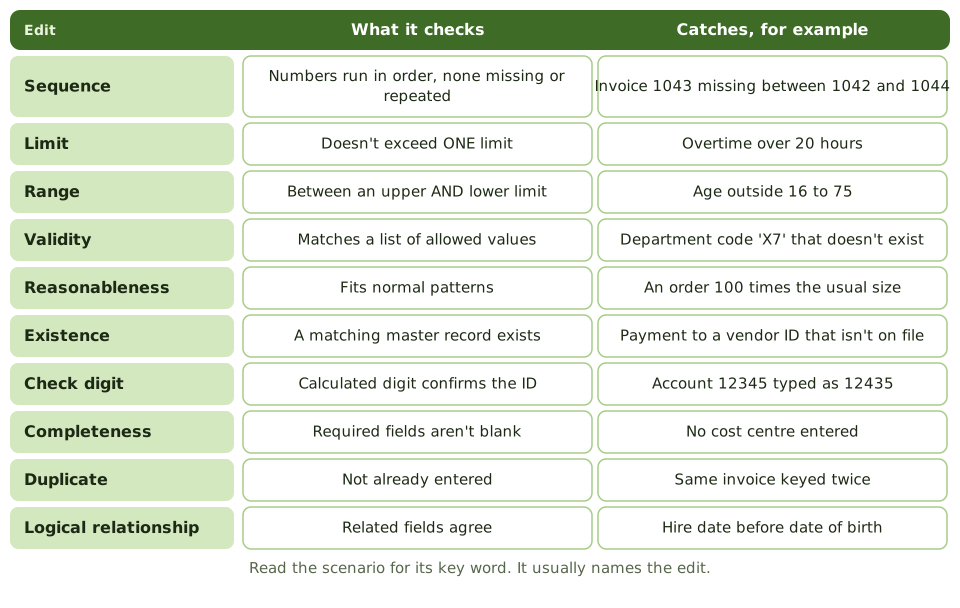
- ✓Validation edits include sequence, limit, range, validity, reasonableness, existence, check digit, completeness, duplicate and logical relationship checks.
- ✓A check digit detects transcription and transposition errors in identifiers such as account numbers.
- ✓Errors are handled by rejecting only the bad transaction, rejecting the whole batch, holding the batch in suspense, or accepting and flagging.
Exam traps
- !Range check has upper AND lower limits; limit check has only one.
- !Validity check compares against a list of valid values; existence check confirms a record exists in a master file.
- !A check digit catches keying and transposition errors, not unauthorised transactions.
- !Hash totals have no meaning in themselves; that's the point.
- !Key verification (re-keying) is costly and used only for critical fields.
- !Reasonableness compares input to what's normal, such as an order 100 times larger than usual.
Processing Controls
Keeping data right while the system works on it: run-to-run totals, recalculation, file reconciliation, extra care with master data, and audit trails.
Keeping it right on the inside
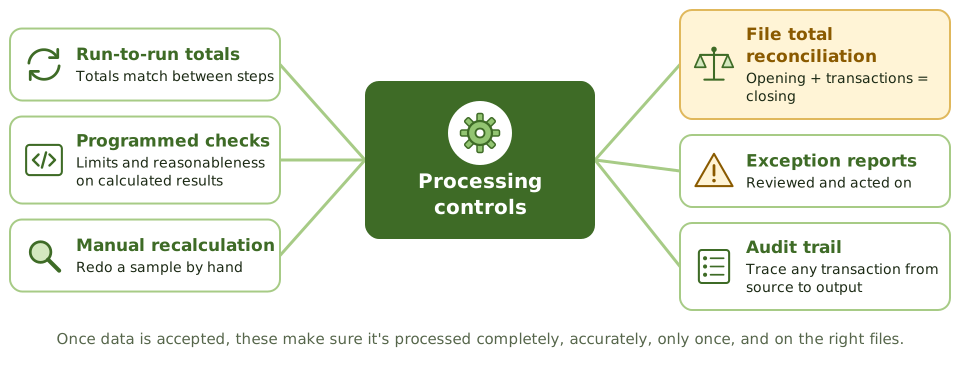
Once the bouncer has let data in, it still has to be handled properly: processed completely (nothing lost or added), accurately (calculations right), only once (no duplicates), and on the right files.
Processing controls check all of that while the system does its work.
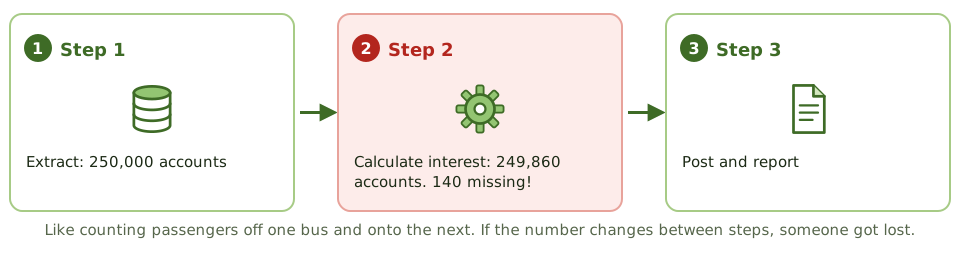
Run-to-run totals
Checking the calculations
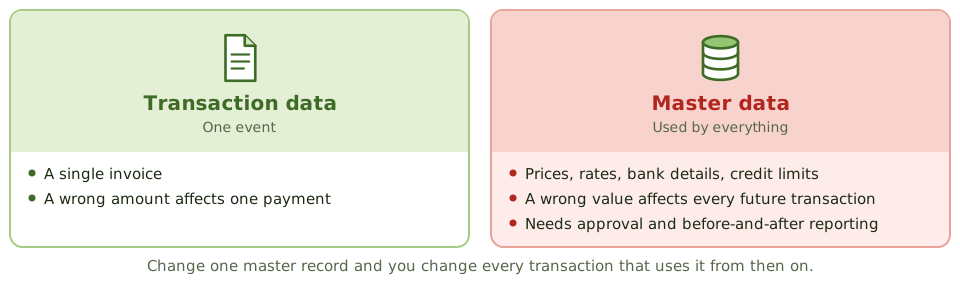
Master data needs extra care
Data file controls
- 1Before-and-after image reports, so every change can be reviewed.
- 2Approval required for master file changes.
- 3Transaction logs for the audit trail and recovery.
- 4File labels and version checks, so the right file is used.
- 5File security: only authorised users and programs update data.
- 6One-for-one checking and prerecorded input to cut keying errors.
How the exam asks about it
| If the question asks… | Answer |
|---|---|
| Records lost between processing steps | Run-to-run totals |
| Review changes to master data | Before-and-after image reports |
| Verify a program's calculations | Manual recalculation of a sample |
| Opening + transactions = closing | Reconciliation of file totals |
| Exception report nobody reviews | Ineffective control |
Key takeaways
- ✓Processing controls make sure data is processed completely, accurately and only once, and that files are updated correctly.
- ✓Run-to-run totals compare control totals between processing steps to detect lost or added records.
- ✓Programmed controls detect processing errors, such as limit checks on calculated amounts and reasonableness checks.
- ✓Manual recalculation of a sample of transactions verifies the program's calculations.
- ✓Reconciliation of file totals confirms master files were updated correctly.
- ✓Data file controls include before-and-after image reporting, transaction logs, file labels, version control and authorised file maintenance.
- ✓Exception reports must be reviewed and acted on.
Exam traps
- !Run-to-run totals detect lost or added records between steps, not wrong calculations within a step.
- !Before-and-after images let changes to master data be reviewed and traced.
- !Changes to master data (such as prices or rates) are higher risk than single transactions, because they affect all future processing.
- !Exception reports with no reviewer are not a control.
Output Controls
The last checkpoint before results leave the system: balancing output, sending reports only to the right people, guarding cheques and other valuable forms, and keeping or destroying output properly.
The last checkpoint
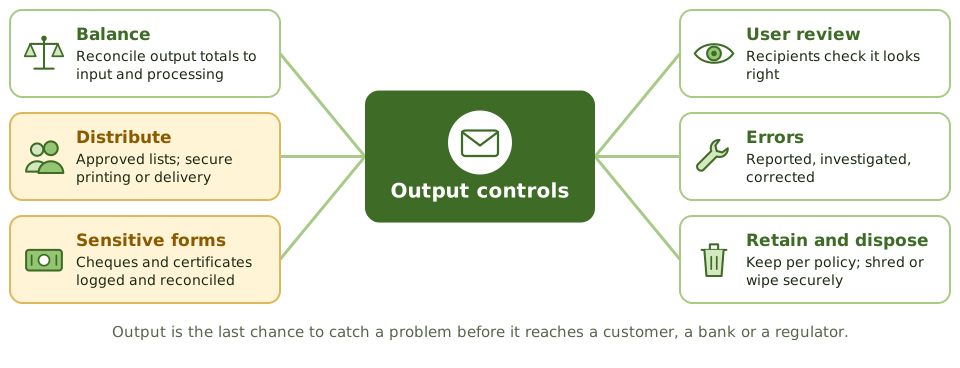
Before a restaurant dish leaves the kitchen, the head chef checks it: right order, right table, looks right. Once it's in front of the customer, it's too late.
Output controls are that final check. Reports, files, payments and documents must be complete, accurate, on time, and reach only the people meant to see them.
Getting it to the right people
- 1Distribution lists approved by the data owner.
- 2Secure printing (release by badge or PIN) or secure electronic delivery.
- 3Sensitive reports clearly labelled.
- 4Recipients confirm receipt of critical reports or files.
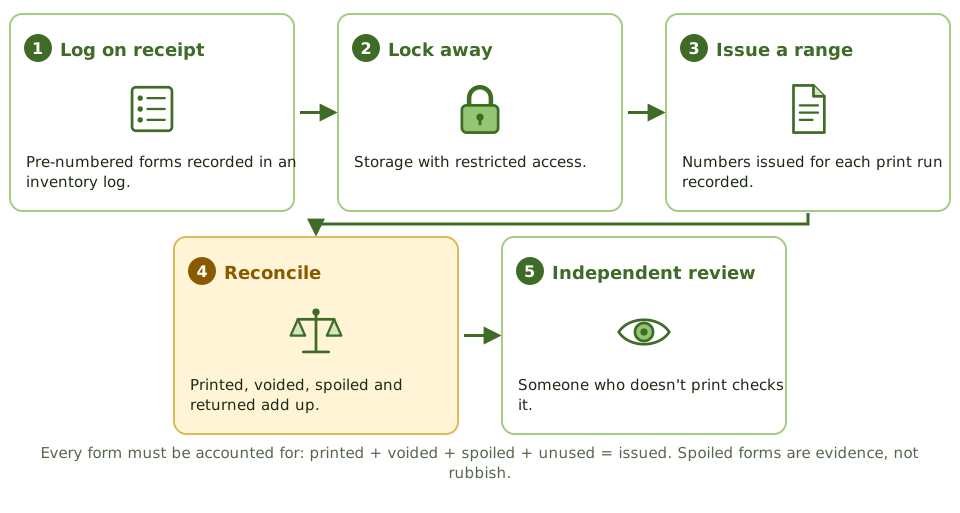
Cheques are nearly cash
Balancing and review
How the exam asks about it
| If the question asks… | Answer |
|---|---|
| Best control over blank cheque stock | Logged inventory, secure storage, reconciliation |
| Reports reach only authorised users | Defined distribution lists, secure delivery |
| Verify output completeness | Reconcile output to input and processing totals |
| Spoiled negotiable forms | Account for them; destroy under control |
Key takeaways
- ✓Output controls make sure output is complete, accurate and delivered only to authorised recipients in a timely way.
- ✓Negotiable instruments and sensitive forms (cheques, certificates) need logging, secure storage and reconciliation of forms used.
- ✓Report distribution follows defined lists; sensitive reports go only to authorised people.
- ✓Output is balanced and reconciled to input and processing totals.
- ✓Users should review output for reasonableness and report errors.
- ✓Retention of output follows policy and legal requirements; disposal must be secure.
Exam traps
- !Blank cheque stock needs inventory control: logged, secured, and reconciled to cheques printed, voided and spoiled.
- !Printing sensitive reports to a shared printer without secure release is an output control weakness.
- !Output should be reconciled to control totals, not just glanced at.
- !Spoiled or voided negotiable forms must be accounted for, not just thrown away.
Data Integrity and ACID
How databases keep data trustworthy: the four ACID properties explained with a bank transfer, what goes wrong when two users collide, integrity rules, and data integrity testing.
Why databases need rules
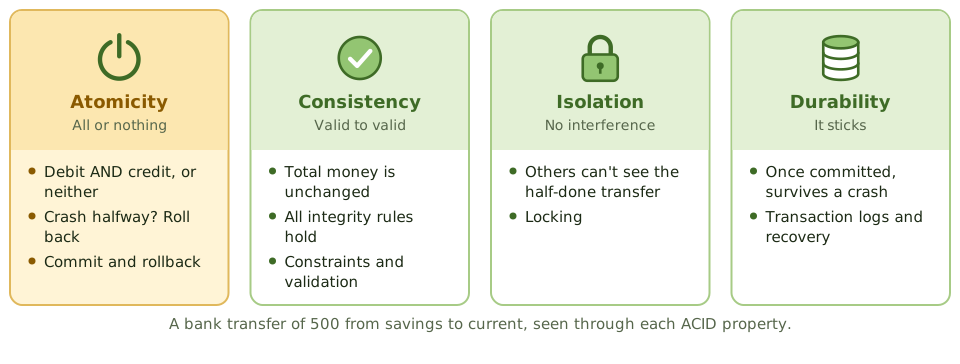
Moving 500 from savings to your current account is two steps: take 500 out, put 500 in. What if the system crashes in between? What if your partner moves money at the same moment?
Databases follow four rules, ACID, so the answer is always 'your money is safe'.
ACID, through one bank transfer
When two users collide
Without isolation, transactions running at the same time cause trouble:
- 1Lost update: two people edit the same record; one overwrites the other.
- 2Dirty read: reading data another transaction hasn't committed yet.
- 3Inconsistent read: data changes between two reads in the same transaction.
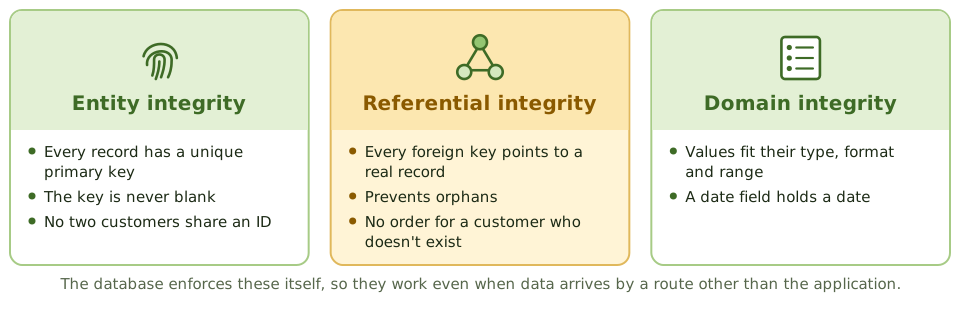
Integrity rules
Data integrity testing
Data integrity tests are substantive tests, often run with CAATs over the whole database.
Relational integrity tests check fields and records: valid values, formats, required fields. Referential integrity tests check across tables: no orphans, relationships intact. Totals are also reconciled between related tables and systems.
How the exam asks about it
| If the question asks… | Answer |
|---|---|
| All-or-nothing transactions | Atomicity |
| Concurrent transactions don't interfere | Isolation |
| Committed transactions survive a crash | Durability |
| Prevents orphan records | Referential integrity |
| Every record has a unique ID | Entity integrity |
Key takeaways
- ✓ACID: atomicity (all or nothing), consistency (valid state to valid state), isolation (transactions don't interfere), durability (committed changes survive failures).
- ✓Atomicity is achieved with commit and rollback; durability with transaction logs and recovery.
- ✓Isolation is achieved with concurrency controls such as locking, preventing problems like lost updates.
- ✓Referential integrity makes sure foreign keys point to existing records; entity integrity makes sure every record has a unique, non-null primary key.
- ✓Data integrity tests are substantive tests that check data accuracy, completeness, consistency and authorisation.
- ✓Relational integrity tests check data at the field and record level; referential integrity tests check relationships between tables.
Exam traps
- !Atomicity: a funds transfer either debits AND credits, or does neither.
- !Isolation prevents concurrent transactions from seeing each other's partial results.
- !Referential integrity prevents orphan records, such as an order for a customer who doesn't exist.
- !Durability doesn't mean backups alone; it means committed transactions survive a crash, typically via logs.
EDI and E-Commerce Controls
Business documents sent machine to machine: how EDI works, what can go wrong without paper, the controls that replace it, and the risks and controls of selling online.
Paperwork without paper
Businesses used to post each other purchase orders and invoices. Each paper document carried a signature, a letterhead and a postmark, all evidence of who sent what and when.
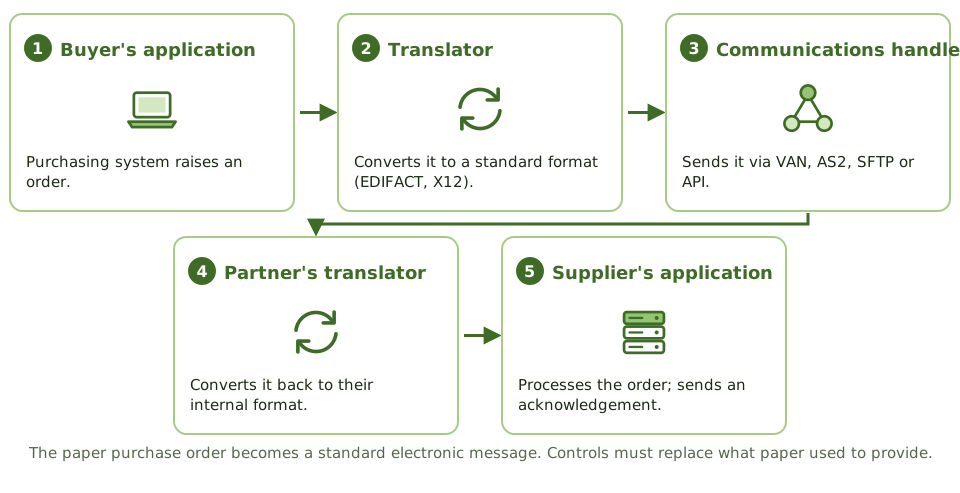
Electronic data interchange (EDI) swaps the paper for standard electronic messages sent system to system. It's faster and cheaper, but every bit of evidence the paper gave you now has to be designed in.
How an EDI order travels
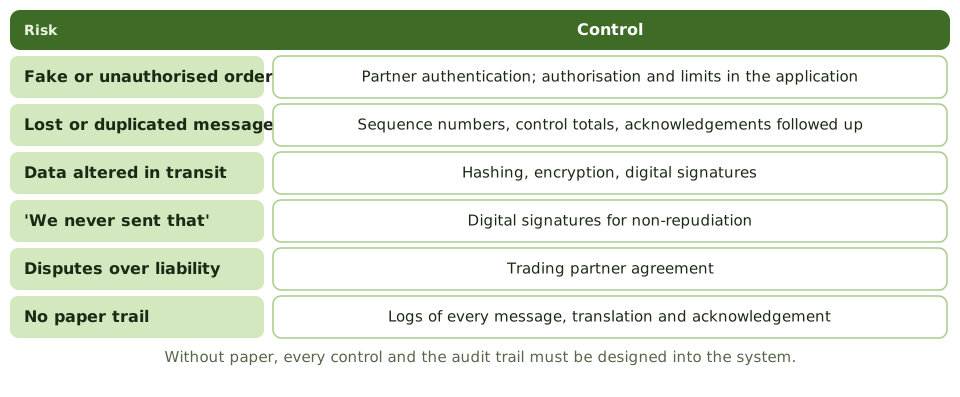
Risks and controls
The acknowledgement trap
A functional acknowledgement only says 'message received, and the format is valid'. It doesn't mean the supplier accepts the order; that needs a business-level reply.
And acknowledgements are useless unless someone chases the ones that never arrive.
E-commerce
How the exam asks about it
| If the question asks… | Answer |
|---|---|
| Detects lost EDI messages | Sequence numbers / acknowledgements |
| What a functional acknowledgement confirms | Receipt and syntax, not acceptance |
| Provides non-repudiation | Digital signatures |
| Sets the legal terms of EDI | Trading partner agreement |
| EDI component that converts formats | Translator (EDI interface) |
Key takeaways
- ✓EDI exchanges business documents (orders, invoices) electronically in standard formats between trading partners.
- ✓EDI components: communications handler, EDI interface (translator and application interface), and the application system.
- ✓Key EDI risks: unauthorised transactions, loss or duplication of transactions, data integrity, and lack of evidence of origin and receipt.
- ✓EDI controls include trading partner agreements, authentication, encryption, sequence numbers, control totals, functional acknowledgements and audit trails.
- ✓E-commerce risks include fraud, privacy breaches, availability, and repudiation of transactions.
- ✓Digital signatures provide authentication, integrity and non-repudiation; TLS provides confidentiality and integrity in transit.
Exam traps
- !A functional acknowledgement confirms receipt and syntax, not that the business accepts the order.
- !Encryption gives confidentiality; non-repudiation needs digital signatures.
- !Lack of paper documents means the audit trail must be designed into the system.
- !The trading partner agreement sets legal obligations; without it, disputes are hard to resolve.