Domain 4: Information Systems Operations and Business Resilience
Arrow keys or space to move, F for full screen. Read the notes
Information Systems Operations and Business Resilience
30 topics · Operations · Resilience
D4IT Service Management
Running IT like a service business: the service desk, the main ITSM processes and how they feed each other, how priority is set, and what the auditor checks.
IT as a service business
Think of a hotel. Guests call one number, reception. Reception logs the request, fixes what it can, and sends the rest to housekeeping, maintenance or the kitchen. Behind the scenes, each team has its own process, and the manager tracks how quickly guests are looked after.
IT service management (ITSM) runs IT the same way. Frameworks such as ITIL and ISO/IEC 20000 describe the processes; COBIT gives auditors the criteria.
The service desk and its processes
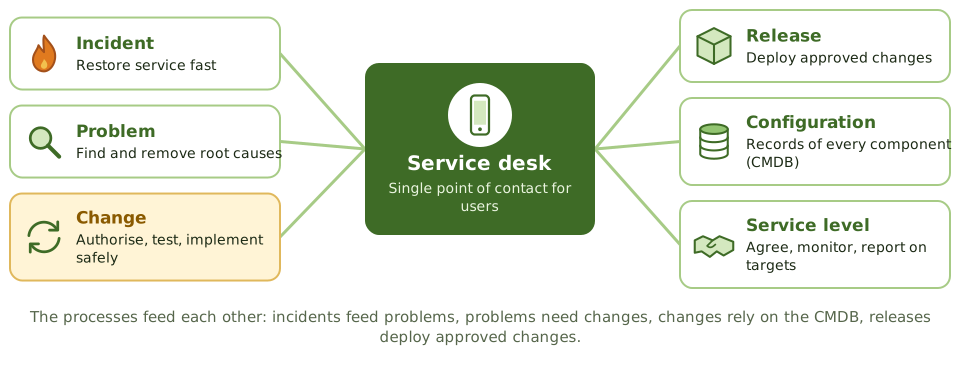
What the service desk does
- 1Logs every incident and request. Every single one.
- 2Sets priority from impact and urgency.
- 3Fixes what it can at first line; escalates the rest.
- 4Keeps users informed.
- 5Closes tickets only when the user confirms it's fixed.
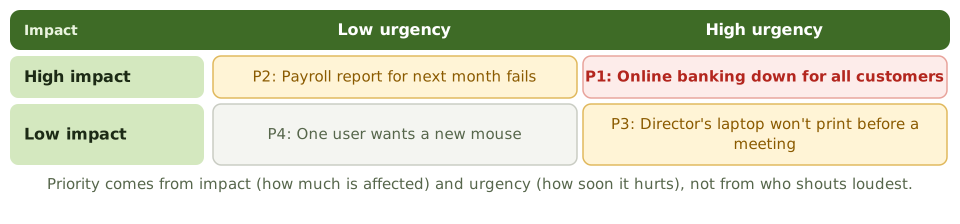
Setting priority
Auditing ITSM
Are processes documented and followed? Is everything logged? Are priorities set consistently? Are SLA reports accurate? Are repeat incidents linked to problems, and fixes to changes?
How the exam asks about it
| If the question asks… | Answer |
|---|---|
| Single point of contact for IT users | Service desk |
| How incident priority is set | Impact and urgency |
| Why log every incident | Trends, problem management, SLA measurement |
| Process that keeps records of IT components | Configuration management |
Key takeaways
- ✓IT service management (ITSM) delivers IT as a set of services that meet agreed business requirements.
- ✓The service desk is the single point of contact for users: it logs, classifies, prioritises and routes incidents and requests.
- ✓Core processes: incident, problem, change, release, configuration, service level, capacity, availability and continuity management.
- ✓Processes depend on each other; for example, problem management relies on accurate incident data and the CMDB.
- ✓Every ticket should be logged, so trends can be analysed and SLAs measured.
- ✓The auditor reviews whether processes are defined, followed, measured and improved.
Exam traps
- !Incidents resolved informally without a ticket undermine trend analysis and problem management.
- !The service desk shouldn't grant access or make changes without the normal approvals.
- !Priority is based on impact and urgency, not on who complains loudest.
- !Closing tickets without user confirmation inflates performance metrics.
Hardware Components and Architecture
The parts inside a computer and what each means for control, the main computing architectures, and how hardware is bought, maintained, monitored and disposed of.
Inside the box
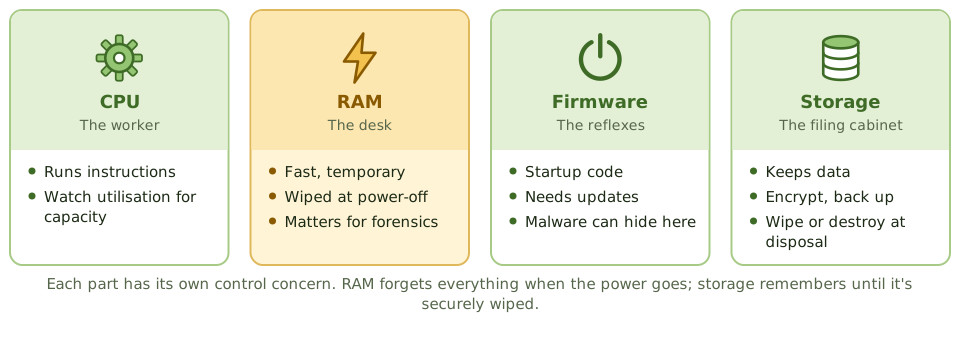
Think of an office worker. The CPU is the worker doing the thinking. RAM is the desk: fast to reach, but cleared every night. Storage is the filing cabinet: slower, but it keeps everything. Firmware is the reflexes that get the worker going each morning.
Each part has its own control concern.
Ports and removable media
USB sticks and other removable media are an easy way for data to walk out of the door and for malware to walk in.
Controls: restrict or disable ports, allow only approved and encrypted devices, and log their use.
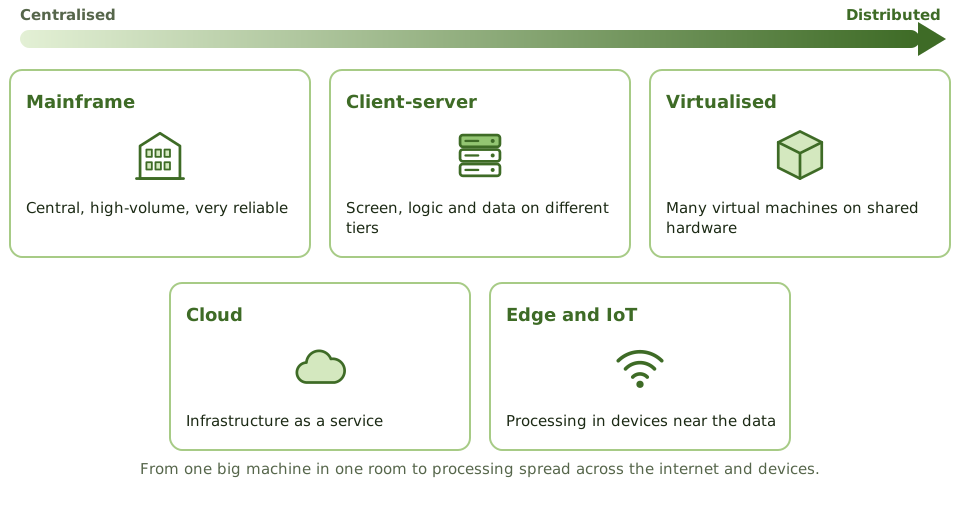
Computing architectures
The hardware life cycle
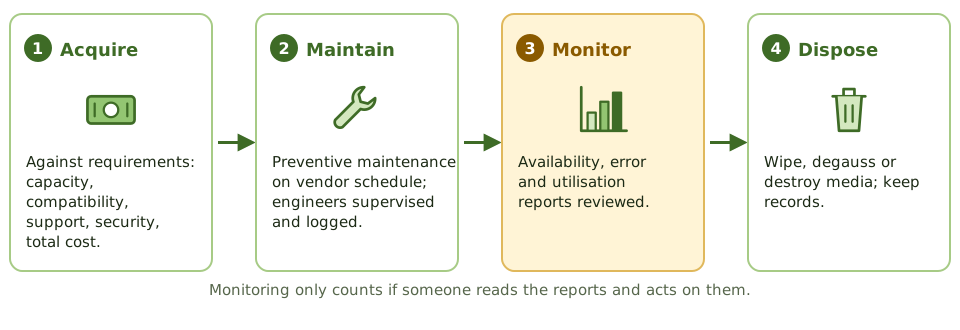
Maintenance engineers
Vendor engineers working on production hardware have physical access to everything. Their visits should be scheduled, supervised where appropriate, and logged.
And keep your own record of hardware faults. If only the vendor logs them, you can't see the trends.
How the exam asks about it
| If the question asks… | Answer |
|---|---|
| Memory lost at power-off | RAM (volatile) |
| Control over vendor engineers | Supervised and logged access |
| Best source for hardware trends | Utilisation and error reports, reviewed |
| Risk of open USB ports | Data leakage and malware |
| Before disposing of storage media | Secure wiping or destruction, documented |
Key takeaways
- ✓The CPU executes instructions; RAM is volatile working memory; ROM and firmware hold startup code; storage holds data persistently.
- ✓Architectures range from mainframes and servers to distributed, client-server, virtualised and cloud environments.
- ✓Hardware acquisition should follow requirements and a documented process, considering capacity, compatibility, support and security.
- ✓Preventive maintenance follows vendor schedules and is logged; maintenance staff access is controlled.
- ✓Hardware monitoring includes availability reports, error logs, utilisation reports and asset inventory.
- ✓Removable media and USB ports are a common data leakage risk.
Exam traps
- !RAM is volatile; its contents are lost when power is removed, which matters for forensics.
- !Firmware can be compromised; it needs updates and integrity protection too.
- !Vendor maintenance engineers with unsupervised access to production hardware are a security risk.
- !Hardware problems logged only by the vendor leave the organisation blind to trends.
Operating Systems
Why the operating system is the foundation every application control stands on, how it's hardened, and why admin accounts, system utilities and logs need the tightest control.
The foundation
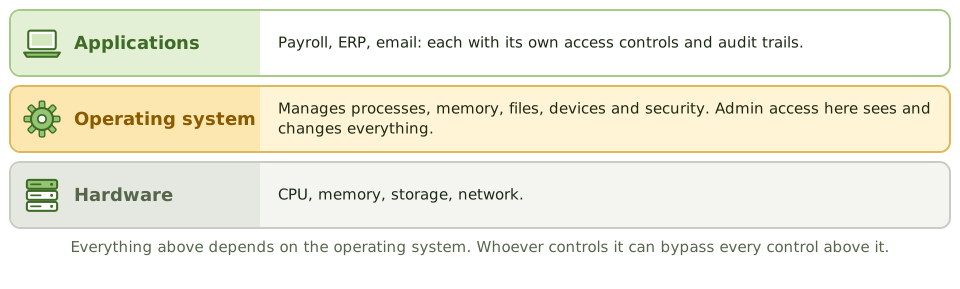
A building's foundations aren't exciting, but if they crack, every floor above is in trouble, however good the locks on the office doors.
The operating system is the foundation for every application. Whoever has admin control of it can read files, change data and switch off logging, bypassing every application control on top.
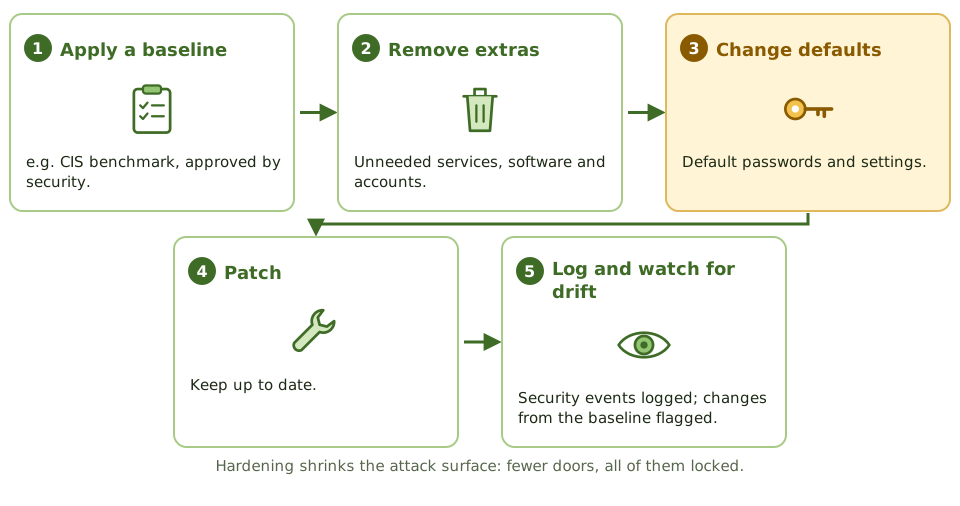
Hardening
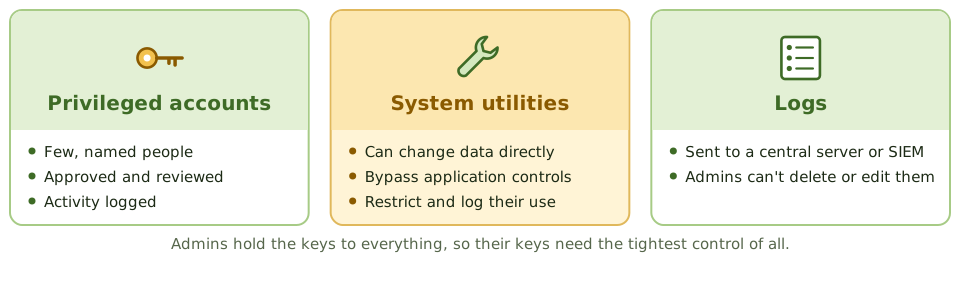
Admins, utilities and logs
What the auditor finds
- 1Parameters compared with policy.
- 2Privileged account list reviewed.
- 3Use of sensitive utilities logged and checked.
- 4Patch status and logging configuration.
- 5OS changes going through change control.
How the exam asks about it
| If the question asks… | Answer |
|---|---|
| Greatest risk from a compromised OS | All application controls can be bypassed |
| Control over system utilities | Restrict access and log use |
| Logs reliable against admins | Central protected log server |
| Purpose of hardening | Reduce the attack surface |
| Common OS finding | Default accounts or passwords unchanged |
Key takeaways
- ✓The operating system manages hardware, memory, processes, files and access, and every application depends on it.
- ✓Compromise of the OS undermines all application controls running on it.
- ✓OS hardening removes unnecessary services, changes defaults, applies security baselines and patches.
- ✓System parameters (such as password rules, logging and access defaults) must be set securely and changes controlled.
- ✓Privileged accounts (root, administrator) and system utilities that can bypass controls must be restricted and logged.
- ✓Logs of system activity should be protected from alteration by administrators.
Exam traps
- !Default accounts and passwords left on systems are a classic finding.
- !System utilities that can change data directly bypass application controls; restrict and log them.
- !If administrators can delete or alter their own logs, logging isn't an effective detective control.
- !Reviewing OS parameters once isn't enough; configuration drift needs monitoring.
OSI Model
The seven layers of network communication explained with a parcel delivery, which devices and protocols live at each layer, and why knowing the layer tells you what a control can do.
Sending a parcel
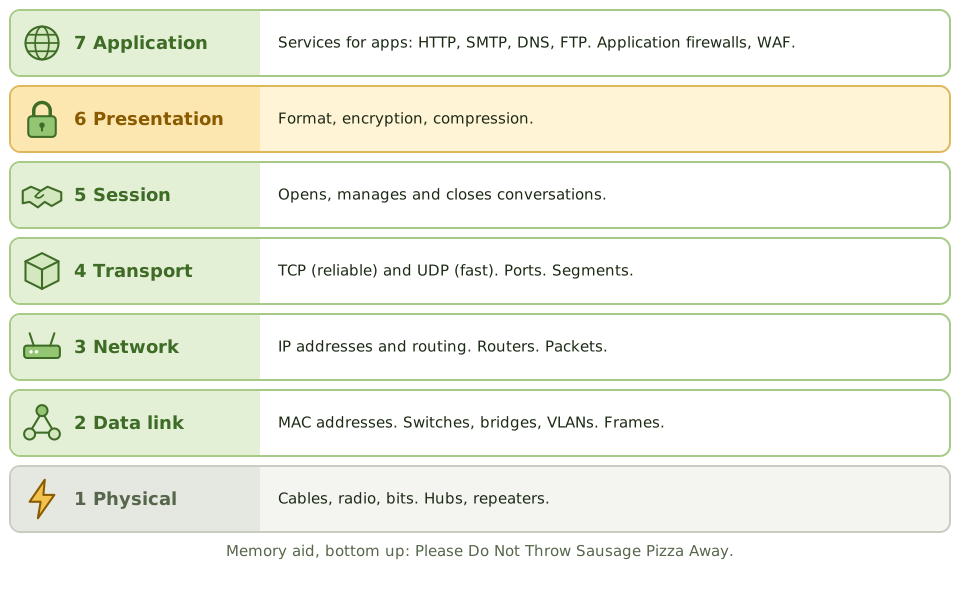
Sending a parcel abroad involves layers. You write the letter (application), translate it and seal it (presentation), agree to keep writing back and forth (session), number the boxes so none go missing (transport), address them to a city (network), hand them to the local van (data link), and the van drives the road (physical).
The OSI model splits network communication into those same seven layers.
The seven layers
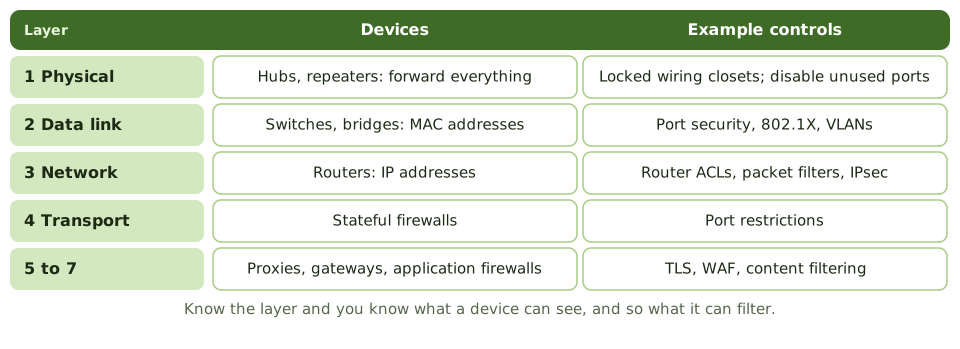
Devices and controls by layer
Why the layer matters
A device can only filter what it can see. A hub sees bits, so it can't filter anything. A switch sees MAC addresses. A router sees IP addresses. An application firewall sees the actual web request.
How the exam asks about it
| If the question asks… | Answer |
|---|---|
| Layer where routers work | Network (3) |
| Layer where switches work | Data link (2) |
| Layer for encryption and formatting | Presentation (6) |
| Layer of TCP and UDP | Transport (4) |
| Device translating between protocols | Gateway |
Key takeaways
- ✓The OSI model has seven layers: physical, data link, network, transport, session, presentation, application.
- ✓Layer 1 physical: cables, signals, hubs, repeaters. Layer 2 data link: frames, MAC addresses, switches, bridges.
- ✓Layer 3 network: IP addressing and routing, routers. Layer 4 transport: TCP and UDP, ports, reliability.
- ✓Layer 5 session manages dialogues; layer 6 presentation handles formatting, encryption and compression; layer 7 application is where user-facing protocols run.
- ✓Gateways can operate up to layer 7 and translate between different protocols.
- ✓Knowing the layer tells you which device or control acts on the traffic.
Exam traps
- !Switches work at layer 2 (MAC addresses); routers at layer 3 (IP addresses).
- !Hubs and repeaters are layer 1 and forward everything; they can't filter.
- !Encryption and data format conversion belong to the presentation layer in the OSI model.
- !A packet-filtering firewall works at layers 3 and 4; an application firewall at layer 7.
TCP/IP and Common Protocols
How the internet's own model works, the difference between TCP and UDP, IP addresses and NAT, and the protocols and ports that come up in security questions.
The internet's rulebook
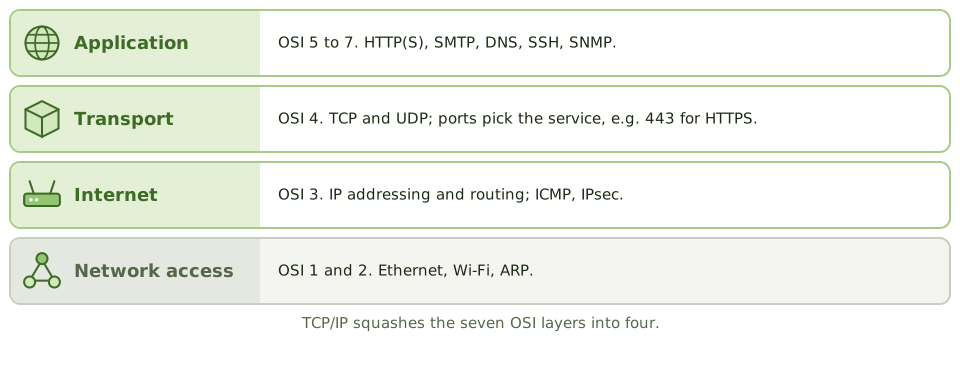
The OSI model is the textbook version. TCP/IP is what the internet actually runs on. It squashes the seven layers into four.
You don't need to configure it, but you do need to know what each piece does and which protocols are risky.
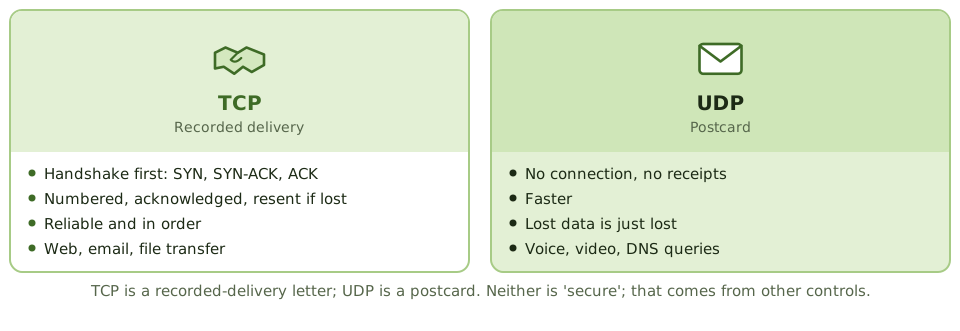
TCP vs UDP
Addresses and NAT
- 1IPv4 addresses are 32-bit; IPv6 addresses are 128-bit.
- 2Private ranges (10.x, 172.16-31.x, 192.168.x) are used inside the organisation.
- 3NAT translates private addresses to a public one at the edge.
- 4Subnetting splits networks into segments, which helps segregation.
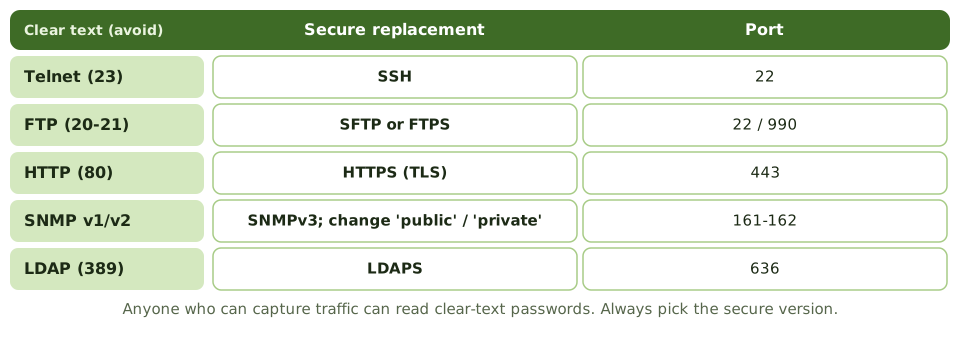
Clear text vs secure
Other protocols worth knowing
| Protocol | What it does | Watch out for |
|---|---|---|
| DNS (53) | Names to addresses | Poisoning; use DNSSEC |
| DHCP (67-68) | Hands out addresses | Rogue DHCP servers |
| SMTP (25/587) | Sends email | Spoofing; use TLS, SPF, DKIM, DMARC |
| RDP (3389) | Remote desktop | Never expose to the internet; MFA |
| NTP (123) | Synchronises clocks | Needed so logs line up |
How the exam asks about it
| If the question asks… | Answer |
|---|---|
| Protocol that guarantees delivery | TCP |
| Risk of Telnet or FTP | Passwords sent in clear text |
| Secure replacement for Telnet | SSH |
| Why NTP matters for security | Accurate timestamps to correlate logs |
| Risk of default SNMP settings | Device settings read or changed |
Key takeaways
- ✓TCP/IP has four layers: network access, internet, transport and application.
- ✓TCP is connection-oriented and reliable (handshake, acknowledgements, retransmission); UDP is connectionless and faster, without delivery guarantees.
- ✓IP addresses identify hosts; private address ranges are used internally and translated with NAT.
- ✓Insecure protocols (Telnet, FTP, HTTP, SNMPv1/v2) send data, including credentials, in clear text; secure alternatives are SSH, SFTP/FTPS, HTTPS and SNMPv3.
- ✓DNS translates names to addresses; DHCP assigns addresses automatically; both are critical and attack targets.
- ✓Network management protocols such as SNMP need strong authentication because they can change device settings.
Exam traps
- !Telnet and FTP transmit passwords in clear text. Replace with SSH and SFTP.
- !UDP isn't 'insecure' by design; it's unreliable (no delivery guarantee). Security comes from other controls.
- !NAT hides internal addresses but isn't a substitute for a firewall.
- !Default SNMP community strings ('public', 'private') are a common finding.
Network Devices: Switches, Routers, Gateways
What each network device does and how much it understands about the traffic, why segmentation matters, and the configuration and access controls the auditor checks.
The post room
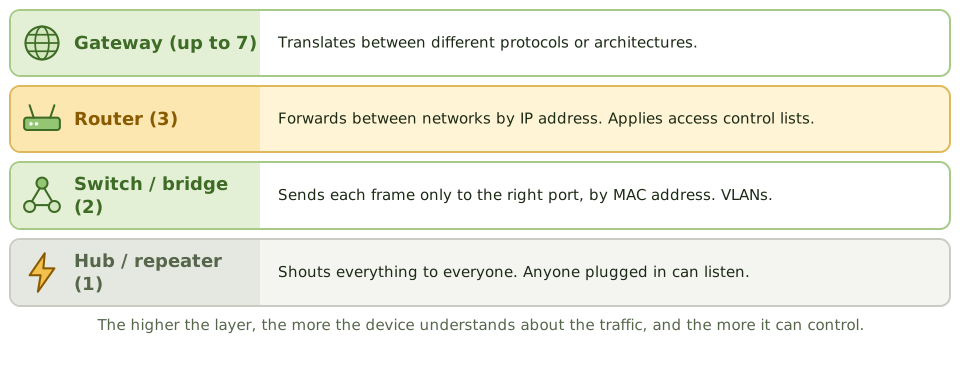
Picture an office post room. A junior who shouts every message to the whole floor is a hub. A clerk who hands each letter to the right desk is a switch. The mail van that takes letters between buildings using street addresses is a router. A translator who rewrites letters for a foreign office is a gateway.
Device by device
| Device | Layer | Does what |
|---|---|---|
| Repeater / hub | 1 | Regenerates and sends to every port |
| Bridge / switch | 2 | Forwards by MAC address; VLANs |
| Router | 3 | Forwards between networks by IP; ACLs |
| Load balancer | 4-7 | Spreads traffic across servers |
| Gateway | Up to 7 | Translates between protocols |
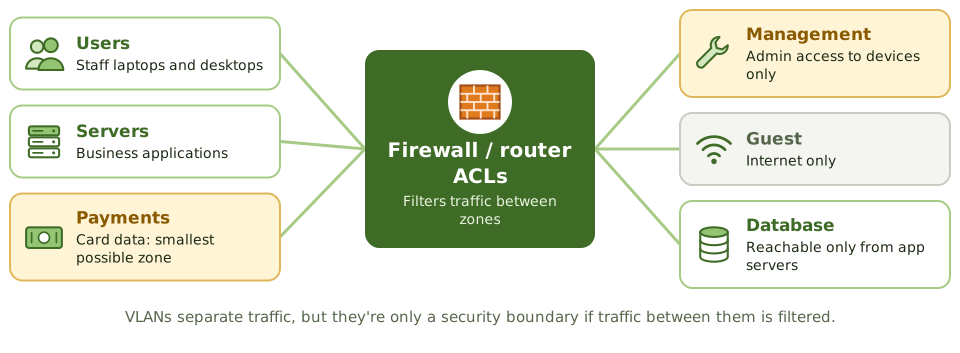
Segmentation
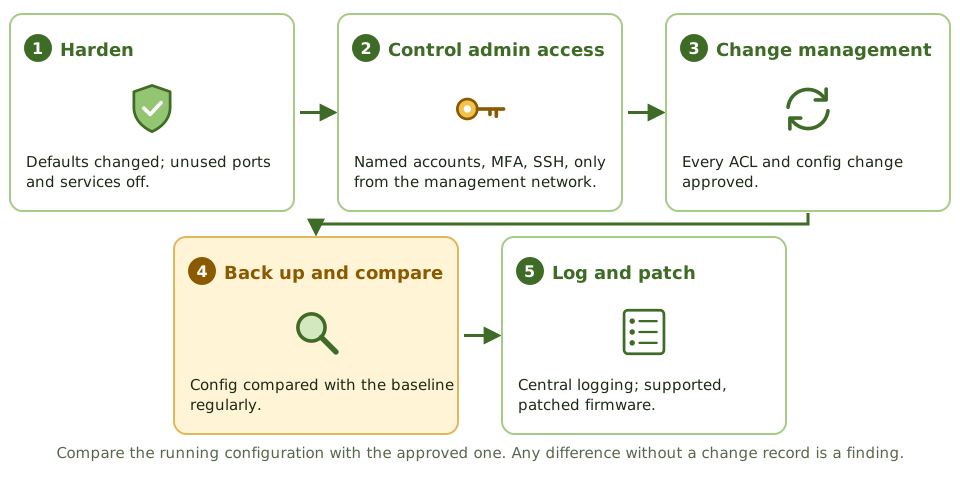
Controlling the devices
How the exam asks about it
| If the question asks… | Answer |
|---|---|
| Forwards by IP address | Router |
| Forwards by MAC address | Switch (or bridge) |
| Translates between protocols | Gateway |
| Risk of hubs | Every device sees all traffic |
| Detect unauthorised router changes | Compare with an approved baseline |
| Purpose of segmentation | Limit access, contain compromises |
Key takeaways
- ✓Hubs and repeaters (layer 1) forward everything; switches (layer 2) forward by MAC address; routers (layer 3) forward by IP address.
- ✓Bridges connect network segments at layer 2; gateways translate between different protocols, up to layer 7.
- ✓VLANs on switches segment traffic logically; routing between VLANs should be controlled with ACLs or firewalls.
- ✓Network devices need hardened configurations, controlled administrative access, logging and change control.
- ✓Device configurations should be backed up and compared regularly against an approved baseline.
- ✓Network segmentation limits how far an attacker can move after a compromise.
Exam traps
- !A hub sends traffic to all ports, so anyone connected can sniff it; switches reduce this.
- !Routers with default passwords or open management interfaces are a high-risk finding.
- !VLANs separate traffic but aren't a security boundary unless inter-VLAN routing is filtered.
- !Unauthorised changes to router ACLs or firewall rules bypass network controls; change management applies.
LAN/WAN Topologies
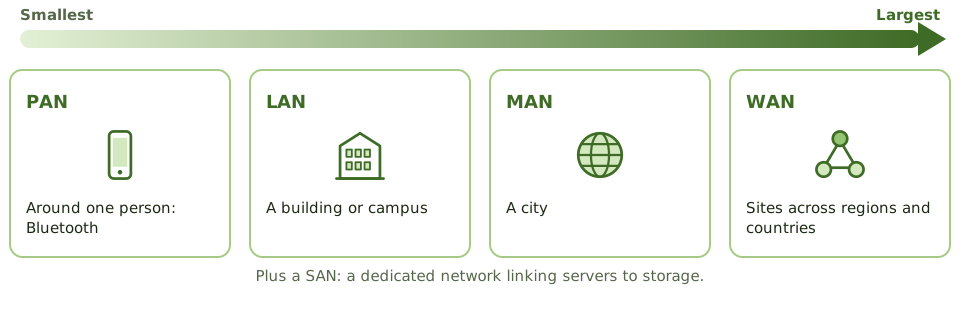
Network sizes from a phone to the world, the shapes networks can take and what breaks them, cable types from cheapest to most secure, and how organisations connect their sites.
Networks come in sizes
Networks come in shapes
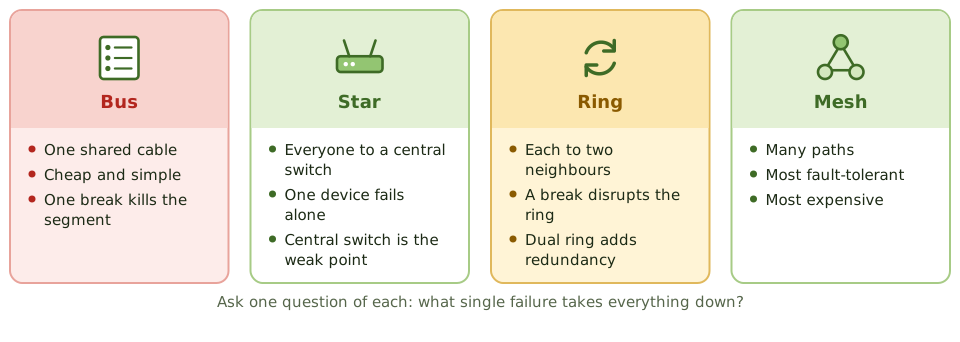
Think of roads. One long street everyone lives on (bus): close it and nobody gets anywhere. A roundabout with spokes (star): one closed driveway affects one house, but close the roundabout and everything stops. A ring road. Or a city grid with many routes (mesh): the most resilient, and the most expensive to build.
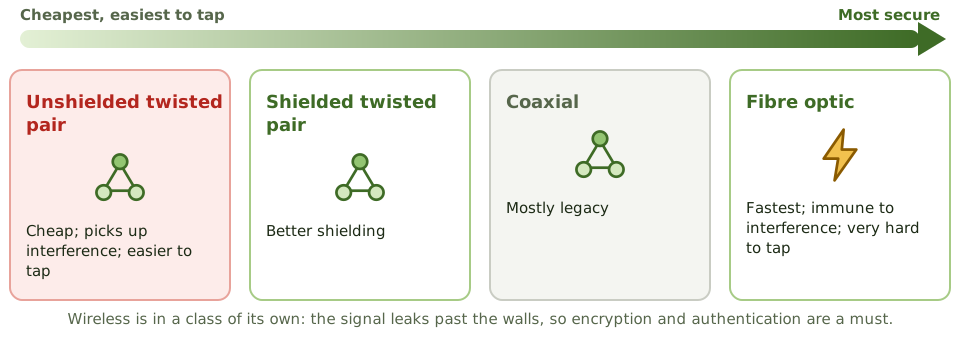
Cables and wireless
Connecting sites
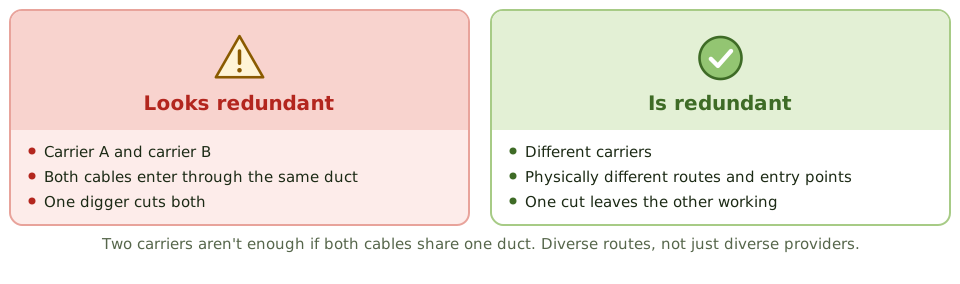
Real redundancy
How the exam asks about it
| If the question asks… | Answer |
|---|---|
| Most fault-tolerant topology | Mesh |
| Single point of failure in a star | The central switch or hub |
| Hardest cable to tap | Fibre optic |
| Most prone to interference | Unshielded twisted pair |
| Key point for redundant WAN links | Different carriers and physical routes |
Key takeaways
- ✓Network types by scope: PAN, LAN, MAN, WAN; plus SAN for storage.
- ✓Star topology: all nodes connect to a central device; a single node failure is isolated but the central device is a single point of failure.
- ✓Bus topology: one shared cable; a break can take down the whole segment.
- ✓Ring topology: each node connects to two others; a break disrupts the ring unless it's a dual ring.
- ✓Mesh topology: multiple paths between nodes; most resilient and most expensive.
- ✓Fibre optic cable is most secure and resistant to interference; unshielded twisted pair is cheapest and most susceptible.
- ✓WAN options include MPLS, leased lines, SD-WAN and VPNs over the internet.
Exam traps
- !Mesh gives the most redundancy; star depends on its hub or switch.
- !Fibre is hardest to tap and immune to electromagnetic interference.
- !Wireless signals extend beyond physical boundaries, so they need encryption and authentication.
- !Redundant WAN links should use different carriers and physical routes, or they may fail together.
Database Models and DBMS
How databases organise data, from family trees to tables to NoSQL, what a database management system does, the three SQL language types, and why the database administrator needs watching.
Organising data
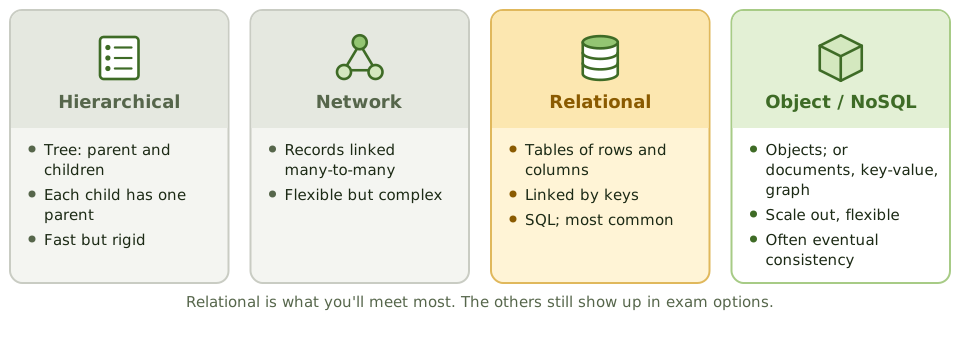
A filing system can be a family tree (each folder inside exactly one parent folder), a web of cross-references, or a set of spreadsheets linked by ID numbers. Databases use the same ideas.
The relational model, tables linked by keys, is by far the most common.
Relational basics
- 1Table: rows (records) and columns (fields).
- 2Primary key: the unique ID of each row.
- 3Foreign key: a column pointing to another table's primary key.
- 4View: a virtual table showing only selected rows or columns. Also an access control.
- 5Stored procedures and triggers: code in the database that enforces rules.
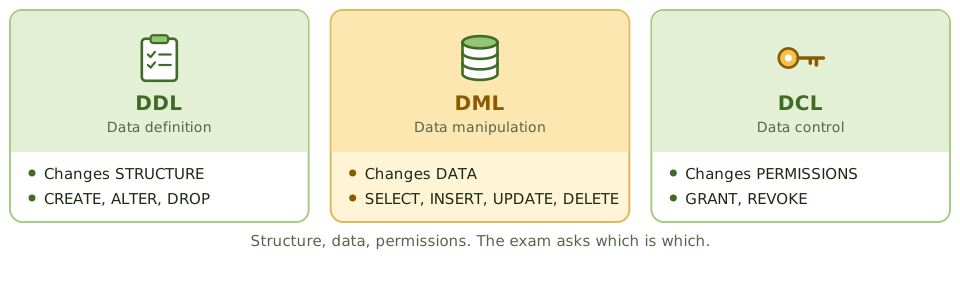
The three SQL languages
What the DBMS does
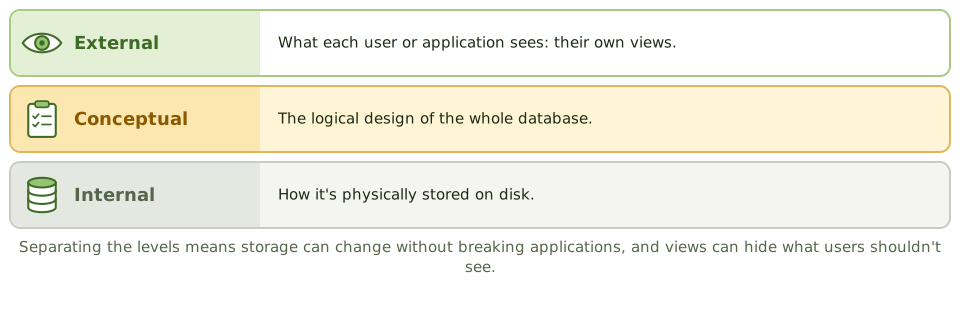
The database management system handles security and access, locking so users don't collide, integrity rules, backup, logging and recovery.
It also keeps the data dictionary: the metadata describing every field, structure, relationship, owner and access rule. Changes to it need restricting and logging.
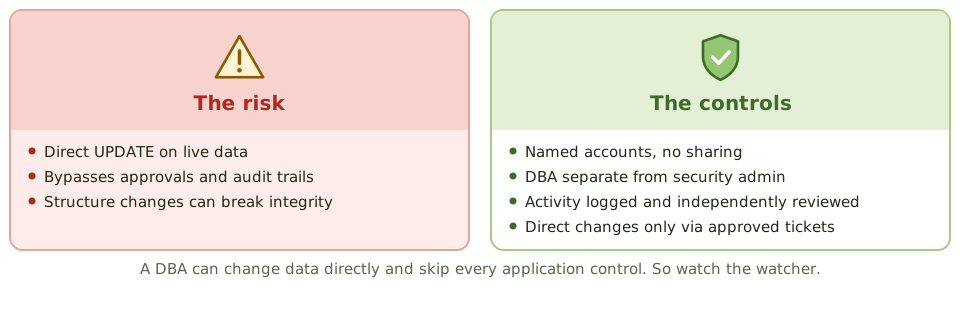
Watching the DBA
How the exam asks about it
| If the question asks… | Answer |
|---|---|
| Language used to grant permissions | DCL (GRANT, REVOKE) |
| Store of metadata about the database | Data dictionary / directory system |
| Feature that restricts what users see | Views |
| Main risk from DBA access | Direct data changes bypassing application controls |
| Most common database model | Relational |
Key takeaways
- ✓Database models: hierarchical (tree), network (many-to-many links), relational (tables with keys), object-oriented, and NoSQL (document, key-value, graph, column).
- ✓Relational databases organise data in tables of rows and columns, linked by primary and foreign keys.
- ✓A DBMS provides data definition (DDL), manipulation (DML) and control (DCL) languages, plus security, concurrency, backup and recovery.
- ✓The data dictionary/directory system holds metadata: definitions, structures, relationships and access rules.
- ✓The three-schema architecture separates the external (user views), conceptual (logical) and internal (physical) levels.
- ✓The DBA has powerful access to data and structures; their activity must be logged and independently reviewed.
Exam traps
- !DDL changes structure (CREATE, ALTER, DROP); DML changes data (INSERT, UPDATE, DELETE); DCL grants rights (GRANT, REVOKE).
- !Database views can restrict what users see, acting as an access control.
- !Unauthorised changes to the data dictionary can corrupt or expose data; restrict and log them.
- !NoSQL databases often trade strict consistency for scale; integrity controls may sit in the application instead.
Database Controls and Normalization
Storing each fact once (normalisation) and why breaking that rule needs extra controls, plus the access, integrity, backup, recovery and monitoring controls that protect a database.
Store each fact once
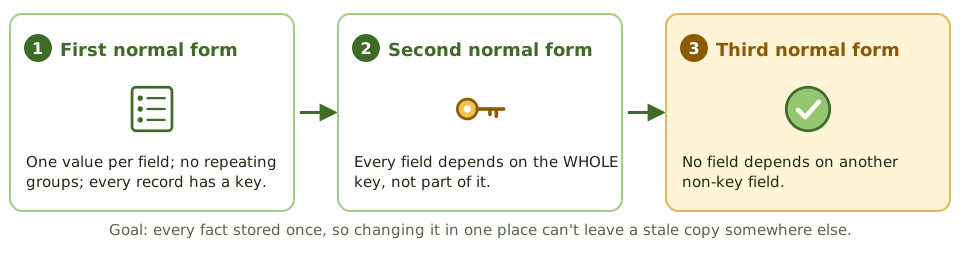
If your address is written in five different address books and you move house, you have to update all five. Miss one, and post goes to the old address.
Normalisation designs a database so each fact is stored in one place only. Change it once, and it's right everywhere.
Denormalisation
Sometimes data is copied on purpose to make reports faster, common in data warehouses. That's denormalisation.
Fine, but now the copies can drift apart, so you need compensating controls: controlled update routines or regular reconciliation.
Access and integrity controls
- 1Users reach data through applications, not database tools.
- 2Roles and views limit what each user sees and changes.
- 3DBA and schema-owner accounts: named, few, monitored.
- 4Service accounts get only what the application needs.
- 5Keys, constraints and triggers enforce rules in the database itself.
- 6Production data masked before use in testing.
Recovery
Monitoring
Database activity monitoring (DAM) logs and alerts on suspicious activity: bulk extracts, direct changes to sensitive tables, privilege escalation, access at odd hours.
How the exam asks about it
| If the question asks… | Answer |
|---|---|
| Purpose of normalisation | Reduce redundancy and update anomalies |
| Risk of denormalisation | Inconsistent data |
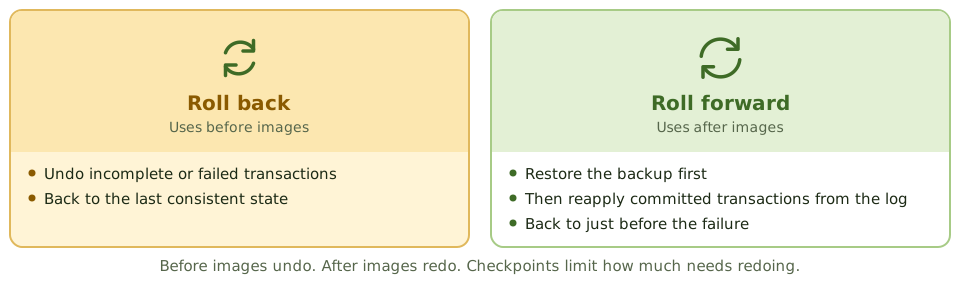
| Reapply committed work after a restore | Roll forward (after images / logs) |
| Undo incomplete transactions | Roll back (before images) |
| Best control over DBA activity | Logging with independent review |
| Production data in testing | Mask or anonymise it |
Key takeaways
- ✓Normalisation organises data to reduce redundancy and update anomalies, improving integrity.
- ✓First normal form removes repeating groups; second removes partial dependencies on a composite key; third removes transitive dependencies.
- ✓Denormalisation improves performance but increases redundancy and the risk of inconsistent data.
- ✓Database controls include access through roles and views, DBA activity logging, integrity constraints, encryption, backup and recovery.
- ✓Recovery uses backups plus transaction logs: rollback removes incomplete transactions, roll forward reapplies committed ones.
- ✓Checkpoints limit how much processing must be redone after a failure.
Exam traps
- !Normalisation reduces redundancy; denormalisation reintroduces it for speed, so compensating integrity controls are needed.
- !Rollback undoes incomplete transactions; roll forward reapplies committed transactions after a restore.
- !Database-level access for end users bypasses application controls.
- !Encrypting the database doesn't protect against an authorised user with excessive access.
Asset Management
Why knowing exactly what you own comes before almost every other control, what an asset record holds, how assets are tracked from purchase to disposal, and how to keep the list honest.
You can't protect what you don't know about
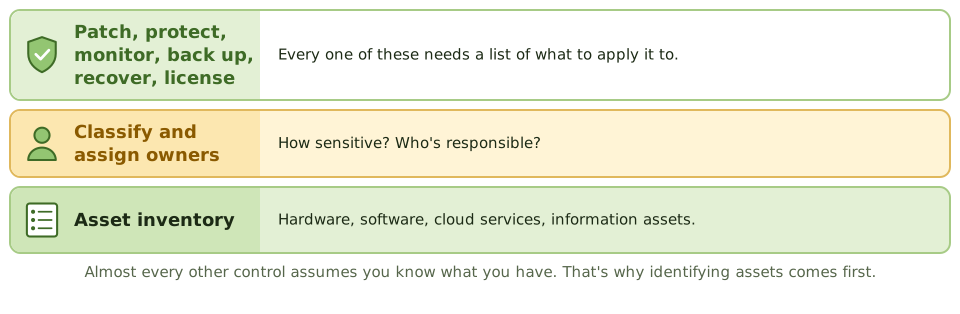
Before insuring your home, you list what's in it. If the expensive camera isn't on the list, it isn't covered when it's stolen.
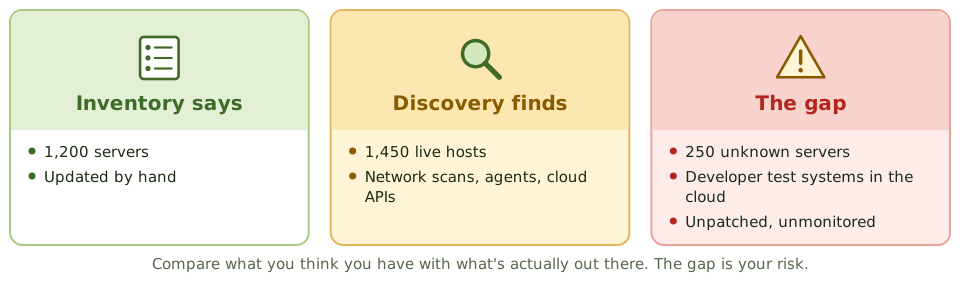
IT works the same way. You can't patch, protect, back up, license or recover a server nobody knows exists. That's why identifying assets is the first step in risk assessment, security and continuity planning.
What's tracked
From purchase to disposal
Keeping the list honest
Software licences
Software asset management compares licences owned with software actually installed and used. Too few licences is a legal and financial risk; too many is waste.
Restricting who can install software makes this far easier.
How the exam asks about it
| If the question asks… | Answer |
|---|---|
| First step in protecting information assets | Identify and inventory them, then classify |
| Best way to keep the inventory complete | Automated discovery reconciled to it |
| Risk of assets without owners | Not patched, monitored or protected |
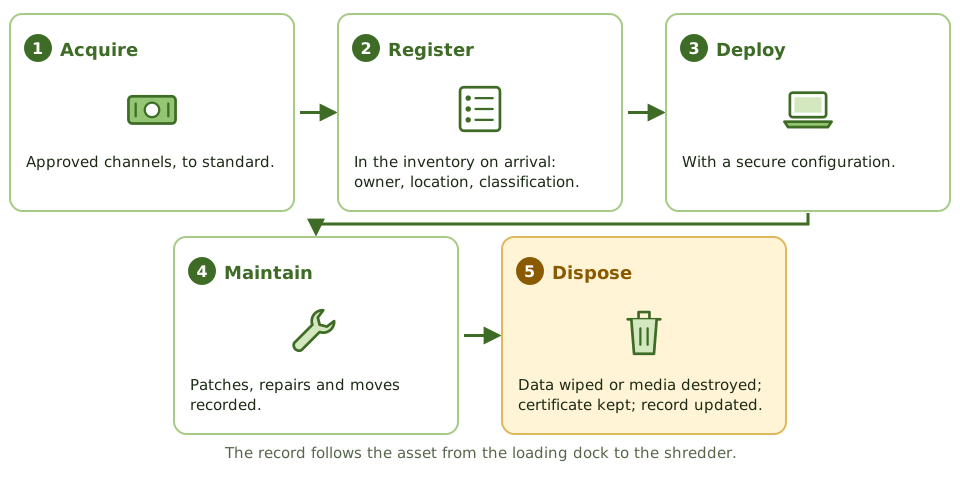
| Before disposing of hardware | Secure data destruction, documented |
Key takeaways
- ✓IT asset management maintains an accurate inventory of hardware, software, cloud services and information assets.
- ✓You can't protect, patch, license or recover what you don't know you have; the inventory is foundational.
- ✓Each asset should have an owner, location, classification, configuration details and life cycle status.
- ✓Assets are managed through acquisition, deployment, maintenance, and secure disposal.
- ✓Discovery tools and reconciliation against purchase records keep the inventory complete.
- ✓Software asset management compares licences owned with software installed and used.
Exam traps
- !The first step in many security and continuity programs is identifying assets.
- !Assets without owners tend to go unpatched and unmonitored.
- !Disposal without secure data destruction is a data breach risk.
- !Asset inventory (what you own) differs from the CMDB (how components are configured and related), though they overlap.
Configuration Management
Keeping an accurate map of IT components and how they depend on each other: configuration items, the CMDB, baselines, and why the map is only useful if change management keeps it current.
A map of the plumbing
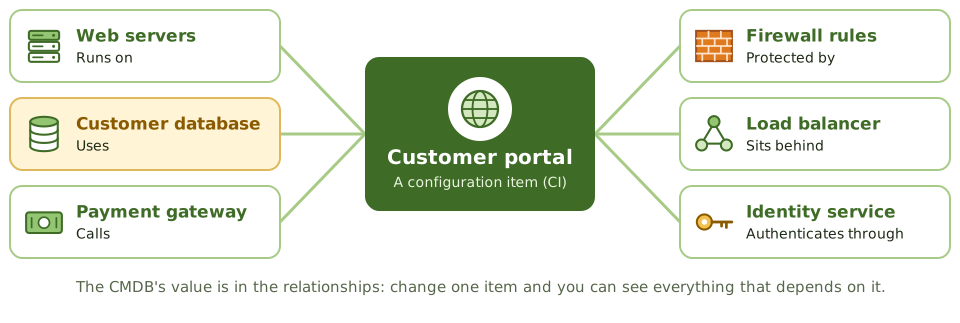
Before a plumber turns off a valve, they want to know which taps it feeds. Turn off the wrong one, and the whole building loses water.
Configuration management keeps that map for IT: every component (a configuration item, or CI), its settings, and what depends on what.
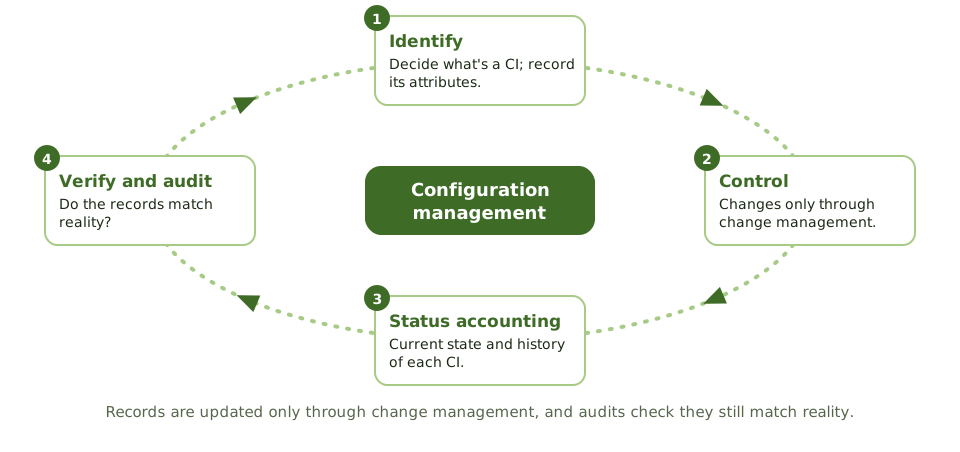
The four activities
What the CMDB is used for
- 1Change impact: what else will this change affect?
- 2Incident diagnosis: which components are involved?
- 3Problem management: what do repeat incidents have in common?
- 4Recovery: what to rebuild, and in what order.
- 5Security: which systems run the vulnerable version?
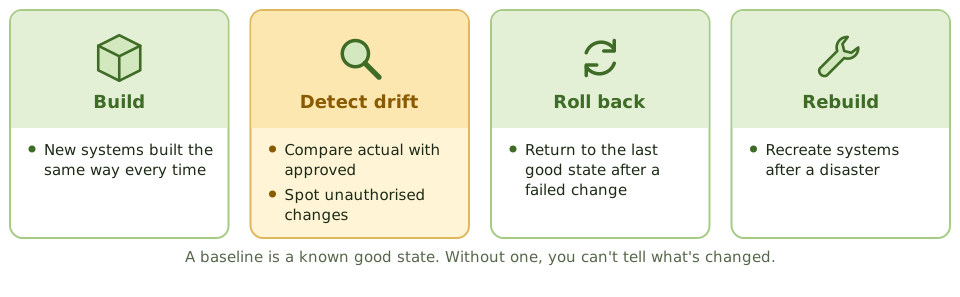
Baselines
A wrong map is worse than none
CMDB updates are part of closing every change. Automated discovery and regular audits check the records still match reality.
How the exam asks about it
| If the question asks… | Answer |
|---|---|
| Database of CIs and relationships | CMDB |
| Purpose of a baseline | Reference for changes, drift detection, recovery |
| How CMDB records are updated | Through change management |
| Best way to verify CMDB accuracy | Compare with actual configurations |
Key takeaways
- ✓Configuration management identifies configuration items (CIs), records their attributes and relationships, and controls changes to them.
- ✓The configuration management database (CMDB) holds CI records and how they depend on each other.
- ✓A baseline is an approved configuration at a point in time, used as a reference for changes and recovery.
- ✓Configuration management supports change impact assessment, incident diagnosis, and recovery.
- ✓CI records are updated only through change management; regular audits (verification) confirm the CMDB matches reality.
- ✓Configuration drift from baselines is detected by automated comparison.
Exam traps
- !An inaccurate CMDB is worse than none: decisions get made on wrong data.
- !Updating the CMDB is part of closing a change, not optional paperwork.
- !Configuration management controls the configuration; change management approves changes to it. They work together.
- !Baselines are needed to detect unauthorised changes.
Job Scheduling and Batch Processing
The automated jobs that run overnight: why the schedule must be controlled, who may change it, how jobs depend on each other, and what happens when one fails.
The night shift
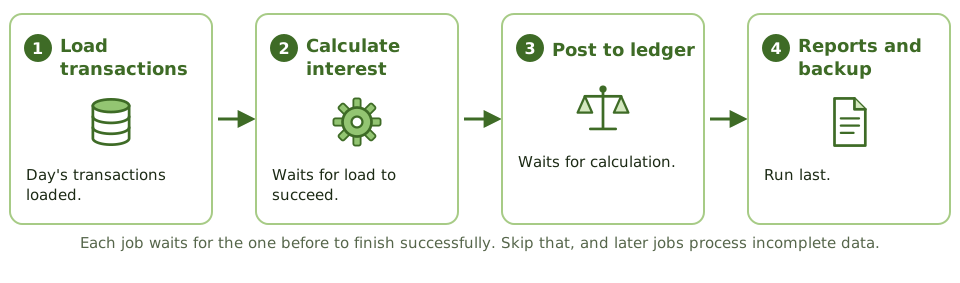
A bakery runs to a strict timetable overnight: mix the dough, let it rise, bake, cool, then pack. Bake before it's risen, or pack before it's cooled, and the whole batch is ruined.
Most transaction processing, interfaces, backups and reports run the same way, as scheduled batch jobs. If the wrong job runs, runs twice, or fails silently, every downstream system can end up wrong.
Why automate it
- 1Jobs run in the right order at the right time.
- 2Dependencies are enforced: no job starts on incomplete data.
- 3Less manual operator intervention, so fewer mistakes.
- 4A log of everything that ran.
The controls
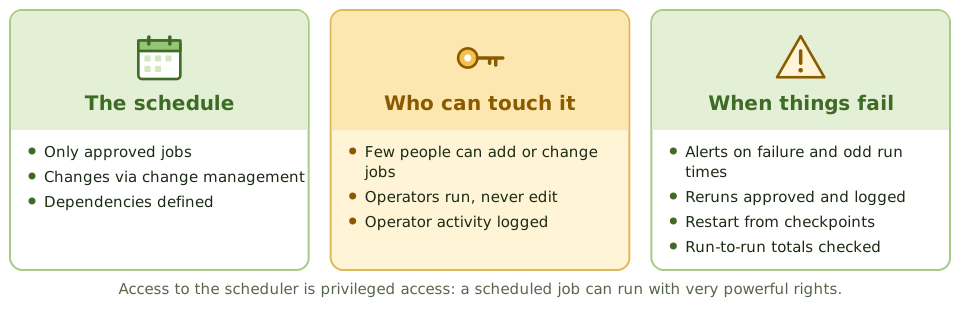
Reruns
When a job fails halfway, rerunning it from the start can process half the data twice. Reruns need approval, a restart from a checkpoint, and a check for duplicates.
How the exam asks about it
| If the question asks… | Answer |
|---|---|
| Main benefit of automated scheduling | Fewer manual errors; sequence enforced |
| Control over schedule changes | Change management with approval |
| Risk of unauthorised reruns | Duplicate processing |
| Who may modify job definitions | A restricted group, not operators |
| Evidence jobs ran as scheduled | Scheduler logs reviewed for exceptions |
Key takeaways
- ✓Job scheduling software runs batch jobs automatically in the right order and at the right time, reducing operator error.
- ✓Only authorised, approved jobs should be in the production schedule; changes to schedules go through change management.
- ✓Access to the scheduler is restricted, because a scheduled job can run with powerful privileges.
- ✓Job outcomes are monitored; failures are investigated and reruns are authorised and logged.
- ✓Job logs and exception reports are reviewed to detect unauthorised or failed jobs.
- ✓Dependencies between jobs must be defined so later jobs don't process incomplete data.
Exam traps
- !Operators shouldn't be able to change job definitions or programs, only run approved schedules.
- !A rerun without authorisation can duplicate transactions.
- !Ad hoc jobs submitted outside the schedule need the same approval and logging.
- !Scheduler access is effectively privileged access; review it like admin access.
Incident Management
Getting a broken service back as fast as possible: logging, prioritising, escalating, resolving and closing incidents, handling major ones, and where incident management stops and problem management starts.
Get it working again
When a pipe bursts, the first job is to stop the water and get the kitchen usable again. Working out why the pipe burst comes later.
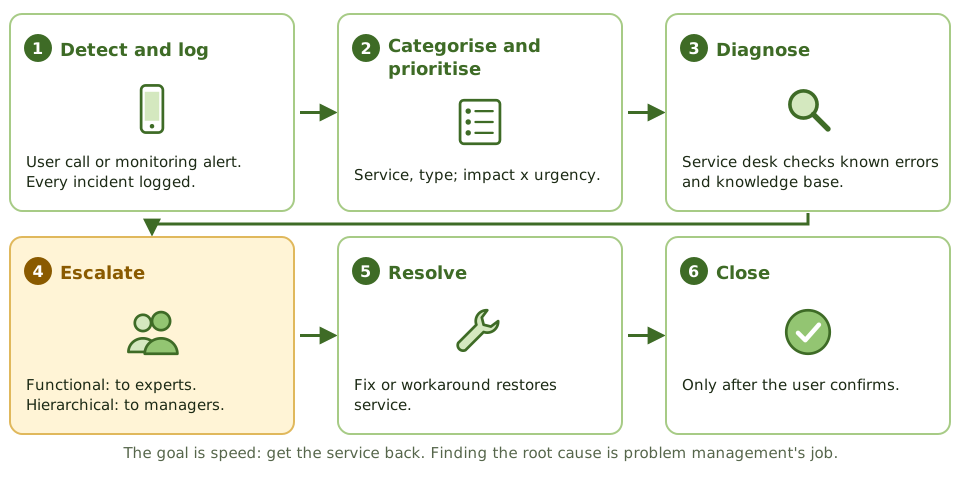
An incident is any unplanned interruption or drop in service quality. Incident management's only goal is to restore normal service as quickly as possible.
The process
Two kinds of escalation
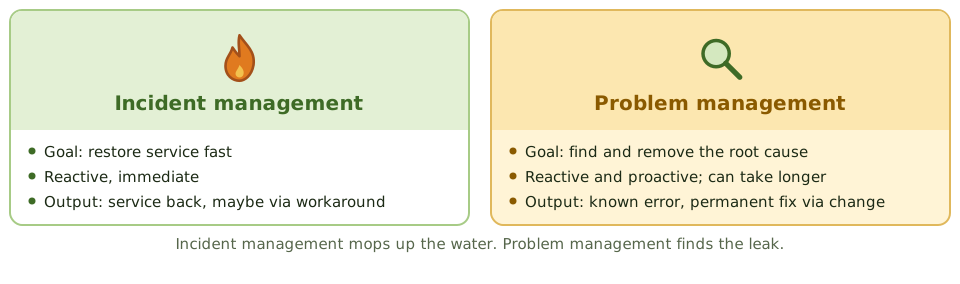
Incident vs problem
Security incidents are different
Malware, breaches and unauthorised access follow the security incident response process (Domain 5). The service desk has to recognise them and route them correctly, because evidence must be preserved and legal or regulatory notification may apply.
A quick 'restart and close' can destroy the evidence.
How the exam asks about it
| If the question asks… | Answer |
|---|---|
| Primary objective of incident management | Restore service as quickly as possible |
| How priority is set | Impact and urgency |
| Escalation to a more skilled team | Functional escalation |
| Same symptoms recurring | Raise a problem record |
| When to close an incident | After the user confirms |
Key takeaways
- ✓Incident management restores normal service as quickly as possible and minimises business impact.
- ✓Every incident is logged, categorised and prioritised by impact and urgency.
- ✓Functional escalation moves an incident to a more skilled team; hierarchical escalation involves management.
- ✓Workarounds restore service; root cause analysis belongs to problem management.
- ✓Major incidents follow a separate, faster procedure with dedicated communication.
- ✓Incidents are closed only after the user confirms service is restored.
Exam traps
- !The goal of incident management is restoring service, not finding root cause.
- !Security incidents follow the incident response process, with evidence preservation, and may need different handling.
- !Closing incidents without user confirmation distorts metrics.
- !Repeated incidents with no linked problem record show the incident and problem processes aren't connected.
Problem Management
Finding out why things keep breaking and fixing it for good: problems, known errors and workarounds, root cause analysis, and the move from reactive to proactive.
Finding the leak
Incident management mops up the water. Problem management goes into the ceiling to find the leaking pipe and replaces it, so you stop needing the mop.
A problem is the underlying cause of one or more incidents. Problem management finds root causes and removes them so incidents don't come back.
Key terms
| Term | Meaning |
|---|---|
| Problem | The underlying cause, or potential cause, of incidents |
| Known error | A problem with its root cause found and documented |
| Workaround | Reduces the impact without fixing the cause |
| Known error database (KEDB) | Known errors and workarounds for the service desk |
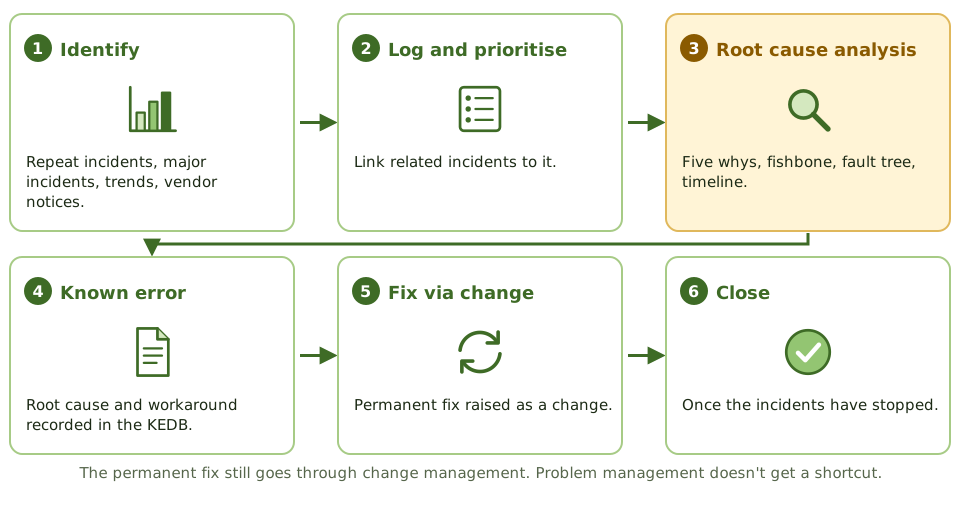
The process
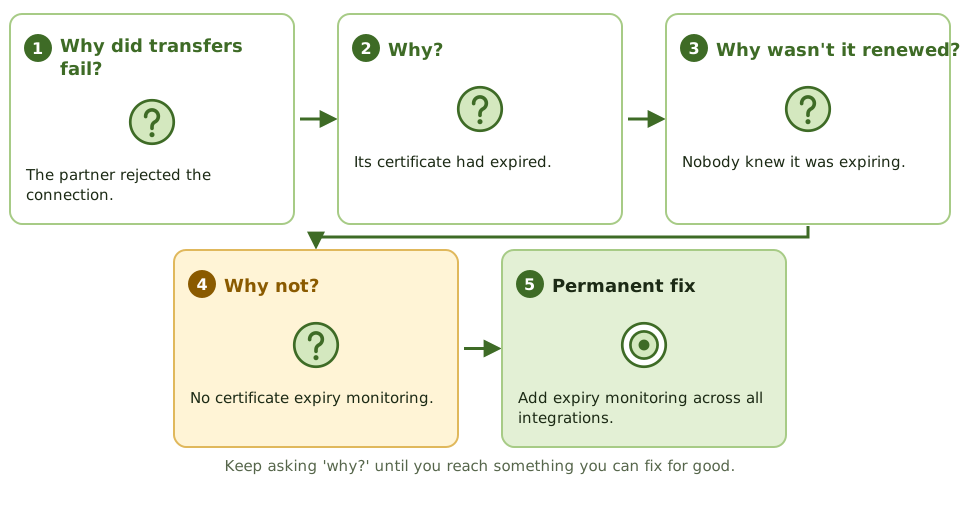
Asking 'why?' five times
Reactive vs proactive
How the exam asks about it
| If the question asks… | Answer |
|---|---|
| Primary goal of problem management | Remove root causes; prevent recurrence |
| Problem with known cause and workaround | Known error |
| Proactive problem management | Trend analysis to prevent incidents |
| How the permanent fix is made | Through change management |
| Best sign it's working | Fewer recurring incidents |
Key takeaways
- ✓Problem management identifies the root causes of incidents and prevents them from recurring.
- ✓A problem is the underlying cause of one or more incidents; a known error is a problem with a documented root cause and workaround.
- ✓Reactive problem management responds to incidents; proactive problem management analyses trends to find issues before they cause incidents.
- ✓Root cause analysis techniques include the five whys, fishbone (Ishikawa) diagrams and fault tree analysis.
- ✓Permanent fixes are implemented through change management.
- ✓The known error database helps the service desk resolve incidents faster.
Exam traps
- !Problem management isn't about restoring service fast; that's incident management.
- !A workaround isn't a resolution; the problem stays open until the root cause is removed or the risk is accepted.
- !Fixes found by problem management still need change approval.
- !Without incident trend analysis, problem management is purely reactive.
Change Management
Making sure nothing changes in production without approval: what counts as a change, who approves what, keeping developers out of production, emergency changes, and how the auditor hunts for changes that skipped the process.
Nothing changes without a yes
In a hospital, nobody changes a patient's medication on a whim. The change is requested, a doctor approves it, the pharmacy checks it, a nurse gives it, and it's all written in the chart.
Change management does the same for production systems. Its main goal: prevent or detect unauthorised changes to programs, configurations, parameters and data.
What counts as a change
| Type | Examples |
|---|---|
| Programs | Code, scripts, reports, interfaces, batch jobs |
| Configurations and parameters | Tax rates, approval limits, firewall rules |
| Infrastructure | Servers, network devices, cloud resources |
| Vendor software and patches | Upgrades, new releases, security patches |
| Data | Direct database updates outside the application |
The change process
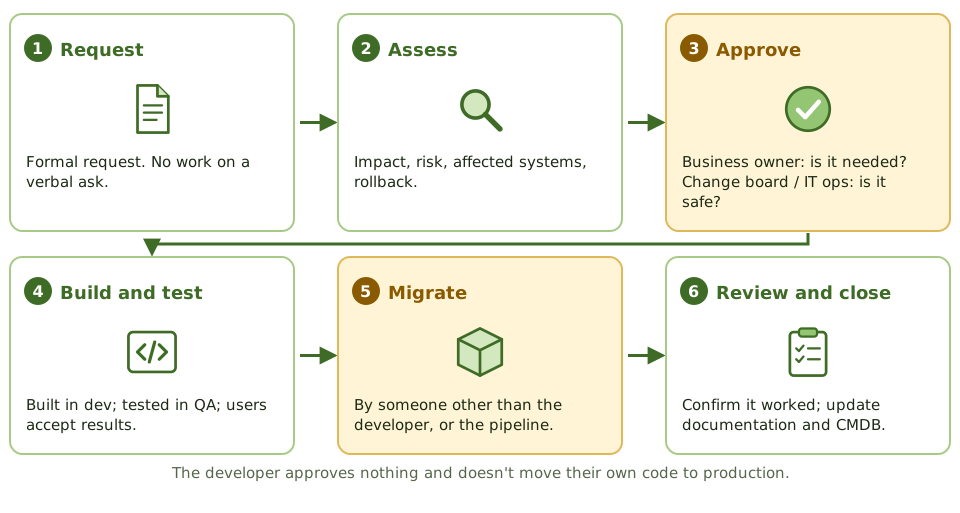
Who approves what
Keeping developers out of production
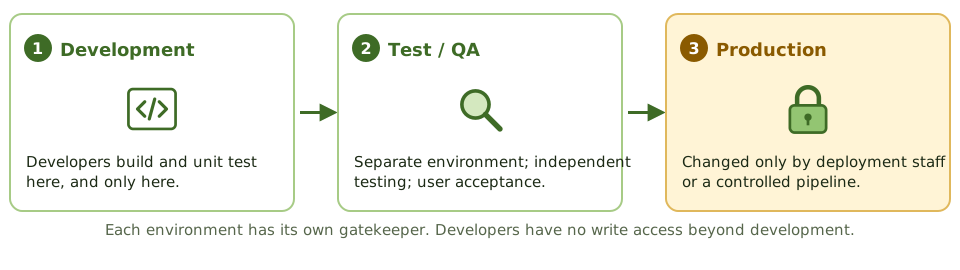
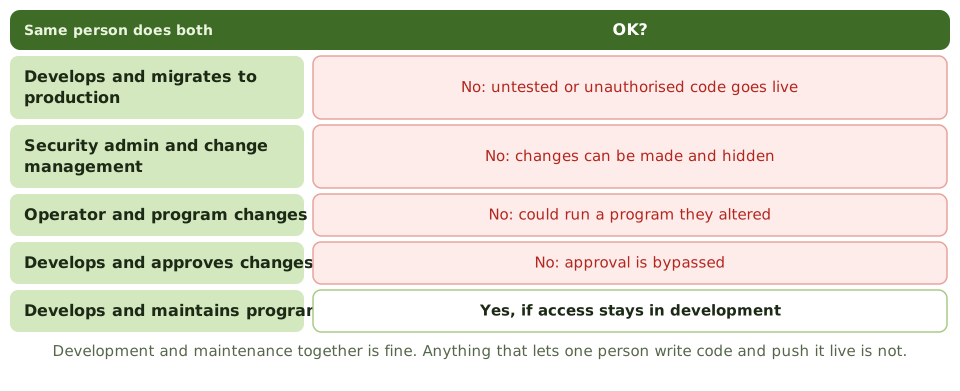
Incompatible duties
Emergency changes
Hunting for unauthorised changes
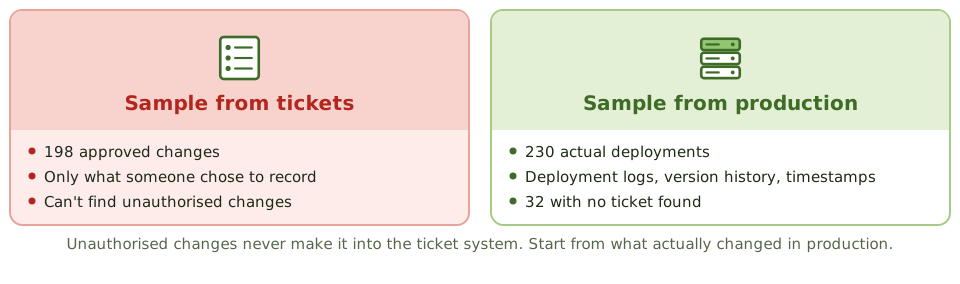
Test both ways. Production to ticket finds unauthorised changes. Ticket to production checks approved changes went in as approved.
Why it matters to the whole audit
Automated application controls are usually tested once and relied on all year. That only works if nobody could change them unnoticed.
Weak change management means the auditor can't rely on automated controls, so substantive testing goes up.
How the exam asks about it
| If the question asks… | Answer |
|---|---|
| Detect unauthorised program changes | Code comparison / reconcile production to approvals |
| Developer deploys own code, small team | Independent review of production changes |
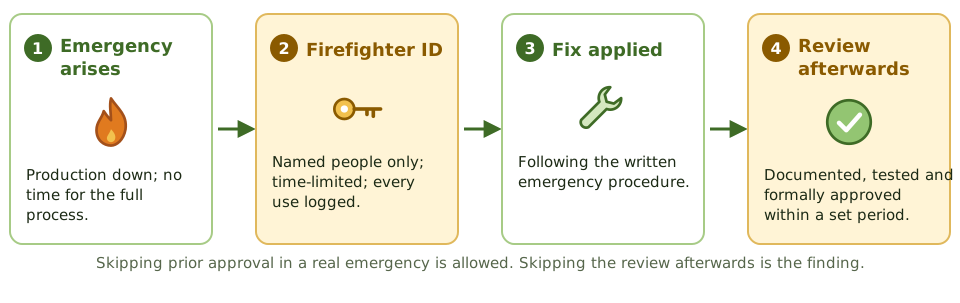
| Emergency change without approval | Retrospective approval; control emergency IDs |
| Who approves a program change | Business owner (IT ops: production readiness) |
| Weak change management in an audit | Less reliance on automated controls; more substantive testing |
| Logging the development library | Not enough: misses production changes |
Key takeaways
- ✓The main objective of change control is to prevent or detect unauthorised changes to programs, configurations, parameters and data.
- ✓Users or business owners approve that a change meets the need and accept the test results. IT operations or the change board approves that it's safe for production.
- ✓The developer of a change must not migrate it to production. In a small team, the compensating control is an independent review of production changes.
- ✓Emergency changes may skip prior approval, but must be documented, tested and approved after the fact, and emergency IDs must be restricted and logged.
- ✓To detect unauthorised changes, start from what changed in production and trace back to approvals. The ticket system only shows recorded changes.
- ✓Each production executable should match one approved version of source code. Code comparison detects differences.
- ✓Weak change management means automated controls can't be relied on, so substantive testing increases.
Exam traps
- !Sampling tickets from the change system can't detect changes that bypassed it. Test from the production side.
- !Logging changes to development libraries doesn't detect changes to production.
- !In a small organisation, hiring more staff is rarely the expected answer. An independent review of production changes is.
- !Security administration and change management are incompatible duties: broad security rights let changes go unnoticed.
- !An emergency change without prior approval isn't the finding by itself. The finding is no after-the-fact review.
- !Development plus maintenance by the same programmer is acceptable, as long as they have no production access.
Release and Patch Management
Getting approved changes into production safely: types of release, what must exist before deploying, and the patch process that balances speed against the risk of breaking things.
Delivering the change
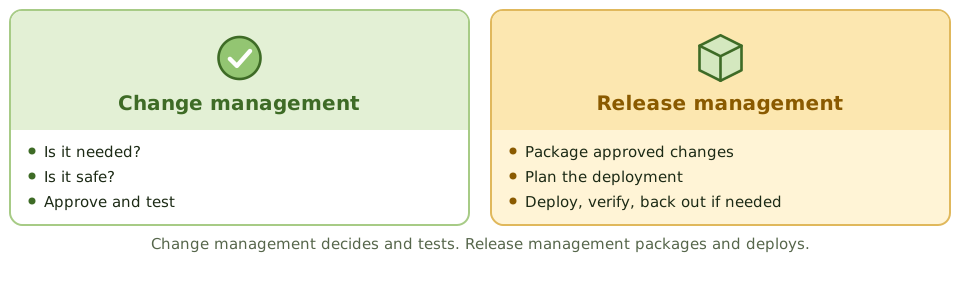
Change management is the kitchen deciding the new recipe is approved. Release management is service: plating the dishes, getting them out at the right moment, and taking one back if it's wrong.
Release management packages approved changes and deploys them into production in a controlled way.
Types of release
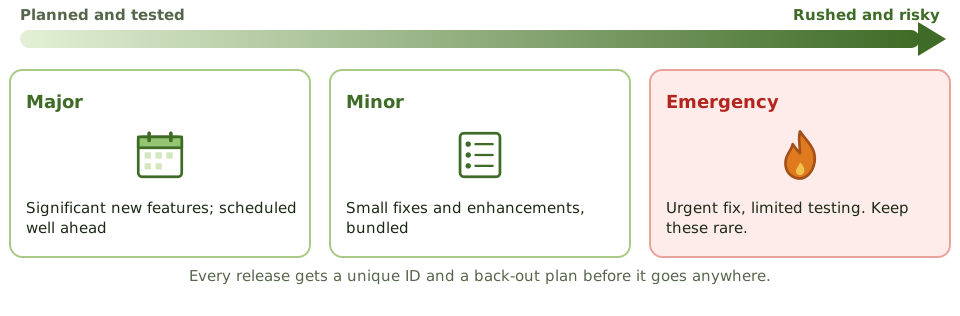
Release controls
- 1A unique ID for every release (configuration management).
- 2A definitive media library: a secure store of approved versions.
- 3A deployment plan with timing and responsibilities.
- 4A back-out plan, prepared before deploying.
- 5Testing in an environment that mirrors production.
- 6Checks after release that it worked.
Patch management
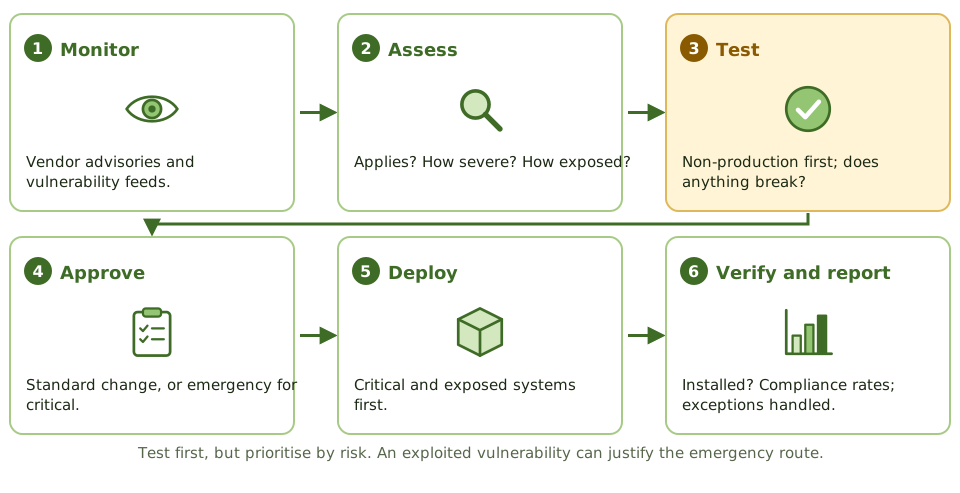
Speed vs safety
Unpatched systems are a leading cause of breaches. Badly tested patches cause outages. The exam's balance: test before deploying, prioritise by risk, and use the emergency route when a vulnerability is being actively exploited.
Systems that can't be patched need documented risk acceptance and compensating controls such as isolation and monitoring.
How the exam asks about it
| If the question asks… | Answer |
|---|---|
| Change vs release management | Change approves; release deploys |
| Must exist before deploying a release | A tested back-out plan |
| Step before patching production | Test the patch |
| System can't be patched | Compensating controls; documented risk acceptance |
| Measure of patching effectiveness | Time to patch critical flaws; compliance rate |
Key takeaways
- ✓Release management plans, builds, tests and deploys approved changes into production as controlled packages.
- ✓Release types: major (significant new functionality), minor (small enhancements and fixes) and emergency (urgent fixes).
- ✓Every release has a unique identifier, a deployment plan and a back-out plan.
- ✓Patch management keeps systems current with vendor fixes, prioritised by risk.
- ✓Patches are tested before production deployment, ideally in a test environment that mirrors production.
- ✓Patch status is monitored and exceptions (systems that can't be patched) are documented with compensating controls.
Exam traps
- !Change management approves; release management deploys.
- !Emergency patches can use expedited change but still need recording and retrospective review.
- !Applying patches directly to production without testing risks outages.
- !Unsupported systems that no longer receive patches need compensating controls or replacement.
- !Automated patching without verification can leave failures unnoticed.
Service Level Management
Agreeing what good service looks like and checking it's delivered: the service catalogue, SLAs and the OLAs and supplier contracts that hold them up, and why reported numbers need checking.
Agreeing what 'good' means
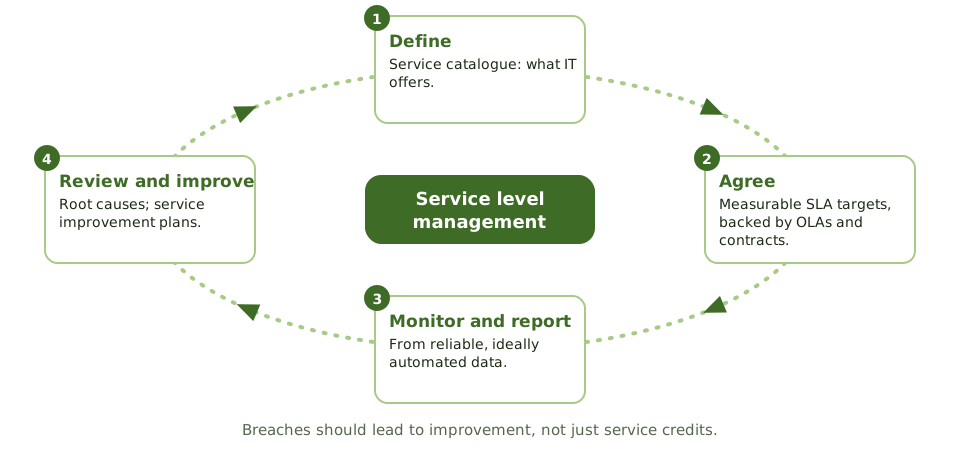
A delivery company promises 'next day by noon'. That promise is only real if it's measurable, if the warehouse, drivers and planes all commit to their part, and if someone checks the actual delivery times.
Service level management does this for IT: agree measurable targets with the business, make sure everyone behind them can deliver, and report honestly.
The three agreements
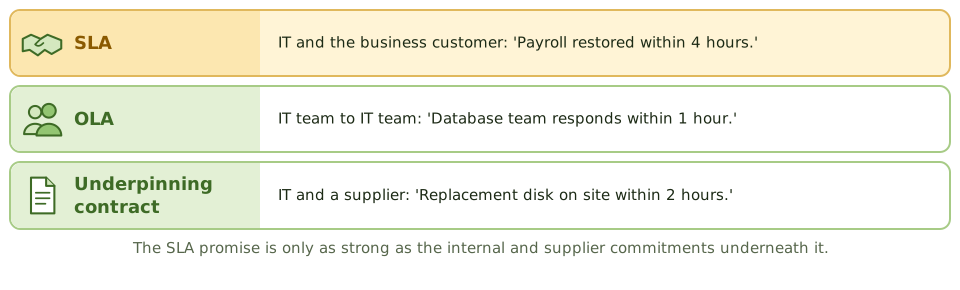
What an SLA contains
- 1Services covered and service hours.
- 2Measurable targets: availability, response and resolution times.
- 3How performance is measured, and from what data.
- 4Reporting frequency and review meetings.
- 5Responsibilities of both sides.
- 6Escalation and service credits.
Checking the numbers
Is availability measured as users experience it, or for one component? Are exclusions like planned maintenance reasonable? Could the provider reclassify incidents to look better?
How the exam asks about it
| If the question asks… | Answer |
|---|---|
| Internal agreement supporting an SLA | Operational level agreement (OLA) |
| Supplier contract supporting an SLA | Underpinning contract |
| Most important quality of SLA targets | Measurable and agreed with the business |
| Provider's own performance reports | Validate independently |
| Repeated SLA breaches | Root cause analysis; improvement plan |
Key takeaways
- ✓Service level management agrees, monitors and reports on service levels with customers, and drives improvement.
- ✓A service catalogue lists the services IT provides; SLAs set measurable targets for them.
- ✓Operational level agreements (OLAs) are internal agreements between IT teams; underpinning contracts are with external suppliers. Both must support the SLA.
- ✓SLA targets should be measurable, agreed with the business, and reported regularly.
- ✓The auditor checks that reported performance is accurate and based on reliable data.
- ✓Repeated SLA breaches should lead to service improvement plans, not just penalty payments.
Exam traps
- !An SLA target that can't be measured can't be managed.
- !If OLAs and supplier contracts don't support the SLA, the SLA will be breached.
- !Self-reported performance by the provider should be validated.
- !Availability measured excluding 'planned' downtime can hide poor service.
Capacity and Performance Monitoring
Having enough IT horsepower for today and tomorrow without paying for too much: the three levels of capacity management, why business plans matter more than history, and the warning signs.
Enough, but not too much
A restaurant needs enough tables for Saturday night, but not so many that half sit empty all week. And if a big party is booked next month, the manager needs to know now, not when they walk in.
Capacity management makes sure IT can meet today's and tomorrow's demand at a sensible cost. Too little means slow systems and outages; too much wastes money.
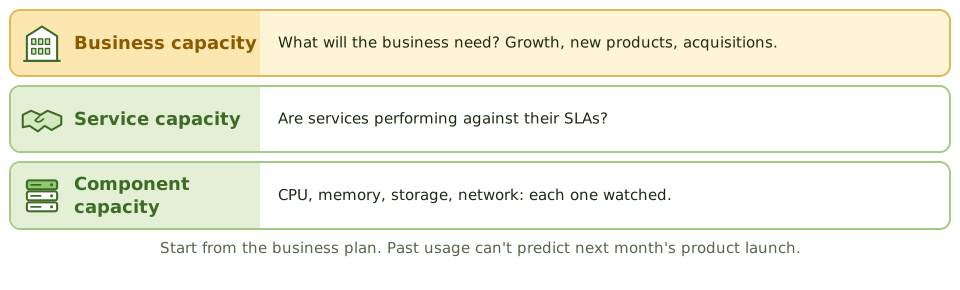
Three levels
The activities
- 1Monitor utilisation and response times, with thresholds and alerts.
- 2Analyse trends, peaks and bottlenecks.
- 3Tune systems to use existing resources better.
- 4Manage demand, e.g. move batch jobs off-peak.
- 5Forecast from trends AND business plans.
- 6Keep a documented, reviewed and funded capacity plan.
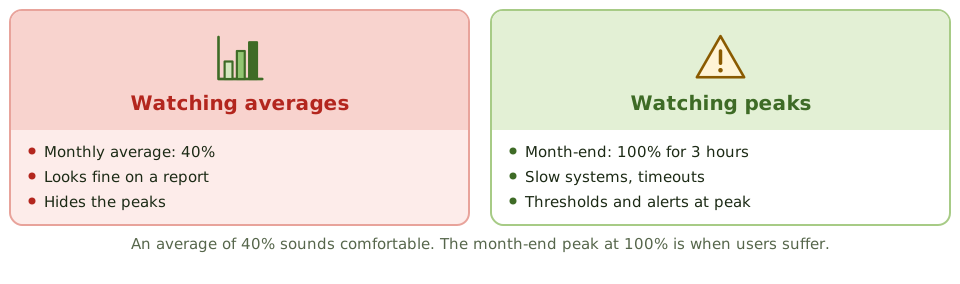
Watch the peaks
Warning signs
Users notice slow systems before IT does. Emergency hardware purchases. Storage runs out without warning. No link between business plans and IT planning. In the cloud, auto-scaling with no limits brings surprise bills.
How the exam asks about it
| If the question asks… | Answer |
|---|---|
| Primary input to capacity planning | Business plans and forecasts, plus trends |
| Purpose of performance monitoring | Spot issues early; feed capacity planning |
| Users notice slowness before IT | Inadequate monitoring and thresholds |
| Risk of excess capacity | Unnecessary cost |
Key takeaways
- ✓Capacity management makes sure IT resources meet current and future business demand cost-effectively.
- ✓It covers business capacity (future demand), service capacity (service performance) and component capacity (CPU, memory, storage, network).
- ✓Monitoring utilisation and response times, with thresholds and alerts, gives early warning.
- ✓Capacity plans use trend analysis and business forecasts, such as new products or acquisitions.
- ✓Insufficient capacity causes outages and slow response; excessive capacity wastes money.
- ✓Cloud elasticity helps but still needs monitoring and cost control.
Exam traps
- !Capacity planning should start from business plans, not just past utilisation.
- !Average utilisation can hide peaks; monitor peak periods.
- !Performance problems are often first noticed by users when monitoring is missing.
- !Auto-scaling without limits can produce unexpected costs.
End-User Computing
The spreadsheets, user-built databases and low-code apps that quietly run important processes: what can go wrong, and the inventory-first, risk-based way to bring them under control.
The spreadsheet that runs the company
Every organisation has one: the spreadsheet only one person understands, which somehow calculates a number that ends up in the annual report.
End-user computing (EUC) means tools built and run by business users rather than IT: spreadsheets, desktop databases, macros, scripts, user-built reports and low-code apps. They're quick and flexible, which is exactly why they end up running important processes.
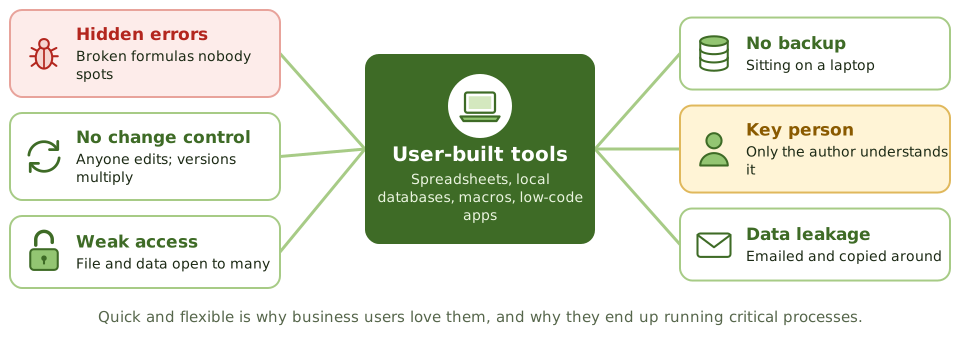
What can go wrong
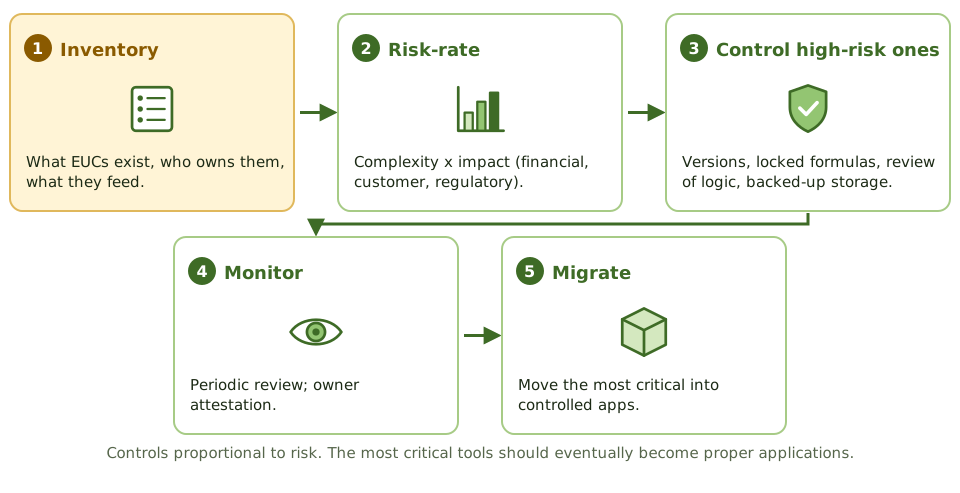
Bringing EUC under control
Checking the output isn't enough
A final number can look perfectly reasonable while the formula behind it is wrong. Review the logic, not just the result.
How the exam asks about it
| If the question asks… | Answer |
|---|---|
| First step in controlling EUC risk | Inventory the EUC applications |
| Biggest spreadsheet risk in financial reporting | Undetected errors and unauthorised changes |
| Best control over a critical spreadsheet | Version control plus independent review of logic |
| Long-term fix for a critical EUC | Migrate it to a controlled application |
Key takeaways
- ✓End-user computing (EUC) means applications built and run by business users outside IT's formal development: spreadsheets, local databases, scripts, low-code apps.
- ✓EUC often supports critical processes such as financial reporting, pricing and regulatory returns.
- ✓Risks: errors in formulas and logic, no change control, weak access controls, no backup, key person dependency and lack of documentation.
- ✓Control starts with an inventory of EUC tools and a risk rating of each.
- ✓High-risk EUCs need controls such as version control, access restrictions, input and formula checks, independent review, backup and documentation.
- ✓Some high-risk EUCs should be migrated to controlled applications.
Exam traps
- !A spreadsheet that feeds the financial statements is in scope for IT controls, even though IT didn't build it.
- !Password-protecting a spreadsheet isn't enough; formulas and versions still need control.
- !The first step in managing EUC risk is knowing what EUCs exist.
- !Reviewing the output of a spreadsheet doesn't verify its formulas.
BCP Lifecycle
Planning to keep the business going when things go badly wrong: how BCP differs from DRP, the life cycle from policy to maintenance, who owns what, and the 'what comes first' questions.
When the building is gone
Imagine your office floods overnight. Where do staff go in the morning? Which customers do you call first? Which systems must be back by lunchtime, and which can wait a week?
Business continuity planning answers those questions before the flood, while there's time to think.
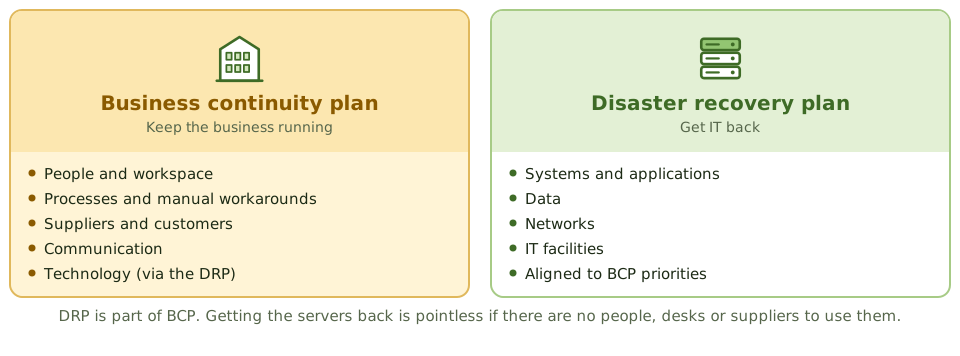
BCP vs DRP
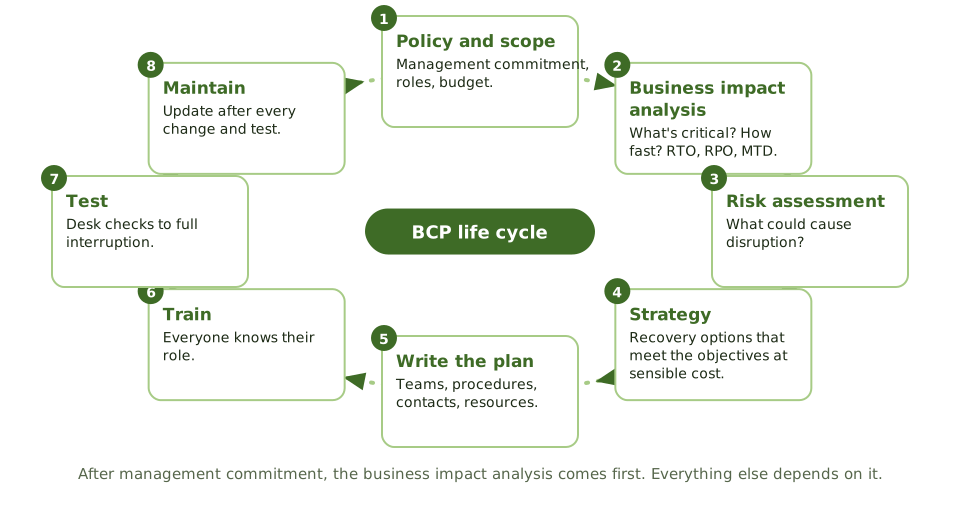
The life cycle
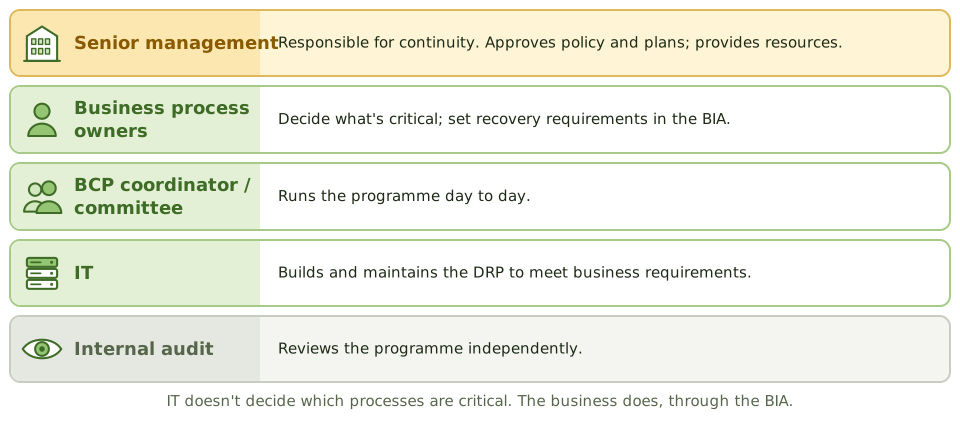
Who owns what
What the plan contains
- 1Scope, objectives and assumptions.
- 2Who can declare a disaster, and when.
- 3Teams and roles, with deputies.
- 4Contact lists: staff, suppliers, customers, authorities.
- 5Recovery procedures in priority order, and the resources needed.
- 6Communication, and how to return to normal.
Plans go stale fast
Update the plan after changes to the organisation, people and contact details, systems, suppliers and premises, and after every test and real incident.
How the exam asks about it
| If the question asks… | Answer |
|---|---|
| First step after management commitment | Business impact analysis |
| Who decides which processes are critical | Process owners / senior management |
| Ultimately responsible for continuity | Senior management / board |
| BCP vs DRP | BCP: the business. DRP: IT recovery |
| Keeps a plan effective | Regular testing and maintenance |
| Where plan copies go | Offsite, accessible to key staff |
Key takeaways
- ✓Business continuity planning (BCP) makes sure critical business processes can continue or resume after a disruption; disaster recovery planning (DRP) covers recovery of IT.
- ✓The BCP life cycle: policy and scope, business impact analysis, risk assessment, strategy selection, plan development, training and awareness, testing, and maintenance.
- ✓The business impact analysis is the key early step: it identifies critical processes and sets recovery priorities and objectives.
- ✓Senior management is responsible for BCP; business process owners own recovery requirements; IT supports with DRP.
- ✓A plan must be tested, kept current with organisational and system changes, and distributed with copies stored offsite.
- ✓ISO 22301 is the standard for business continuity management systems.
Exam traps
- !The FIRST step after getting management commitment is the business impact analysis, not choosing a recovery site.
- !IT doesn't decide which business processes are critical; the business does, through the BIA.
- !BCP covers people, facilities, processes and suppliers, not just IT.
- !An untested plan gives little assurance; the most important ongoing activity is testing and maintenance.
- !Plan copies must be available offsite; a plan stored only on the affected server is useless.
Business Impact Analysis
Working out what would hurt most if it stopped, and how fast: the BIA steps, the four criticality levels, and the cost curves that point to the right recovery strategy.
What would hurt most?
If your house were on fire and you had two minutes, what would you grab? Probably not the toaster. You'd grab the things that are irreplaceable or that you'd need tomorrow.
A business impact analysis (BIA) asks the same question of an organisation: which processes matter most, how quickly does the damage grow if they stop, and what do they depend on?
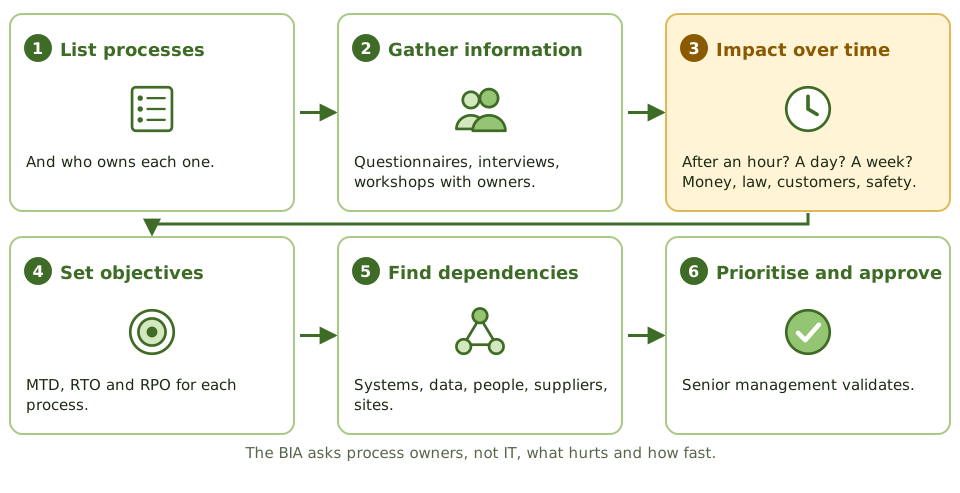
The steps
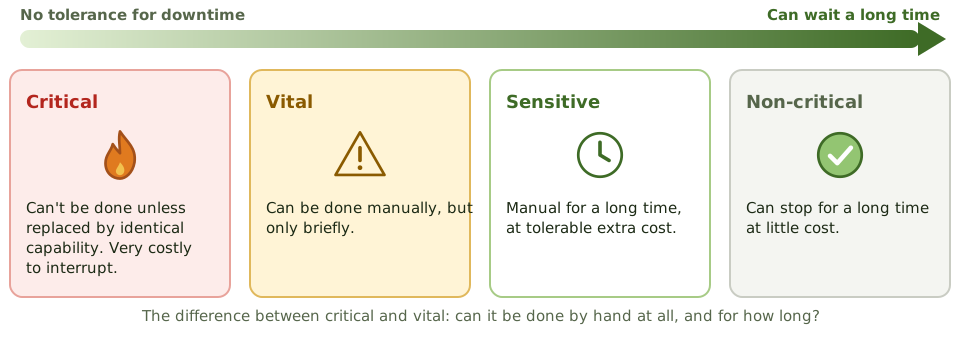
Four levels of criticality
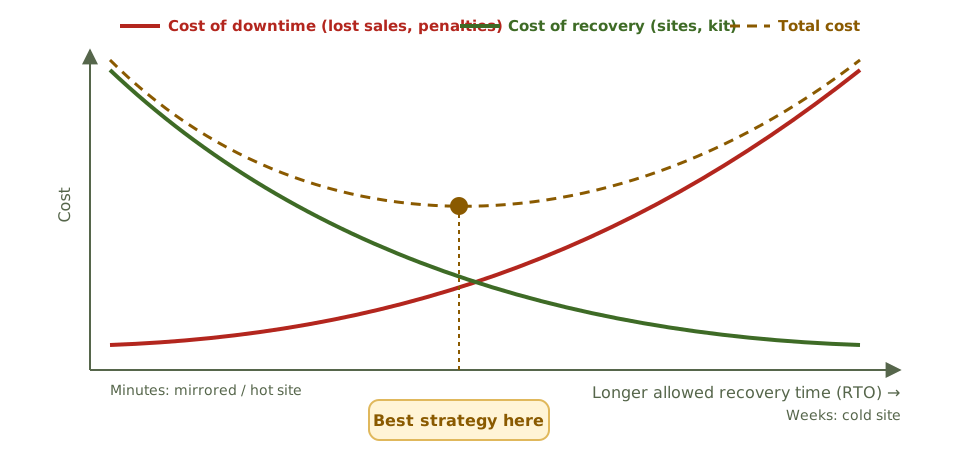
Finding the right spend
Business decides, IT follows
Process owners and key users supply the information; IT describes system dependencies; senior management approves the priorities. IT systems inherit their priority from the processes they support.
How the exam asks about it
| If the question asks… | Answer |
|---|---|
| Primary purpose of a BIA | Find critical processes and impact, to set priorities |
| Main source of BIA information | Process owners and key users |
| Output used to choose strategies | RTO, RPO and MTD per process |
| Manual only for a brief period | Vital |
| How the best strategy is found | Balance downtime cost against recovery cost |
| When to update the BIA | After major business changes, and periodically |
Key takeaways
- ✓The BIA identifies critical business processes, the impact of their disruption over time, and the resources they depend on.
- ✓It produces recovery priorities and objectives: MTD, RTO and RPO for each process and supporting system.
- ✓Impacts include financial loss, regulatory penalties, customer harm, reputational damage and safety.
- ✓Information comes from process owners through questionnaires, interviews and workshops, and is validated with senior management.
- ✓Criticality categories: critical, vital, sensitive and non-critical, based on how long a process can be down and whether manual workarounds exist.
- ✓Comparing the rising cost of downtime with the falling cost of recovery helps find the optimal recovery strategy.
- ✓The BIA should be reviewed when the business changes significantly, and periodically.
Exam traps
- !The BIA is about business impact, not threats; identifying threats is the risk assessment.
- !Process owners, not IT, are the main source of BIA information.
- !A shorter RTO means a more expensive recovery strategy; the BIA balances the two.
- !IT systems inherit recovery objectives from the business processes they support.
- !Dependencies (suppliers, other systems, key people) must be identified, or recovery will stall.
RTO, RPO, MTD, SDO
The recovery numbers the exam asks about again and again, shown on one timeline: what each means, how they relate, and which design decision each one drives.
Two questions after a disaster
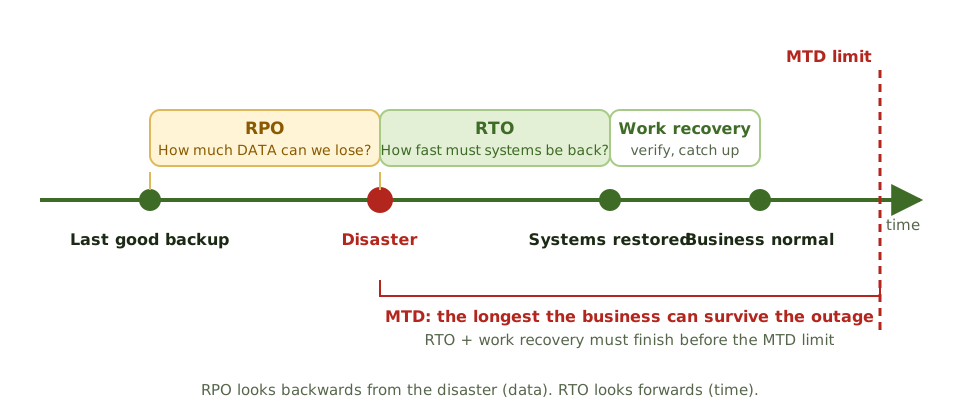
Your laptop dies. Two questions matter. How much work have I lost since my last backup? And how long until I'm working again?
The first is the recovery point objective (RPO): how much data you can afford to lose. The second is the recovery time objective (RTO): how fast you must be back.
The definitions
| Metric | Meaning |
|---|---|
| RPO | Maximum data loss, measured in time |
| RTO | Maximum time to restore the system or process |
| MTD | Longest the process can be down before damage is unacceptable |
| SDO | Reduced service level required while in recovery mode |
| MTO | Longest the business can run in recovery mode |
| Interruption window | How long it can wait from failure to restored critical services |
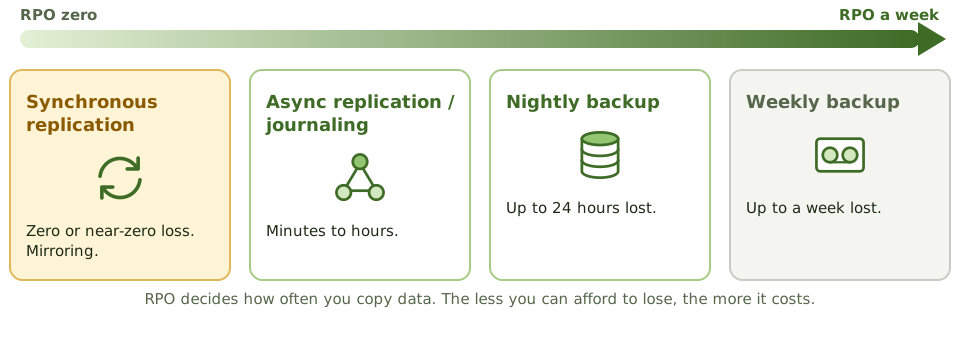
RPO drives backups
RTO drives the recovery setup
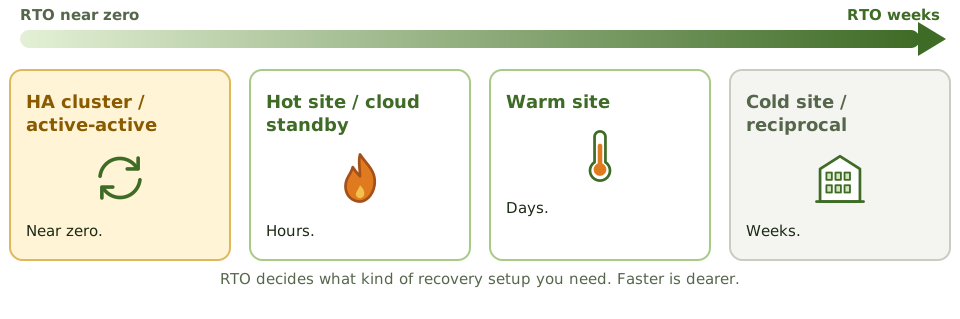
Does the strategy actually meet them?
Lower RTO and RPO cost more. The auditor questions targets that aren't justified by downtime cost, and strategies that can't meet the targets set.
How the exam asks about it
| If the question asks… | Answer |
|---|---|
| Metric that sets backup frequency | RPO |
| Metric that sets the recovery site type | RTO |
| RPO of zero requires | Synchronous replication / mirroring |
| RTO and MTD relationship | RTO must be shorter than MTD |
| Reduced service acceptable in recovery | SDO |
| Effect of lowering RTO and RPO | Higher cost |
Key takeaways
- ✓Recovery point objective (RPO) is the maximum acceptable data loss, measured in time; it drives backup and replication frequency.
- ✓Recovery time objective (RTO) is the maximum acceptable time to restore a system or process; it drives the choice of recovery strategy and site.
- ✓Maximum tolerable downtime (MTD) is the longest a process can be unavailable before the damage is unacceptable; RTO must be less than MTD.
- ✓Service delivery objective (SDO) is the level of service to be provided in alternate (recovery) mode.
- ✓Maximum tolerable outage (MTO) is the longest the organisation can operate in alternate mode.
- ✓The interruption window is the time the organisation can wait from failure to restoration of critical services.
- ✓The lower the RTO and RPO, the higher the cost of recovery.
Exam traps
- !RPO is about data (how far back), RTO is about time (how fast). Don't mix them up.
- !An RPO of zero needs synchronous replication or mirroring; daily backups give an RPO of up to 24 hours.
- !An RTO of minutes needs a hot site or high availability; a cold site can't meet it.
- !Low RTO and RPO aren't automatically better; they must be justified by the cost of downtime.
- !SDO describes reduced service levels during recovery, not full service.
Recovery Strategies
Turning recovery targets into a real plan for every resource a process needs (workspace, IT, data, networks, people, suppliers) and choosing options that meet the targets at a sensible cost.
From targets to a plan
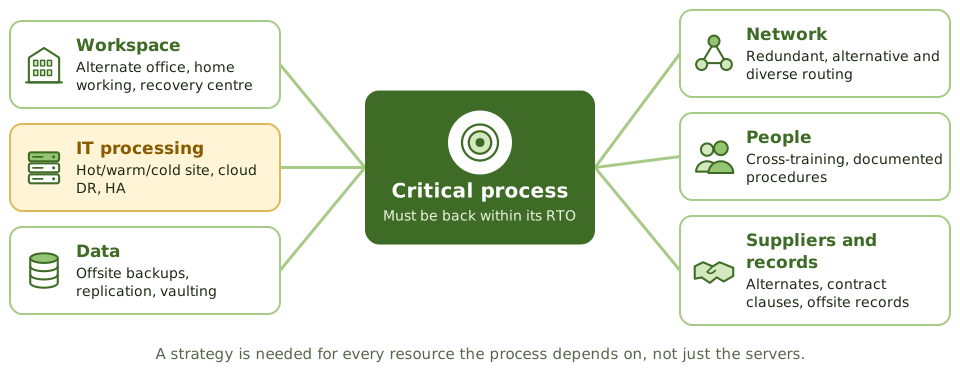
The BIA says the order process must be back within four hours. Fine, but back where, on what, with whose data, run by whom?
A recovery strategy is the answer for every resource the process depends on, chosen to meet its RTO and RPO at a cost the downtime justifies. Senior management approves it; the plan documents it; tests prove it.
IT options compared
| Option | RTO | Cost |
|---|---|---|
| Active-active / mirrored | Near zero | Very high |
| Hot site | Hours | High |
| Cloud DR | Minutes to hours | Pay for standby |
| Warm site | Days | Medium |
| Cold site | Weeks | Low |
| Reciprocal agreement | Uncertain | Low |
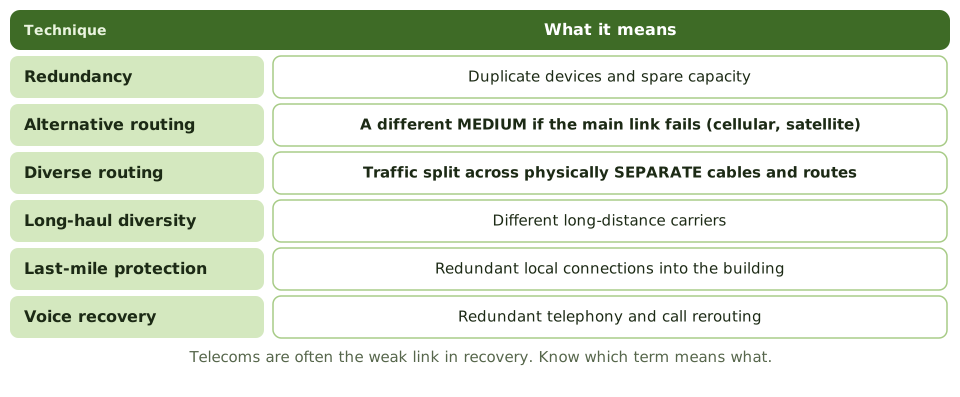
Network recovery
Don't share the disaster
A recovery site must be far enough away not to be hit by the same event (flood plain, power grid, regional disaster), but reachable by staff if needed.
How the exam asks about it
| If the question asks… | Answer |
|---|---|
| Basis for choosing strategies | RTO and RPO from the BIA, balanced with cost |
| Different medium if a link fails | Alternative routing |
| Traffic split over separate cables | Diverse routing |
| Weakness of reciprocal agreements | Enforceability, capacity, compatibility |
| Recovery site location concern | Not exposed to the same regional risk |
Key takeaways
- ✓A recovery strategy is the approach for restoring business processes and IT within their recovery objectives at acceptable cost.
- ✓Strategies are selected from the BIA's RTO and RPO and the cost trade-off between downtime and recovery.
- ✓Strategies are needed for every resource a process depends on: facilities, IT systems, data, networks, people, suppliers and records.
- ✓IT options include alternate sites, cloud-based DR, high availability, replication, reciprocal agreements and vendor quick-ship arrangements.
- ✓Network recovery uses redundancy, alternative routing, diverse routing and last-mile protection.
- ✓Strategies must be approved by senior management and reflected in the plan and tested.
Exam traps
- !The strategy is chosen after the BIA, not before.
- !Recovering IT without people, workspace or suppliers doesn't recover the business.
- !A recovery site in the same area as the primary site can be hit by the same disaster.
- !Cloud DR still needs tested runbooks, identity and network access, and contractual capacity.
- !Reciprocal agreements are cheap but hard to enforce and often fail on compatibility or capacity.
Alternate Sites: Hot, Warm, Cold
The kinds of recovery site, from a full mirror to an empty room, how fast each gets you running, why reciprocal agreements disappoint, and what to check in a recovery site contract.
Somewhere to go
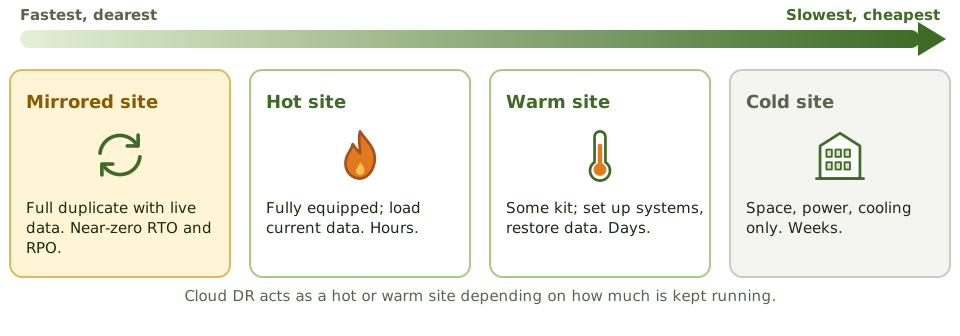
If your home became unliveable, you could move into a furnished holiday flat and be settled the same day (hot). Or a flat with furniture but no food or bedding (warm). Or an empty flat where you bring everything yourself (cold). Faster costs more.
Recovery sites work the same way.
The site types
| Site | What's there | RTO |
|---|---|---|
| Mirrored | Full duplicate with live data | Near zero |
| Hot | Fully equipped; load current data | Hours |
| Warm | Facilities and some kit | Days |
| Cold | Space, power, cooling, cabling | Weeks |
| Mobile | Transportable unit delivered on site | Days |
| Reciprocal | Another organisation's spare capacity | Uncertain |
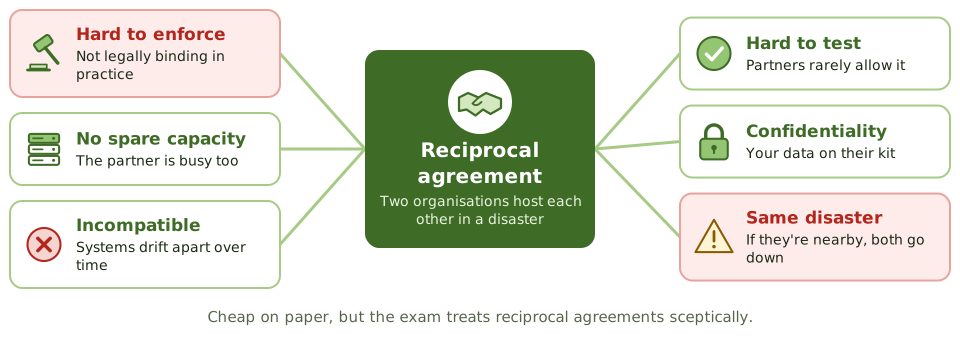
The trouble with reciprocal agreements
Read the contract first
How the exam asks about it
| If the question asks… | Answer |
|---|---|
| Operational within hours | Hot site |
| Only space and utilities | Cold site |
| Main concern with a shared commercial site | Oversubscription in a regional disaster |
| Weakness of reciprocal agreements | Not enforceable; capacity and compatibility |
| Near-zero RTO and RPO | Mirrored / duplicate site |
| Hot site intended for | Short-term use |
Key takeaways
- ✓A hot site is fully equipped and can be operational within hours; it's the most expensive conventional option.
- ✓A warm site has infrastructure and some equipment, but needs systems configured and data restored; recovery in days.
- ✓A cold site provides space, power, cooling and connectivity only; equipment must be delivered; recovery in weeks.
- ✓A mirrored (duplicate) site runs in parallel with real-time data, for near-zero RTO and RPO.
- ✓Mobile sites are transportable units; reciprocal agreements share capacity with another organisation.
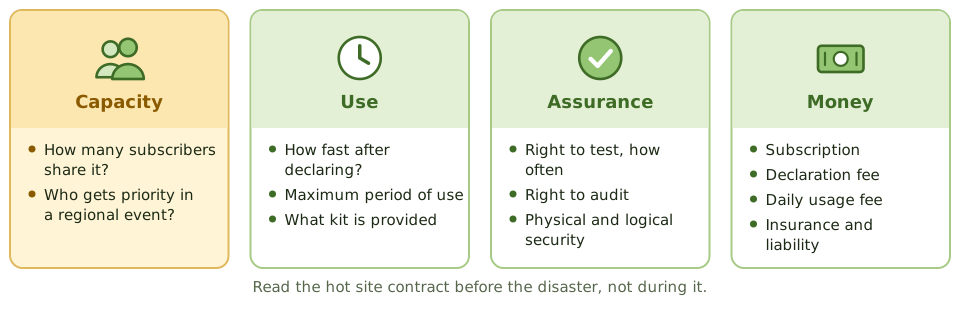
- ✓Commercial site contracts should cover configuration, availability during regional disasters (oversubscription), testing rights, duration of use and audit rights.
Exam traps
- !Hot sites are usually meant for short-term use (weeks), not indefinite operation.
- !Commercial sites shared by many subscribers may be oversubscribed in a regional disaster.
- !Cold sites are cheap but can't meet short RTOs.
- !Reciprocal agreements are rarely enforceable and often break down on capacity and compatibility.
- !The right to test at the site should be in the contract.
Backup Types: Full, Incremental, Differential
The three classic backup types explained with one week of backups and a Thursday crash, plus replication and the other ways to lose less data.
Why backups come in different types
Copying everything every night would be the simplest approach. But for large systems, a full copy can take hours and fill a lot of storage.
So organisations take one full copy now and then, and in between they only copy what has changed. There are two ways to decide what "changed" means, and that gives us incremental and differential backups.
The three types in one sentence each
One week, one crash: what do you need?
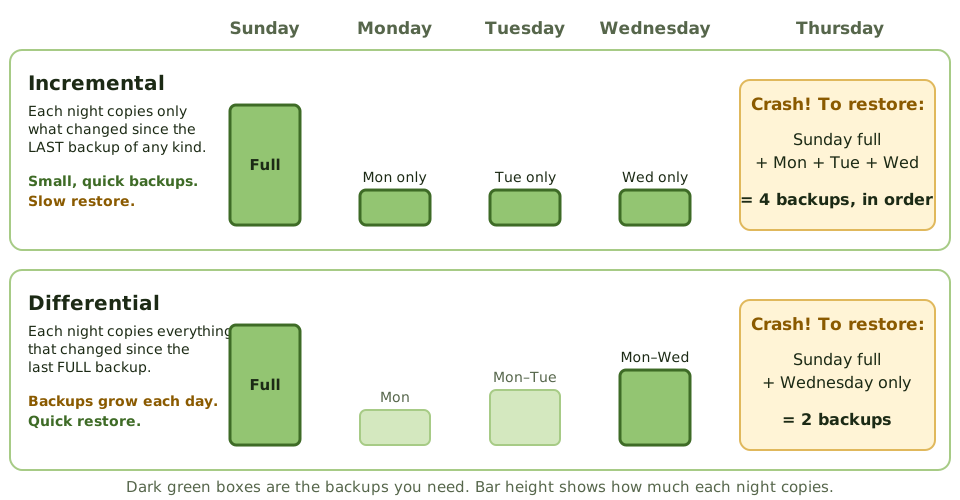
A full backup runs on Sunday. Then nightly backups run Monday to Wednesday. On Thursday morning the server dies. Here's what each approach needs to get the data back.
The trade-off
| Type | Copies | Time to back up | Time to restore |
|---|---|---|---|
| Full | Everything | Longest | Shortest: one set |
| Incremental | Changes since the last backup | Shortest | Longest: full + every incremental, in order |
| Differential | Changes since the last full | Grows each day | Medium: full + latest differential |
The weak link in an incremental chain
With incrementals, every link matters. Each one only holds one day's changes, so you need all of them in the right order.
Losing less data
Nightly backups mean you could lose up to a day of work. When the business can't accept that (a low RPO), other techniques copy data much more often.
Replication is not a backup
Replication copies everything instantly, including mistakes. Delete a table by accident, or get hit by ransomware, and the copy is damaged within seconds too. You still need point-in-time backups, and at least one copy that attackers can't reach (offline or immutable).
How the exam asks about it
| If the question asks… | Answer |
|---|---|
| Backup of changes since the last full backup | Differential |
| Fastest backup, slowest restore | Incremental |
| Restoring with differentials needs | Last full + latest differential |
| Zero data loss | Synchronous replication / mirroring |
| Sending transaction logs to another site in real time | Remote journaling |
| Best evidence backups work | A successful test restore |
Key takeaways
- ✓A full backup copies everything every time: simplest to restore, slowest and largest to take.
- ✓An incremental backup copies only what changed since the last backup of any kind: quickest to take, slowest to restore (the full plus every incremental since).
- ✓A differential backup copies everything changed since the last full backup: it grows each day, but restoring needs only the full plus the latest differential.
- ✓Most organisations combine them, for example a weekly full backup with daily incrementals or differentials.
- ✓Mirroring, replication and journaling reduce data loss to minutes or zero, and support a low RPO.
- ✓Replication copies mistakes and ransomware too, so point-in-time and offline or immutable backups are still needed.
- ✓A backup only counts if it can be restored, so restores must be tested.
Exam traps
- !Incremental = since the LAST backup (of any kind). Differential = since the last FULL backup.
- !With incrementals, one missing or damaged backup in the chain means everything after it is lost.
- !Fastest backup but slowest restore: incremental. Bigger daily backups but faster restore: differential.
- !Replication and RAID are not backups: delete a file and it's deleted everywhere.
- !'Backup completed successfully' messages don't prove the data can be restored.
Backup Storage and Rotation
Where backups should live, how long to keep them, how to protect them from loss, theft and ransomware, and how an auditor proves they can actually be restored.
Don't keep the spare key under the mat
Keeping your spare house key in the same drawer as the main one doesn't help when you're locked out. Keeping backups in the same building as the servers doesn't help when the building floods.
Backups need to be somewhere else, kept safe, kept for the right time, and proven to work.
Offsite storage
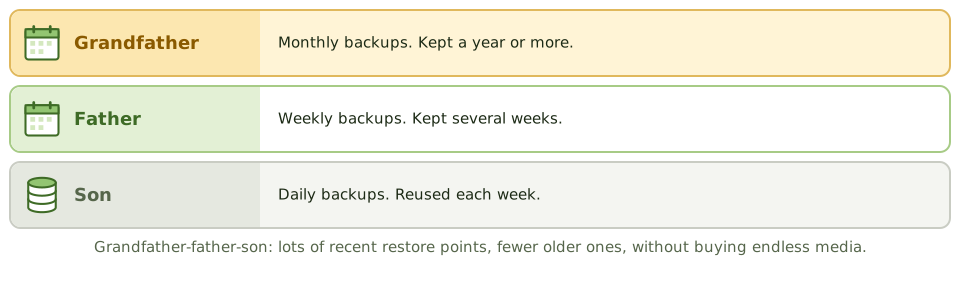
Rotation and retention
Protecting the media
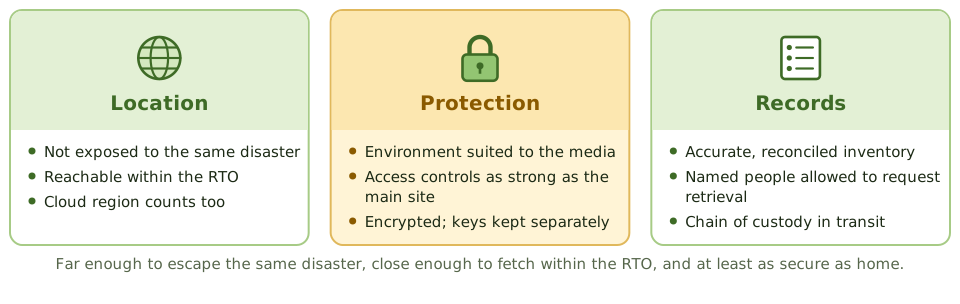
- 1Encrypt backups; keep the keys separately.
- 2Label clearly, without revealing what's on it.
- 3Locked containers and chain-of-custody records in transit.
- 4Securely dispose of retired media.
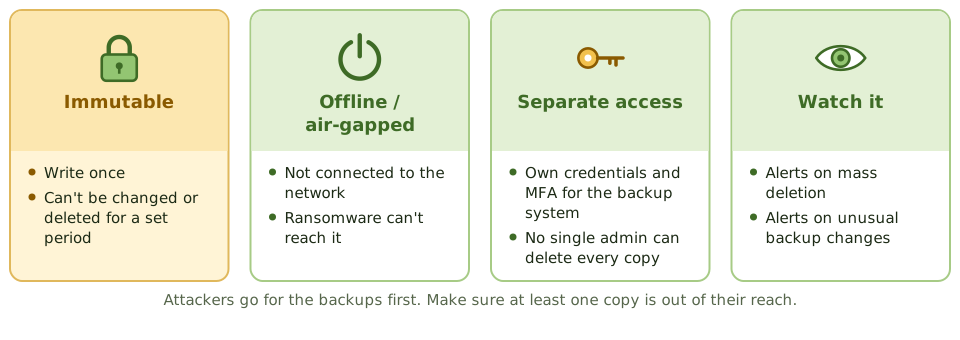
Ransomware goes for backups first
Proving they work
Review backup logs and how failures are followed up. Reconcile the offsite inventory with backup records. Check the offsite facility. Above all, look at restore tests, and whether restore times meet the RTO.
How the exam asks about it
| If the question asks… | Answer |
|---|---|
| Key quality of an offsite location | Not exposed to the same risks as the main site |
| Best evidence backups are usable | Successful restore tests |
| Control over media in transit | Encryption and tracked secure courier |
| Daily, weekly and monthly sets | Grandfather-father-son |
| Protecting backups from ransomware | Immutable or offline copies, separate credentials |
Key takeaways
- ✓Backups must be stored offsite, far enough away not to be affected by the same disaster, with environmental and access controls at least as good as the primary site.
- ✓Grandfather-father-son (GFS) rotation keeps daily, weekly and monthly sets, balancing retention and media reuse.
- ✓Retention periods follow business, legal and regulatory requirements.
- ✓Backup media should be encrypted, labelled, inventoried and tracked when transported.
- ✓Immutable or offline backups protect against ransomware and malicious deletion.
- ✓The auditor checks offsite inventory against records, tests restores, and reviews backup logs and failures.
Exam traps
- !Backups stored in the same building as the primary systems don't protect against site disasters.
- !Unencrypted backup tapes lost in transit are a data breach.
- !An offsite inventory that doesn't match the backup records means you don't know what you can restore.
- !Backup job success messages don't prove data can be restored.
- !Backup administrators who can delete all copies are a single point of compromise.
DRP Contents
What goes into a disaster recovery plan, the teams that carry it out and who acts first, and how to keep the plan usable on the worst day.
A recipe for the worst day
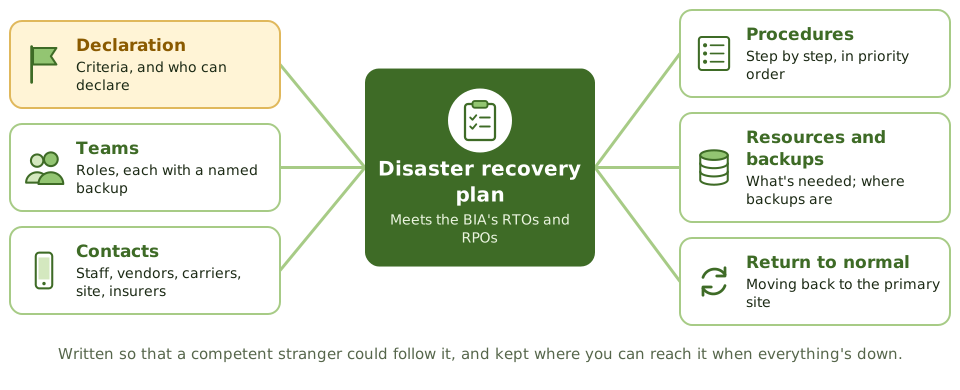
A good recipe works for anyone who follows it, not just the chef who wrote it. And it's no use locked in a kitchen that's on fire.
The disaster recovery plan is the step-by-step recipe for getting IT back within the BIA's RTOs and RPOs. It's part of the business continuity plan and follows its priorities.
What's in it
| Section | Includes |
|---|---|
| Scope and objectives | Systems covered, priorities, RTO and RPO |
| Declaration | Criteria, who can declare, how people are told |
| Teams | Roles with primary and backup people |
| Contacts | Staff, vendors, carriers, recovery site, insurers |
| Procedures | Step by step, in priority order |
| Return to normal | Restoring and moving back to the primary site |
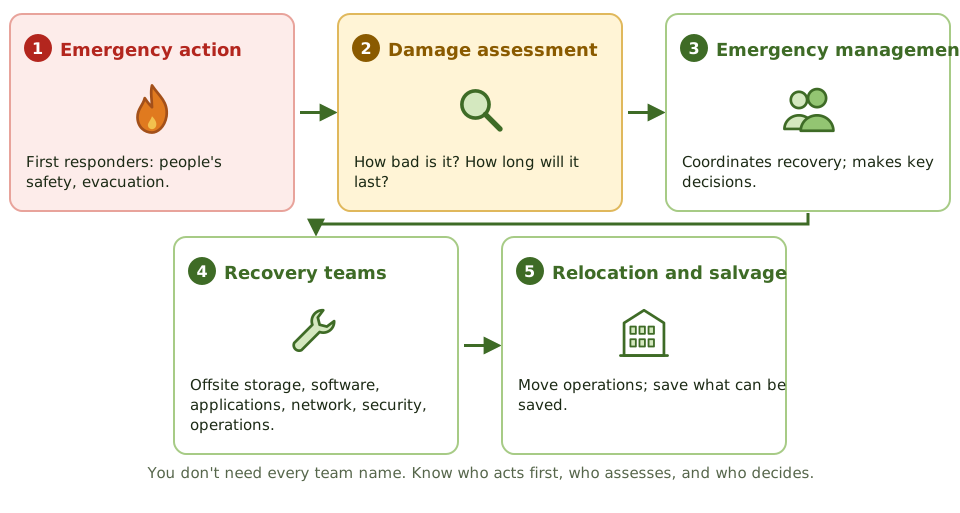
The teams
Keeping it usable
- 1Detailed enough for someone other than the usual admin to follow.
- 2A named backup for every role.
- 3Copies offsite, in a form you can reach when email and file shares are down.
- 4Updated after changes to systems, people, suppliers, and after every test.
- 5Staff trained in their roles.
How the exam asks about it
| If the question asks… | Answer |
|---|---|
| First priority in a disaster | Safety of people |
| Team estimating damage and outage length | Damage assessment team |
| Who can declare a disaster | An authorised person named in the plan |
| Where DRP copies go | Offsite, accessible to team members |
| Main update triggers | System, staff and supplier changes; test results |
Key takeaways
- ✓The DRP documents how IT systems, data and infrastructure will be recovered to meet the business's recovery objectives.
- ✓It covers declaration and escalation, teams and responsibilities, contact lists, recovery procedures in priority order, resources and the return to normal operations.
- ✓Recovery is organised into teams such as the emergency action, damage assessment, emergency management, offsite storage, software, applications, network, security and relocation teams.
- ✓Each role has a named primary and backup person.
- ✓Copies of the plan must be stored offsite and be accessible when primary systems are down.
- ✓The plan must be updated after changes in systems, staff or suppliers, and after tests.
Exam traps
- !The first priority in any disaster is the safety of people.
- !A plan that lists only names, without roles and deputies, fails when someone is unavailable.
- !Recovery procedures must be detailed enough for someone other than the usual administrator to follow.
- !The plan should cover returning to the primary site, not just failing over.
- !Who can declare a disaster must be defined in advance.
Testing BCP/DRP
Proving the plan works before you need it: the ladder of tests from a desk check to shutting the data centre down, how a test is run and judged, and the test-choice questions.
The fire drill
A school doesn't wait for a real fire to find out the fire exit is blocked. It runs drills, starting with a talk-through and building up to everyone actually leaving the building.
Continuity tests work the same way. An untested plan gives very little assurance.
The ladder of tests
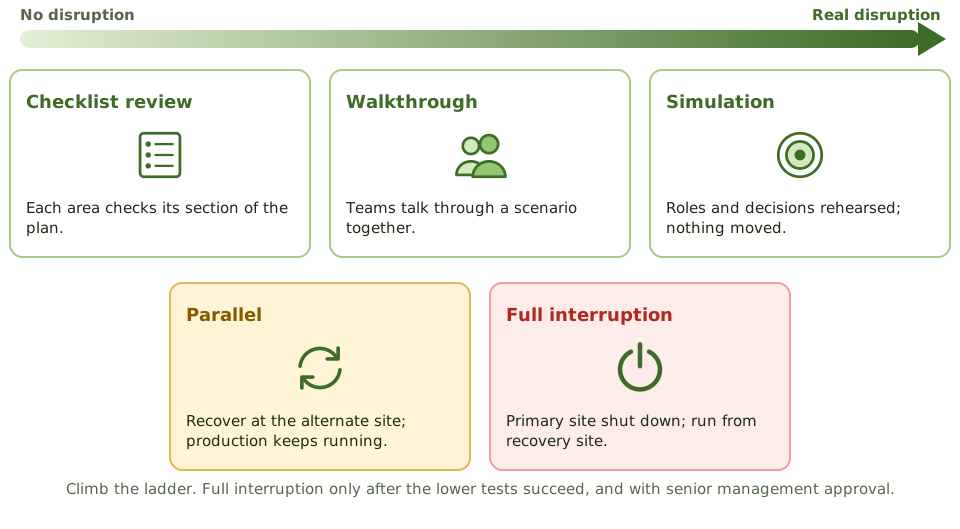
Parallel vs full interruption
Running a test
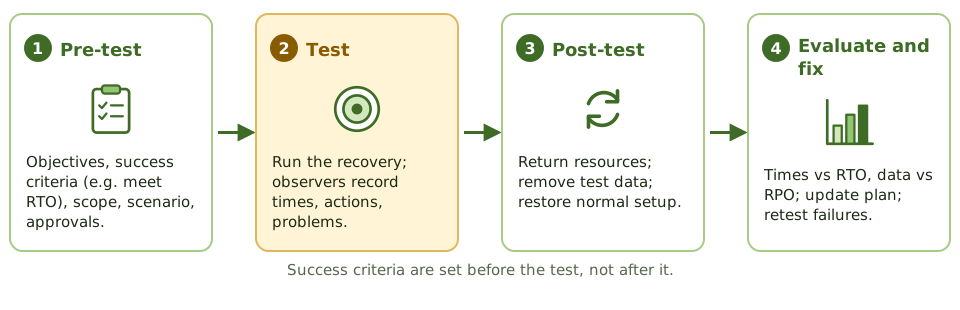
Judging the result
- 1Time to recover each system vs its RTO.
- 2Work processed at the recovery site.
- 3Data accuracy vs RPO and integrity checks.
- 4Share of the plan carried out successfully.
Who takes part
Business users, not just IT. The test should prove business processes can recover, not just servers. Internal audit may observe and review the results.
A test that finds nothing wrong probably wasn't realistic. Finding weaknesses is the point.
How the exam asks about it
| If the question asks… | Answer |
|---|---|
| Least disruptive test | Checklist review / desk check |
| Teams talk through the plan together | Structured walkthrough (tabletop) |
| Recovery site runs while production continues | Parallel test |
| Most realistic, most risky | Full interruption test |
| Most important outcome of a test | Find weaknesses; update the plan |
| Best measure of success | Recovered within RTO and RPO |
Key takeaways
- ✓Test types, from least to most disruptive: checklist (desk) review, structured walkthrough (tabletop), simulation, parallel test, full interruption test.
- ✓A checklist review distributes the plan for each team to check against their area; a walkthrough has team members talk through the plan together.
- ✓A simulation (functional exercise) rehearses a scenario with roles and decisions, without actually moving operations.
- ✓A parallel test recovers systems at the alternate site while production continues at the primary site.
- ✓A full interruption test shuts down the primary site and runs from the recovery site; most realistic, most risky.
- ✓Tests have pre-test, test and post-test phases; results are measured against objectives and drive plan updates.
- ✓Tests should increase in scope over time; a full interruption test is done only after lower-level tests succeed.
Exam traps
- !A full interruption test should not be the first test performed; start with paper and walkthrough tests.
- !A parallel test doesn't interrupt production; a full interruption test does.
- !A test that 'passes' with no issues found may mean the test wasn't realistic.
- !Test objectives and success criteria (such as meeting RTO) must be defined before the test.
- !The most important outcome of a test is identifying weaknesses and updating the plan.
High Availability, RAID, Insurance
Keeping systems running when parts fail (clustering, redundancy, power, RAID), why none of it replaces backups, and the insurance that pays when things go wrong anyway.
A spare tyre for everything
A car with a spare tyre keeps going after a puncture. A plane with two engines keeps flying if one fails. Neither helps if you drive off a cliff.
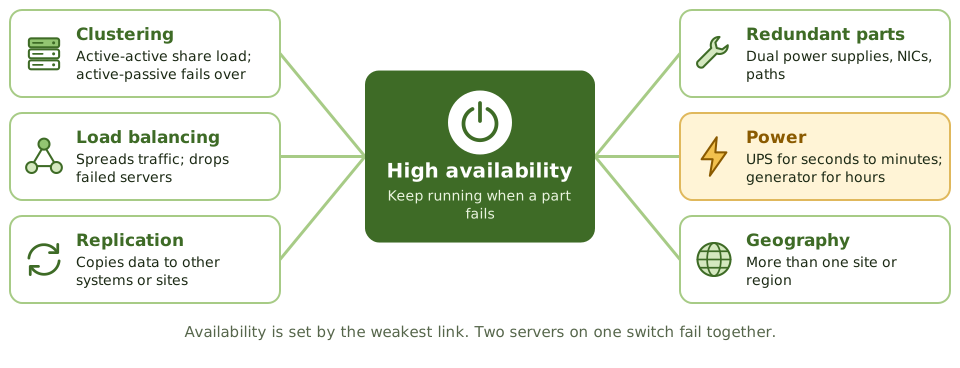
High availability builds spares into IT so a single failed part doesn't stop the service. Backups and insurance cover the cliff.
Clusters and power
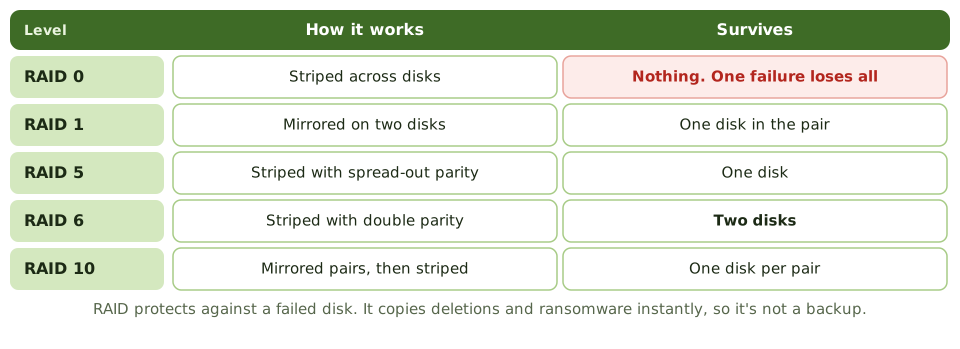
RAID levels
Insurance
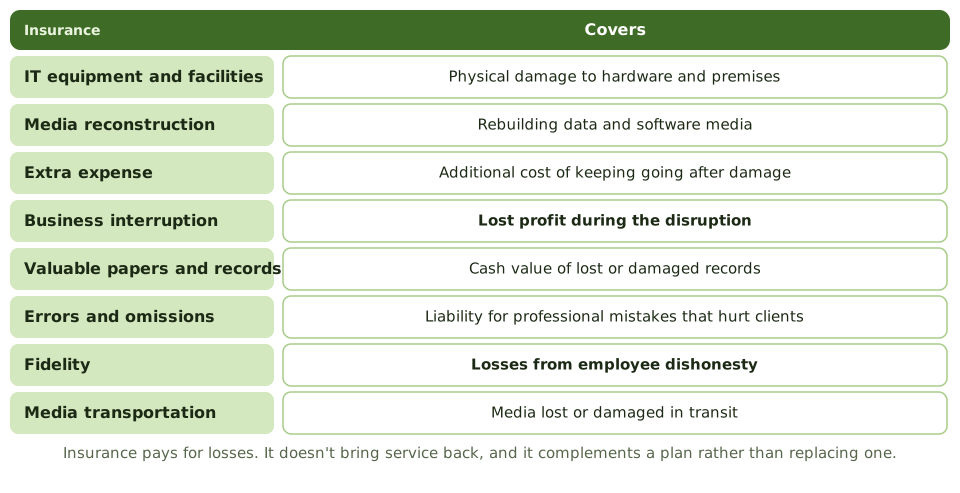
What insurance can't do
Insurance pays for losses. It doesn't bring service back, can't repair reputation, and may not cover regulatory fines. It complements a continuity plan; it never replaces one.
Cyber policies often add incident response, breach notification, extortion and liability. The auditor checks cover matches the risks, and that policy conditions (such as required controls) are actually met.
How the exam asks about it
| If the question asks… | Answer |
|---|---|
| RAID level with no redundancy | RAID 0 |
| RAID level using mirroring | RAID 1 |
| RAID level surviving two disk failures | RAID 6 |
| Does RAID replace backups? | No: deletion, corruption, site loss |
| Insurance for lost profit during an outage | Business interruption |
| Insurance for employee theft | Fidelity coverage |
| Bridges short power outages | UPS |
Key takeaways
- ✓High availability reduces downtime through redundancy: clustering, load balancing, replication and redundant components.
- ✓Active-active clusters share the load; active-passive clusters fail over to a standby.
- ✓RAID 0 stripes with no redundancy; RAID 1 mirrors; RAID 5 stripes with distributed parity and survives one disk failure; RAID 6 survives two; RAID 10 combines mirroring and striping.
- ✓RAID protects against disk failure, not against deletion, corruption, malware or site loss, so it doesn't replace backups.
- ✓Power resilience uses UPS for short outages and generators for longer ones, with tested failover.
- ✓Insurance transfers financial loss: IT equipment, media reconstruction, extra expense, business interruption, valuable records, errors and omissions, fidelity and media transportation.
- ✓Insurance doesn't restore operations; it complements, not replaces, continuity planning.
Exam traps
- !RAID 0 offers no fault tolerance, despite being RAID.
- !RAID and replication aren't backups: deleting a file deletes it on every mirror.
- !A single point of failure anywhere in the chain (power, network switch) defeats redundant servers.
- !Business interruption insurance covers lost profit, not the cost of replacing equipment.
- !Fidelity coverage protects against losses from employee dishonesty.
Auditing BCP
How an IS auditor judges whether the organisation could really recover: the questions to answer, the evidence to gather beyond the plan document, and the findings that come up most.
Could they really recover?
A building inspector doesn't just read the fire safety manual. They check the extinguishers are charged, the exits are clear, and the staff know where to go.
Auditing BCP is the same. The question is simple: could the organisation recover its critical processes within acceptable time and data loss? The plan document is only the start.
Five questions
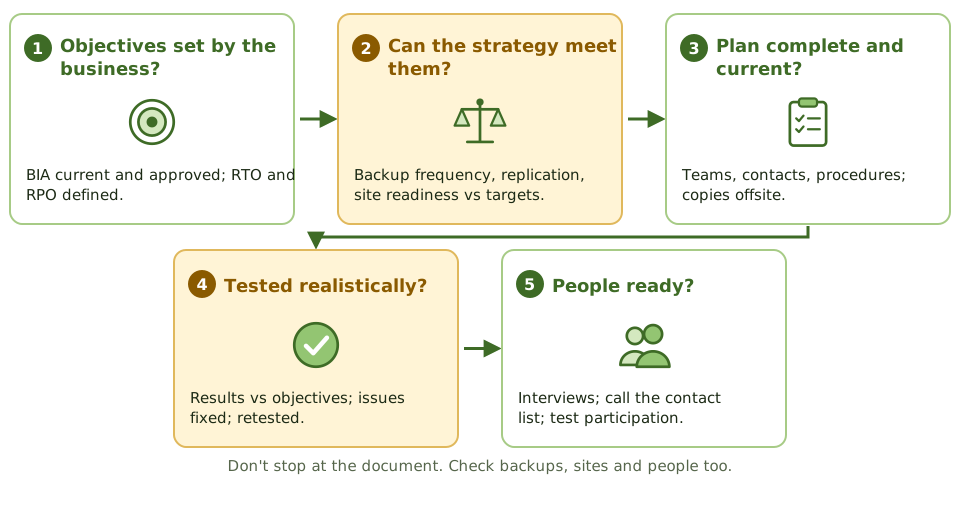
Evidence beyond the document
- 1Reconcile the offsite backup inventory with backup records.
- 2Review timed restore tests.
- 3Read alternate site contracts: capacity, oversubscription, testing rights.
- 4Compare the plan with recent system, staff and supplier changes.
- 5Interview team members; call a sample of the contact list.
- 6Observe a test if possible; check issues were fixed and retested.
The auditor's role
The auditor evaluates and reports. They may advise while the plan is developed, but they don't write or own it. Doing so would impair their independence when they audit it later.
How the exam asks about it
| If the question asks… | Answer |
|---|---|
| Best evidence a DRP will work | Results of a realistic test |
| First thing to review | The BIA and recovery objectives |
| Plan never tested | Major finding: effectiveness not shown |
| Check staff readiness | Interview team members; test participation |
| Verify backups | Reconcile offsite inventory; restore tests |
| Auditor asked to write the BCP | Advise only; management owns it |
Key takeaways
- ✓The auditor evaluates whether the BCP and DRP are adequate, current, tested and able to meet the business's recovery objectives.
- ✓Start by understanding the BIA: are critical processes and recovery objectives identified and approved?
- ✓Check that strategies (sites, backups, contracts) can actually meet the RTOs and RPOs.
- ✓Review test plans and results: the best evidence that the plan works is a successful, realistic test.
- ✓Verify offsite storage, backup inventories, copies of the plan, and alternate site contracts.
- ✓Interview team members to check they know their roles, and check contact lists are current.
Exam traps
- !A well-written plan that has never been tested gives little assurance.
- !If the plan's recovery objectives weren't set by the business, the whole plan rests on IT assumptions.
- !Reviewing the plan document alone isn't enough; verify backups, sites and people.
- !The auditor evaluates and reports; the auditor doesn't write or own the plan.
- !A plan not updated after major system changes is likely to fail.