Topics in this domain
- IT Service Management
- Hardware Components and Architecture
- Operating Systems
- OSI Model
- TCP/IP and Common Protocols
- Network Devices: Switches, Routers, Gateways
- LAN/WAN Topologies
- Database Models and DBMS
- Database Controls and Normalization
- Asset Management
- Configuration Management
- Job Scheduling and Batch Processing
- Incident Management
- Problem Management
- Change Management
- Release and Patch Management
- Service Level Management
- Capacity and Performance Monitoring
- End-User Computing
- BCP Lifecycle
- Business Impact Analysis
- RTO, RPO, MTD, SDO
- Recovery Strategies
- Alternate Sites: Hot, Warm, Cold
- Backup Types: Full, Incremental, Differential
- Backup Storage and Rotation
- DRP Contents
- Testing BCP/DRP
- High Availability, RAID, Insurance
- Auditing BCP
Backup Storage and Rotation
Don’t keep the spare key under the mat
Keeping your spare house key in the same drawer as the main one doesn’t help when you’re locked out. Keeping backups in the same building as the servers doesn’t help when the building floods.
Backups need to be somewhere else, kept safe, kept for the right length of time, and proven to work. (For the different kinds of backup, see Backup Types.)
Offsite storage
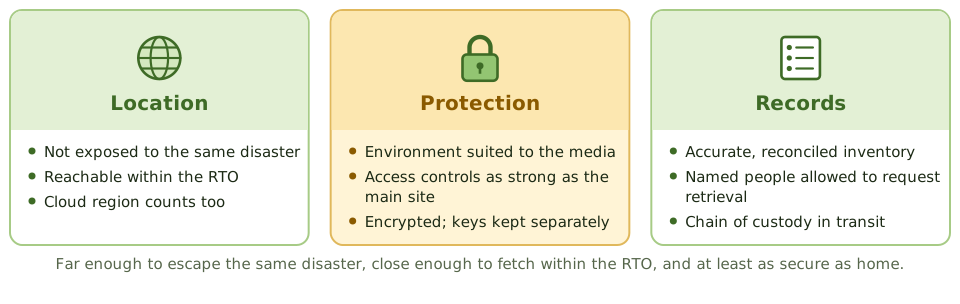
An offsite location should:
- be far enough away not to be hit by the same disaster, but close enough to retrieve backups within the RTO
- have environmental controls suited to the media (temperature, humidity, fire suppression)
- have physical security and access controls at least as strong as the primary site
- keep an accurate, regularly reconciled inventory
- have a list of the people allowed to request retrieval
Cloud storage is now a common offsite location. The same requirements apply, expressed as encryption, access control, geographic separation and retention settings.
Rotation and retention
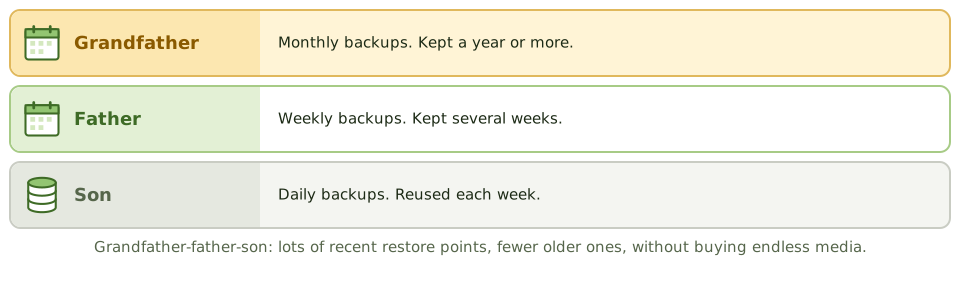
Grandfather-father-son (GFS) is the classic rotation scheme:
- Son: daily backups, reused each week
- Father: weekly backups, kept for several weeks
- Grandfather: monthly backups, kept for a year or more
You get lots of recent restore points and fewer older ones, without buying endless media.
Retention is set by business needs, laws and regulations (tax, financial records, litigation holds) and privacy rules (not keeping personal data longer than needed).
Protecting the media
- Encrypt backups, and keep the keys separately from the backups.
- Label clearly, without revealing sensitive content, and track every item.
- Transport in locked containers with chain-of-custody records. An unencrypted tape lost in transit is a data breach.
- Dispose of retired media securely.
Ransomware goes for backups first
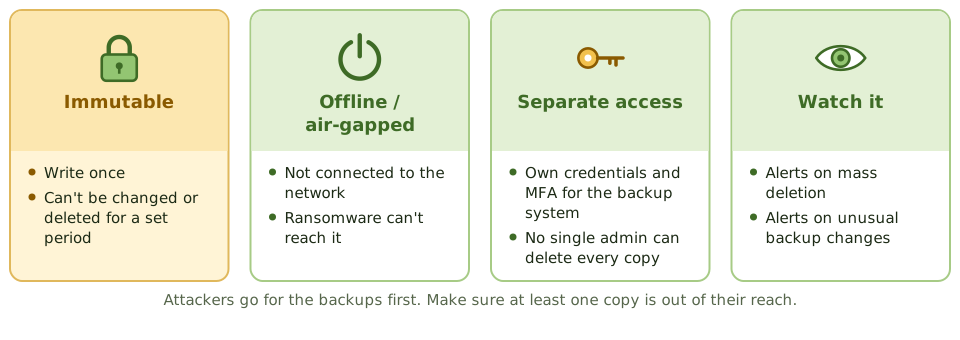
Attackers try to destroy the backups before they encrypt everything else. Defences:
- immutable storage: written once, can’t be changed or deleted for a set period
- offline or air-gapped copies that aren’t connected to the network
- separate credentials and MFA for the backup system, so no single administrator can delete every copy
- monitoring for mass deletion or unusual changes to backups
Proving they work
- Review backup schedules, logs, and how failures are followed up.
- Reconcile the offsite inventory with backup records. If they don’t match, you don’t know what you can restore.
- Visit or review the offsite facility’s controls.
- Review restore tests, and whether restore times meet the RTO.
- Check encryption and access to the backup systems.
“Backup successful” messages prove the job ran, not that the data can be restored.
Example. Backup logs show 100% success. A restore test of the finance database fails: since a storage migration six months ago, the backup job had been backing up an empty directory. Only a test restore could have revealed it.
How the exam asks about it
| If the question asks… | The answer is usually… |
|---|---|
| Most important characteristic of an offsite location | Not subject to the same risks as the primary site |
| Best evidence backups are usable | Successful restore tests |
| Control over backup media in transit | Encryption and secure courier with tracking |
| Rotation scheme with daily, weekly and monthly sets | Grandfather-father-son |
| Defence of backups against ransomware | Immutable or offline copies with separate credentials |
In short
- Backups must be stored offsite, far enough away not to be affected by the same disaster, with environmental and access controls at least as good as the primary site.
- Grandfather-father-son (GFS) rotation keeps daily, weekly and monthly sets, balancing retention and media reuse.
- Retention periods follow business, legal and regulatory requirements.
- Backup media should be encrypted, labelled, inventoried and tracked when transported.
- Immutable or offline backups protect against ransomware and malicious deletion.
- The auditor checks offsite inventory against records, tests restores, and reviews backup logs and failures.
Exam traps
- Backups stored in the same building as the primary systems don't protect against site disasters.
- Unencrypted backup tapes lost in transit are a data breach.
- An offsite inventory that doesn't match the backup records means you don't know what you can restore.
- Backup job success messages don't prove data can be restored.
- Backup administrators who can delete all copies are a single point of compromise.
Slides
Click the slide and use the arrow keys. F toggles full screen.
Offsite storage
Rotation and retention
Ransomware goes for backups first