Topics in this domain
- IT Service Management
- Hardware Components and Architecture
- Operating Systems
- OSI Model
- TCP/IP and Common Protocols
- Network Devices: Switches, Routers, Gateways
- LAN/WAN Topologies
- Database Models and DBMS
- Database Controls and Normalization
- Asset Management
- Configuration Management
- Job Scheduling and Batch Processing
- Incident Management
- Problem Management
- Change Management
- Release and Patch Management
- Service Level Management
- Capacity and Performance Monitoring
- End-User Computing
- BCP Lifecycle
- Business Impact Analysis
- RTO, RPO, MTD, SDO
- Recovery Strategies
- Alternate Sites: Hot, Warm, Cold
- Backup Types: Full, Incremental, Differential
- Backup Storage and Rotation
- DRP Contents
- Testing BCP/DRP
- High Availability, RAID, Insurance
- Auditing BCP
Network Devices: Switches, Routers, Gateways
The post room
Picture an office post room. A junior who shouts every message to the whole floor is a hub. A clerk who hands each letter to the right desk is a switch. The van that carries letters between buildings using street addresses is a router. A translator who rewrites letters for a foreign office is a gateway.
Each network device works at a different OSI layer. The higher the layer, the more it understands about the traffic, and the more it can control.
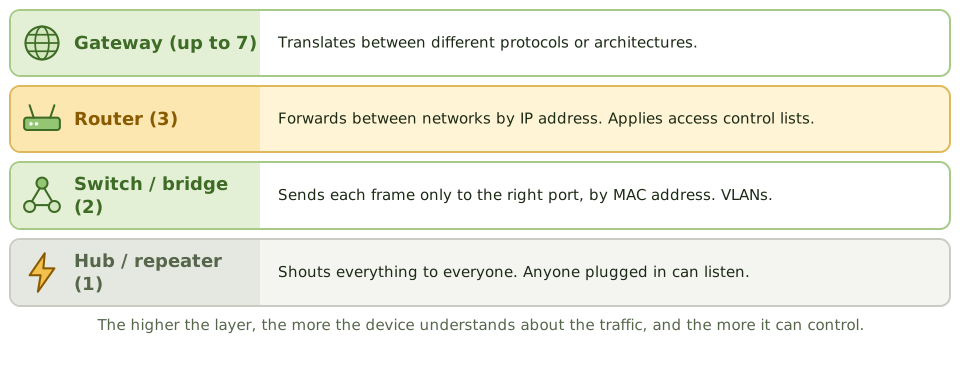
| Device | OSI layer | What it does | Security relevance |
|---|---|---|---|
| Repeater | 1 | Regenerates the signal to go further | None; forwards everything |
| Hub | 1 | Sends incoming traffic out of every port | Anyone plugged in can see all traffic |
| Bridge | 2 | Joins two segments, filtering by MAC address | Reduces traffic between segments |
| Switch | 2 (layer 3 switches also route) | Sends each frame only to the right port; supports VLANs | Limits eavesdropping; VLANs separate traffic |
| Router | 3 | Forwards packets between networks by IP address; applies access control lists | Controls traffic between networks |
| Gateway | Up to 7 | Translates between different protocols or architectures | Joins dissimilar systems |
| Load balancer | 4-7 | Spreads traffic across servers | Availability; may handle TLS |
| Firewall | 3-7 | Enforces security policy on traffic | Covered in Domain 5 |
Segmentation
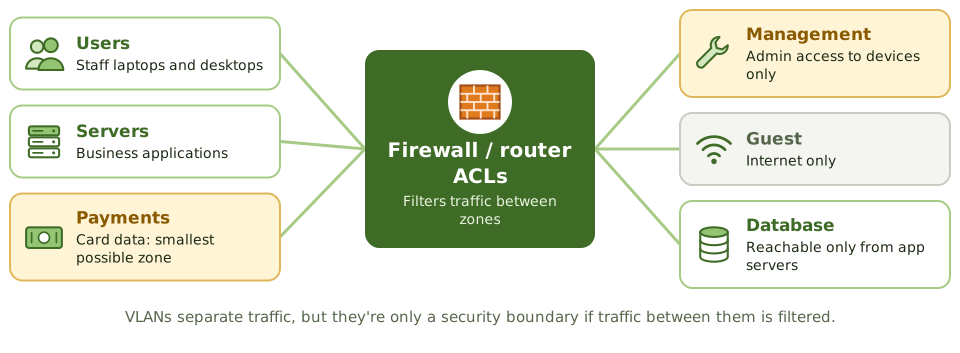
Splitting the network into zones (users, servers, payments, management, guest) means an attacker who gets into one zone can’t simply wander into the others. It also shrinks the scope of rules like PCI DSS, which then apply only to the payment zone.
- VLANs separate traffic logically on the same switches.
- Traffic between VLANs or subnets is filtered by router ACLs or firewalls.
- Without that filtering, VLANs give little real security.
Controlling the devices
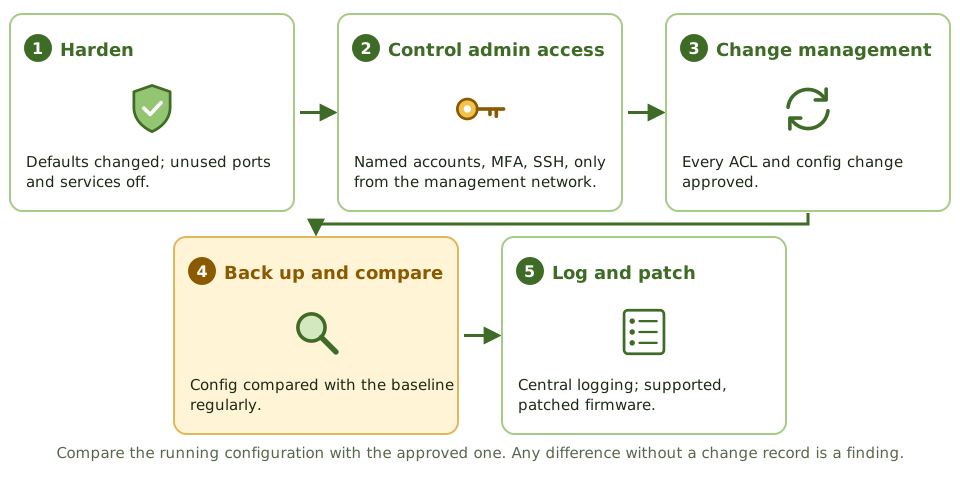
- Harden: change default passwords, switch off unused ports and services, set warning banners.
- Admin access: named accounts, MFA, encrypted protocols (SSH, HTTPS), and only from a management network.
- Change management for every configuration change, including ACLs and firewall rules.
- Back up configurations and compare them regularly with an approved baseline, to catch unauthorised changes.
- Log to a central server.
- Keep firmware patched and supported.
- Physically secure network closets.
Routers with default passwords or management interfaces open to the network are a high-risk finding.
Example. An auditor compares the running configuration of a core router with the approved baseline and finds a rule allowing all traffic from a contractor’s subnet to the database VLAN. No change record exists. The finding covers both the unauthorised change and the lack of regular configuration comparison.
How the exam asks about it
| If the question asks… | The answer is usually… |
|---|---|
| Device forwarding traffic by IP address | Router |
| Device forwarding traffic by MAC address | Switch (or bridge) |
| Device translating between different protocols | Gateway |
| Risk of hubs | All traffic visible to every connected device |
| Best way to detect unauthorised router changes | Compare configurations with an approved baseline; log changes |
| Purpose of network segmentation | Limit access and contain compromises |
In short
- Hubs and repeaters (layer 1) forward everything; switches (layer 2) forward by MAC address; routers (layer 3) forward by IP address.
- Bridges connect network segments at layer 2; gateways translate between different protocols, up to layer 7.
- VLANs on switches segment traffic logically; routing between VLANs should be controlled with ACLs or firewalls.
- Network devices need hardened configurations, controlled administrative access, logging and change control.
- Device configurations should be backed up and compared regularly against an approved baseline.
- Network segmentation limits how far an attacker can move after a compromise.
Exam traps
- A hub sends traffic to all ports, so anyone connected can sniff it; switches reduce this.
- Routers with default passwords or open management interfaces are a high-risk finding.
- VLANs separate traffic but aren't a security boundary unless inter-VLAN routing is filtered.
- Unauthorised changes to router ACLs or firewall rules bypass network controls; change management applies.
Slides
Click the slide and use the arrow keys. F toggles full screen.
The post room
Picture an office post room. A junior who shouts every message to the whole floor is a hub. A clerk who hands each letter to the right desk is a switch. The mail van that takes letters between buildings using street addresses is a router. A translator who rewrites letters for a foreign office is a gateway.
Segmentation
Controlling the devices