Topics in this domain
- IT Service Management
- Hardware Components and Architecture
- Operating Systems
- OSI Model
- TCP/IP and Common Protocols
- Network Devices: Switches, Routers, Gateways
- LAN/WAN Topologies
- Database Models and DBMS
- Database Controls and Normalization
- Asset Management
- Configuration Management
- Job Scheduling and Batch Processing
- Incident Management
- Problem Management
- Change Management
- Release and Patch Management
- Service Level Management
- Capacity and Performance Monitoring
- End-User Computing
- BCP Lifecycle
- Business Impact Analysis
- RTO, RPO, MTD, SDO
- Recovery Strategies
- Alternate Sites: Hot, Warm, Cold
- Backup Types: Full, Incremental, Differential
- Backup Storage and Rotation
- DRP Contents
- Testing BCP/DRP
- High Availability, RAID, Insurance
- Auditing BCP
Change Management
Nothing changes without a yes
In a hospital, nobody changes a patient’s medication on a whim. The change is requested, a doctor approves it, the pharmacy checks it, a nurse gives it, and it’s all written in the chart. If something goes wrong, you can see exactly what changed, who approved it and when.
Change management does the same for production systems. The exam treats it as a key IT general control, and most questions trace back to one objective: preventing or detecting unauthorised changes to programs, configurations, parameters and data.
The supporting objectives, which the Review Manual lists as part of the change procedure:
- everyone affected knows about the change and when it will happen
- system, operations and program documentation is complete, current and up to standard
- job scheduling and operating instructions are updated
- user and project management review and approve the test results
- user management confirms any data conversion was complete and accurate
- legal and compliance implications have been considered
- the risk to operations has been reviewed, and a rollback plan exists
Why it matters to the whole audit
Automated application controls are usually tested once and then relied on for the whole period. That only works if nobody could change them without anyone noticing. If change management is weak, the auditor reduces reliance on automated controls and increases substantive testing.
What counts as a change
It isn’t only code:
| Type | Examples | Exam angle |
|---|---|---|
| Programs | Custom code, scripts, reports, interfaces, batch jobs | Classic program change control |
| Configurations and parameters | Tax rates, approval limits, firewall rules, system settings | No code changes, but a control can be switched off |
| Infrastructure | Servers, network devices, storage, cloud resources | Network changes need written management authorisation |
| Vendor software and patches | Upgrades, new releases, security patches | Still tested and approved in the organisation’s own environment |
| Data | Direct database updates outside the application | Bypasses application controls, so write access is restricted and monitored |
Data changes are normally made through the application, where roles, edit checks and approvals apply. A direct update by a DBA or support engineer skips all of that. Expect questions where the right answer restricts direct write access to production data and monitors its use.
The change process
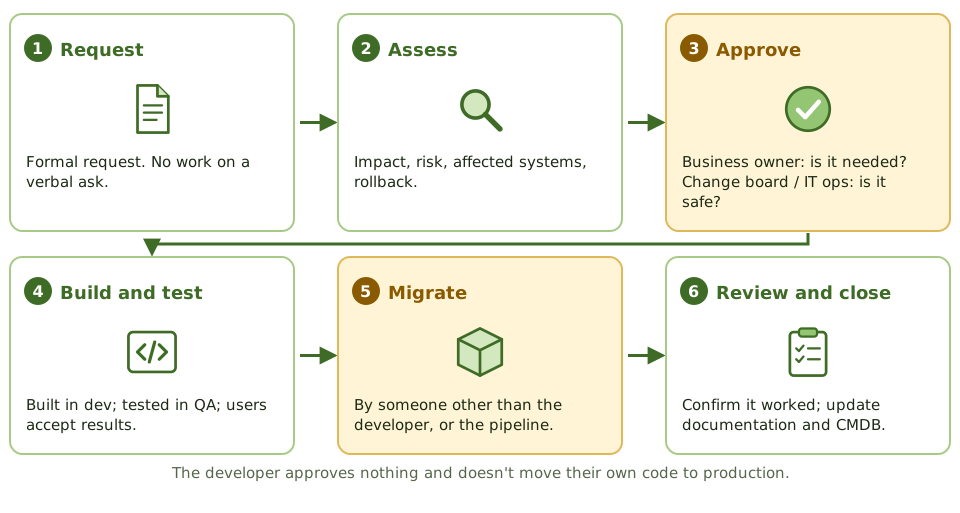
| Step | What should happen | What the auditor looks for |
|---|---|---|
| Request | A formal way to authorise, prioritise and track requests | Every change has a request; no work from verbal requests |
| Assess | Impact, risk, affected systems, rollback approach | Assessment recorded for normal and major changes |
| Approve | Business owner approves the need; change board or IT operations approves production readiness | Approval dated before implementation, by the right people |
| Build and test | Built in development, tested in a separate test or QA environment, users accept the results | Real test evidence and user sign-off, not just “tested OK” |
| Migrate | Moved to production by someone other than the developer, or by a controlled pipeline | Who actually did the migration |
| Review and close | Change confirmed; documentation and configuration records updated | Documentation reflects the changed system |
Who approves
This distinction is tested often:
- The business owner or user management approves that the change is needed, and that the test results show it works.
- IT operations or the change advisory board approves that it’s safe for production: timing, impact on other services, rollback plan. The Review Manual notes IS operations is often the final approver for production.
- The developer approves nothing.
Types of change
| Change type | How it’s handled |
|---|---|
| Standard | Low-risk, routine, follows a pre-approved procedure |
| Normal (minor or major) | Assessed and approved case by case; major changes go to the change board |
| Emergency | Fast-tracked approval; full documentation, testing and approval afterwards |
Release management then packages approved changes and deploys them (see the next article). Change management approves and tests; release management deploys.
FYI: older exam material refers to a "program librarian" who controlled the source and executable libraries and moved programs into production. Today that's usually version control and a deployment pipeline. The control objective is the same: whoever wrote the code doesn't control its promotion to production.
Keeping developers out of production
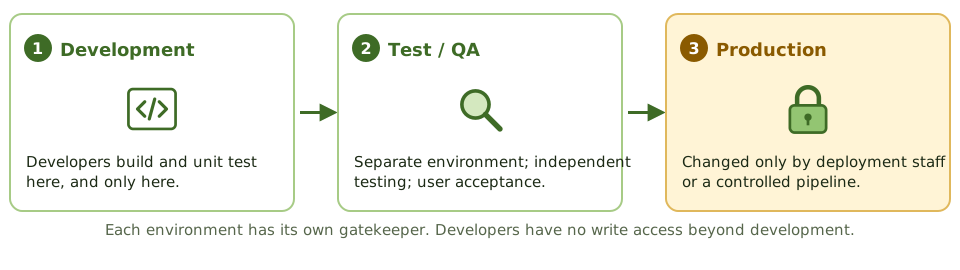
- Developers work in development only, with no write access to test or production.
- Changes are tested in a separate test or QA environment.
- Production can only be changed by the people or tools responsible for deployment.
One source, one executable
Source code is what programmers write. Object code is what the computer runs after compilation. The Review Manual’s audit steps include checking that each production executable has one and only one matching version of approved source code. If they don’t match, either production was changed outside the process, or the organisation can’t reliably rebuild the program.
Code comparison utilities detect these differences. They’re the standard answer to “how would you detect an unauthorised program change?”
Incompatible duties
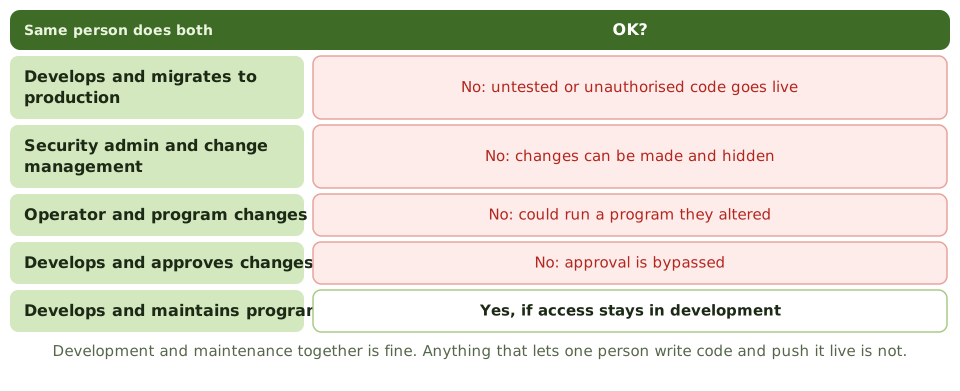
| Combination | Problem | Acceptable? |
|---|---|---|
| Developer with production migration rights | Untested or unauthorised code goes live | No |
| Security administration with change management | Broad security rights let changes be made and hidden | No |
| Computer operator with program change rights | Operator could run a program they altered | No |
| Development with change approval | Changes bypass approval | No |
| Development and maintenance by the same programmer | Normal, as long as access stays in development | Yes |
Small organisations
When there aren’t enough people to separate duties, the exam’s expected answer is a compensating control, not “hire more staff”. The standard one: regularly compare production source and object code with approved versions, reviewed by someone independent of development, and investigate anything that doesn’t match. Logging and independent review of administrator activity does the same job for configuration changes.
Example. A two-person IT team, where the developer also deploys. Each month a code comparison report lists every program changed in production. The IT manager matches each one to an approved request and signs the report. Unmatched changes are investigated.
Emergency changes
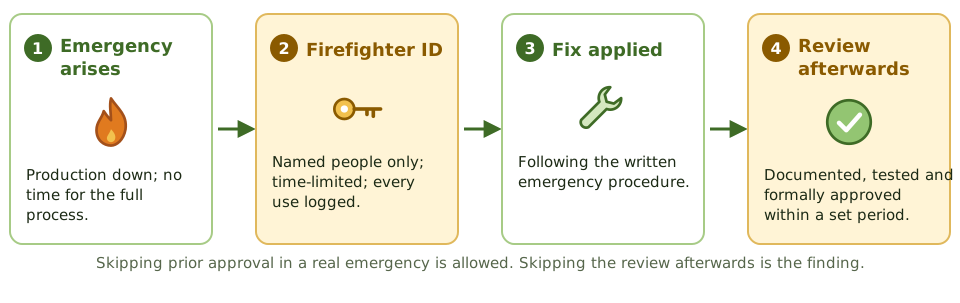
Sometimes production is down and there’s no time for the full process. That’s allowed, under control:
| Control | Detail |
|---|---|
| Written procedure | Defined in the operations manuals, not improvised |
| Emergency (“firefighter”) IDs | Restricted to named people, time-limited, every use logged |
| After-the-fact approval | Documented, tested and formally approved within a set period |
| Monitoring volume | Lots of emergencies suggests people are dodging the normal process |
When a question describes an emergency change made without prior approval, the expected answer is usually a retrospective review and approval process plus control over emergency access. Banning emergency changes is wrong.
Preventing and detecting unauthorised changes
| Preventive | Detective |
|---|---|
| Separating development, software administration and operations | Code comparison against approved versions |
| Developers limited to the development environment | File integrity monitoring |
| Restricted access to source code and production libraries | Logging and review of administrator activity |
| Approval gates enforced by the deployment tool | Reconciling production deployments to change tickets |
| Restricted write access to production data | Monitoring of direct database changes |
Patches are changes too: tracked, tested, approved, installed and verified (see Release and Patch Management). Urgent security patches may use the emergency route, but still get recorded and reviewed.
In automated pipelines
In CI/CD environments, tooling enforces the same controls: peer review of every merge by someone other than the author, automated tests, and deployment only through the pipeline’s own account. The auditor’s attention moves to the pipeline itself:
- who can change the pipeline configuration
- whether authors can approve their own changes
- whether branch protection can be switched off
- whether anyone can still deploy to production directly, around the pipeline
How the auditor tests it
1. Understand the process and tools. How changes are requested, approved, tested and deployed, and who can deploy.
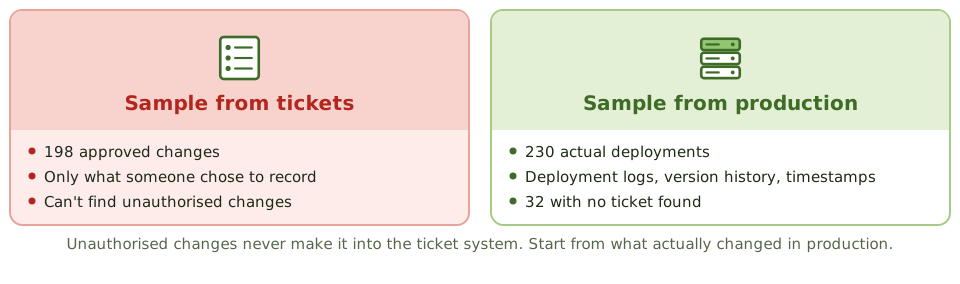
2. Build the population from production. A sample drawn from the change ticket system only contains changes someone chose to record. Unauthorised changes aren’t in it. So get the list of what actually changed from production: deployment logs, version history, executable timestamps, schema change logs, configuration monitoring.
3. Test in both directions.
| Direction | What it tells you |
|---|---|
| Production change → ticket | Was every change authorised? This is how unauthorised changes are found. |
| Ticket → production | Was each approved change implemented as approved, with documentation updated? |
4. Test each sampled change for: approval before implementation by the right people, test evidence and user acceptance, migration by someone other than the developer, a rollback plan, updated documentation, and timely review of emergency changes.
5. Test the supporting controls: access to production libraries and source code, use of emergency IDs, one source version per production executable, and the change tool’s own controls (such as blocking self-approval).
Example. The change system holds 198 approved changes. Deployment history from production shows 230 deployments. Matching them finds 32 with no ticket, six of them made at weekends through a shared admin account. A sample taken from the 198 tickets would never have found them.
Common findings
- developers with production access left over from a project
- approvals dated after implementation
- emergency changes never reviewed afterwards
- test evidence that just says “tested OK”
- configuration changes (firewall rules, approval limits) treated as outside the process
- direct database fixes requested by email with no ticket
- shared administrator accounts, so changes can’t be traced to a person
- tickets that can be approved by the person who raised them
How the exam asks about it
| If the question asks… | The answer is usually… |
|---|---|
| Best way to detect unauthorised program changes | Compare production code with approved versions (code comparison), or reconcile production changes to approvals |
| Developer migrates their own code in a small organisation | Independent review of production changes as a compensating control |
| Emergency change implemented without approval | Retrospective documentation, testing and approval, plus control of emergency IDs |
| Who should approve a program change | The business or user owner (IT operations approves production readiness) |
| Most significant conflict of duties | Developer with production access, or security administration combined with change management |
| Change management found weak during a financial audit | Reduce reliance on automated controls and increase substantive testing |
| Logging changes in the development library | Not enough: it doesn’t detect changes made in production |
In short
- The main objective of change control is to prevent or detect unauthorised changes to programs, configurations, parameters and data.
- Users or business owners approve that a change meets the need and accept the test results. IT operations or the change board approves that it's safe for production.
- The developer of a change must not migrate it to production. In a small team, the compensating control is an independent review of production changes.
- Emergency changes may skip prior approval, but must be documented, tested and approved after the fact, and emergency IDs must be restricted and logged.
- To detect unauthorised changes, start from what changed in production and trace back to approvals. The ticket system only shows recorded changes.
- Each production executable should match one approved version of source code. Code comparison detects differences.
- Weak change management means automated controls can't be relied on, so substantive testing increases.
Exam traps
- Sampling tickets from the change system can't detect changes that bypassed it. Test from the production side.
- Logging changes to development libraries doesn't detect changes to production.
- In a small organisation, hiring more staff is rarely the expected answer. An independent review of production changes is.
- Security administration and change management are incompatible duties: broad security rights let changes go unnoticed.
- An emergency change without prior approval isn't the finding by itself. The finding is no after-the-fact review.
- Development plus maintenance by the same programmer is acceptable, as long as they have no production access.
Slides
Click the slide and use the arrow keys. F toggles full screen.
The change process
Keeping developers out of production
Incompatible duties
Emergency changes
Hunting for unauthorised changes
Test both ways. Production to ticket finds unauthorised changes. Ticket to production checks approved changes went in as approved.