Topics in this domain
- IT Service Management
- Hardware Components and Architecture
- Operating Systems
- OSI Model
- TCP/IP and Common Protocols
- Network Devices: Switches, Routers, Gateways
- LAN/WAN Topologies
- Database Models and DBMS
- Database Controls and Normalization
- Asset Management
- Configuration Management
- Job Scheduling and Batch Processing
- Incident Management
- Problem Management
- Change Management
- Release and Patch Management
- Service Level Management
- Capacity and Performance Monitoring
- End-User Computing
- BCP Lifecycle
- Business Impact Analysis
- RTO, RPO, MTD, SDO
- Recovery Strategies
- Alternate Sites: Hot, Warm, Cold
- Backup Types: Full, Incremental, Differential
- Backup Storage and Rotation
- DRP Contents
- Testing BCP/DRP
- High Availability, RAID, Insurance
- Auditing BCP
Operating Systems
The foundation
A building’s foundations aren’t exciting, but if they crack, every floor above is in trouble, however good the locks on the office doors.
The operating system (OS) sits between applications and hardware. It controls processes, memory, files, devices and security. Every application relies on it.
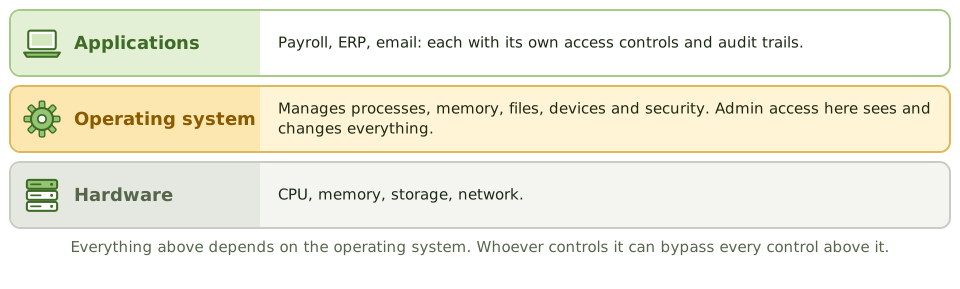
That’s why the OS matters so much to auditors: if it’s compromised or misconfigured, every control in every application on it can be bypassed. Someone with admin access to the OS can read files, change data and switch off logging.
Hardening
Hardening shrinks the attack surface: fewer doors, all of them locked.
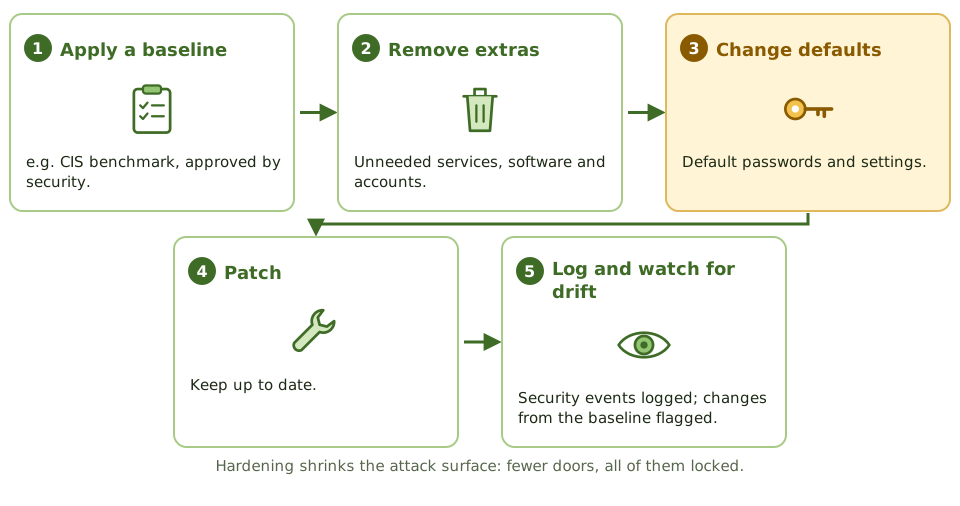
- apply an approved security baseline (for example a CIS benchmark)
- remove unnecessary services, software and accounts
- change default passwords and settings
- apply patches
- log security events
- monitor for configuration drift: settings quietly changing away from the baseline over time
System parameters (password length, lockout, audit settings, default permissions) are set once but affect the whole system. Changes to them go through change management. Checking them once isn’t enough; drift needs ongoing monitoring.
Admins, utilities and logs
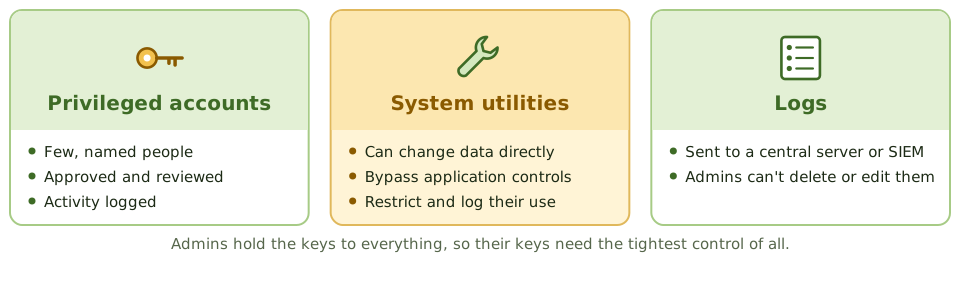
- Privileged accounts (administrator, root) are limited to a few named people, approved, reviewed, and their activity logged.
- Default accounts are renamed, disabled or given new passwords.
- System utilities that can change data or configuration directly (disk editors, database tools, debuggers) bypass application controls, so access is restricted and their use logged.
- Logs of privileged activity are protected from the administrators themselves, for example by sending them to a central log server or SIEM. If admins can delete their own logs, logging isn’t a real detective control.
What the auditor checks
The auditor compares system parameters with policy and reviews privileged account lists, use of sensitive utilities, patch status, logging and log review, and whether OS changes go through change control.
Example. On the payroll database server, five accounts have administrator rights: two named DBAs, one shared “admin” account whose password is on a wiki page, and two accounts belonging to people who left last year. Security logs are stored locally and administrators can clear them. The finding covers privileged access and log protection.
How the exam asks about it
| If the question asks… | The answer is usually… |
|---|---|
| Greatest risk from a compromised OS | All application controls can be bypassed |
| Control over system utilities | Restrict access and log their use |
| Making logs reliable against administrators | Send to a protected central log server; restrict deletion |
| Purpose of hardening | Reduce the attack surface |
| Common OS finding | Default accounts or passwords not changed |
In short
- The operating system manages hardware, memory, processes, files and access, and every application depends on it.
- Compromise of the OS undermines all application controls running on it.
- OS hardening removes unnecessary services, changes defaults, applies security baselines and patches.
- System parameters (such as password rules, logging and access defaults) must be set securely and changes controlled.
- Privileged accounts (root, administrator) and system utilities that can bypass controls must be restricted and logged.
- Logs of system activity should be protected from alteration by administrators.
Exam traps
- Default accounts and passwords left on systems are a classic finding.
- System utilities that can change data directly bypass application controls; restrict and log them.
- If administrators can delete or alter their own logs, logging isn't an effective detective control.
- Reviewing OS parameters once isn't enough; configuration drift needs monitoring.
Slides
Click the slide and use the arrow keys. F toggles full screen.
The foundation
A building's foundations aren't exciting, but if they crack, every floor above is in trouble, however good the locks on the office doors.
The operating system is the foundation for every application. Whoever has admin control of it can read files, change data and switch off logging, bypassing every application control on top.
Hardening
Admins, utilities and logs