Topics in this domain
- IT Service Management
- Hardware Components and Architecture
- Operating Systems
- OSI Model
- TCP/IP and Common Protocols
- Network Devices: Switches, Routers, Gateways
- LAN/WAN Topologies
- Database Models and DBMS
- Database Controls and Normalization
- Asset Management
- Configuration Management
- Job Scheduling and Batch Processing
- Incident Management
- Problem Management
- Change Management
- Release and Patch Management
- Service Level Management
- Capacity and Performance Monitoring
- End-User Computing
- BCP Lifecycle
- Business Impact Analysis
- RTO, RPO, MTD, SDO
- Recovery Strategies
- Alternate Sites: Hot, Warm, Cold
- Backup Types: Full, Incremental, Differential
- Backup Storage and Rotation
- DRP Contents
- Testing BCP/DRP
- High Availability, RAID, Insurance
- Auditing BCP
Hardware Components and Architecture
Inside the box
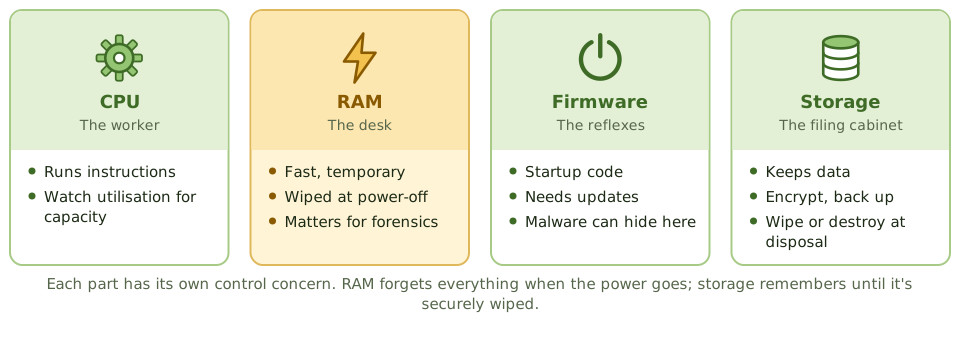
Think of an office worker. The CPU is the worker doing the thinking. RAM is the desk: quick to reach, but cleared every night. Storage is the filing cabinet: slower, but it keeps everything. Firmware is the reflexes that get the worker going each morning.
You don’t need to be an engineer for the exam, but you do need to know what each part means for control.
| Component | Role | Why the auditor cares |
|---|---|---|
| CPU | Runs program instructions | Utilisation is monitored for capacity planning |
| RAM | Fast, temporary working memory | Volatile: wiped when the power goes, so it matters for live forensics |
| ROM / firmware | Startup and device control code | Needs updates; malware can hide here and survive a reinstall |
| Storage | Keeps data: disks, SSDs, SAN, NAS, tape | Encryption, backup, secure disposal |
| Input/output devices | Getting data in and out | Physical and logical access; output controls |
| Removable media | USB sticks, external drives | Data leakage and malware: restrict and encrypt |
Ports and removable media
USB sticks are an easy way for data to walk out of the building and for malware to walk in. Controls: restrict or disable ports, allow only approved and encrypted devices, and log their use.
Computing architectures
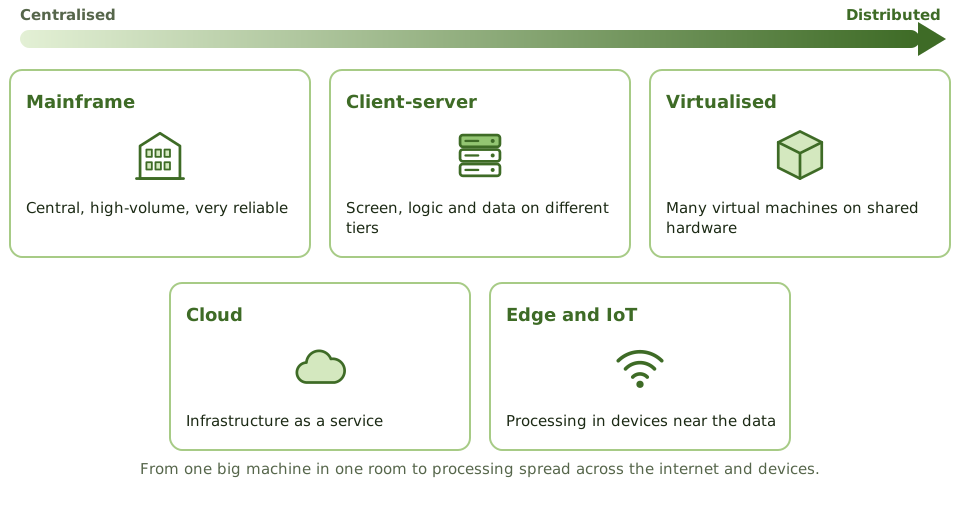
- Mainframes: centralised, high-volume, very reliable processing. Still common in banks and governments.
- Client-server and multi-tier: the screen, the business logic and the data sit on different systems.
- Virtualised: many virtual machines share physical hardware through a hypervisor.
- Cloud: infrastructure delivered as a service.
- Edge and IoT: processing happens in devices close to where data is created.
The hardware life cycle
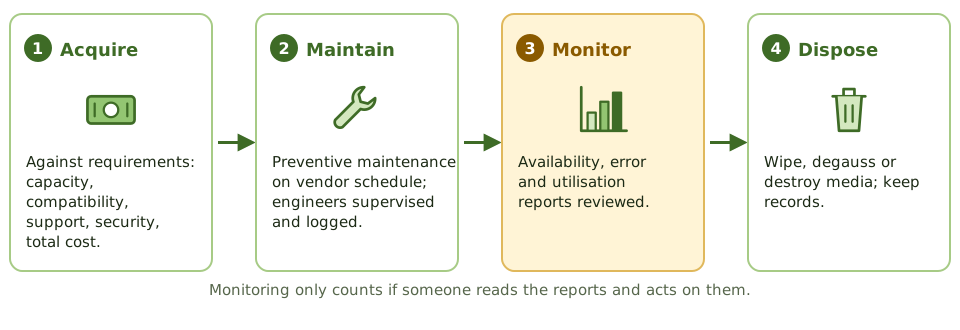
Acquire. Buy against documented requirements and standards: capacity and performance, compatibility, vendor support and lifespan, security features, energy use, total cost of ownership.
Maintain. Preventive maintenance follows the vendor’s schedule and is logged. Vendor engineers working on production equipment have access to everything, so their visits are scheduled, supervised where appropriate, and logged. Keep your own record of faults: if only the vendor logs them, you can’t see the trends.
Monitor. Availability reports, hardware error reports, utilisation reports and asset inventories reveal trends and help plan replacements, but only if someone reads them.
Example. Hardware error logs show the same storage controller reporting corrected memory errors every week for three months. Nobody reviewed them. The controller fails during month-end processing. Monitoring existed but wasn’t acted on, and that’s the finding.
Dispose. Storage media are securely wiped, degaussed or physically destroyed before disposal or reuse, with records kept.
How the exam asks about it
| If the question asks… | The answer is usually… |
|---|---|
| Memory whose contents are lost on power-off | RAM (volatile) |
| Control over vendor maintenance engineers | Supervised and logged access |
| Best source for hardware performance trends | Utilisation and error reports, reviewed regularly |
| Risk of unrestricted USB ports | Data leakage and malware |
| Control before disposing of storage media | Secure wiping or destruction, documented |
In short
- The CPU executes instructions; RAM is volatile working memory; ROM and firmware hold startup code; storage holds data persistently.
- Architectures range from mainframes and servers to distributed, client-server, virtualised and cloud environments.
- Hardware acquisition should follow requirements and a documented process, considering capacity, compatibility, support and security.
- Preventive maintenance follows vendor schedules and is logged; maintenance staff access is controlled.
- Hardware monitoring includes availability reports, error logs, utilisation reports and asset inventory.
- Removable media and USB ports are a common data leakage risk.
Exam traps
- RAM is volatile; its contents are lost when power is removed, which matters for forensics.
- Firmware can be compromised; it needs updates and integrity protection too.
- Vendor maintenance engineers with unsupervised access to production hardware are a security risk.
- Hardware problems logged only by the vendor leave the organisation blind to trends.
Slides
Click the slide and use the arrow keys. F toggles full screen.
Inside the box
Think of an office worker. The CPU is the worker doing the thinking. RAM is the desk: fast to reach, but cleared every night. Storage is the filing cabinet: slower, but it keeps everything. Firmware is the reflexes that get the worker going each morning.
Each part has its own control concern.
Computing architectures
The hardware life cycle