Topics in this domain
- IT Service Management
- Hardware Components and Architecture
- Operating Systems
- OSI Model
- TCP/IP and Common Protocols
- Network Devices: Switches, Routers, Gateways
- LAN/WAN Topologies
- Database Models and DBMS
- Database Controls and Normalization
- Asset Management
- Configuration Management
- Job Scheduling and Batch Processing
- Incident Management
- Problem Management
- Change Management
- Release and Patch Management
- Service Level Management
- Capacity and Performance Monitoring
- End-User Computing
- BCP Lifecycle
- Business Impact Analysis
- RTO, RPO, MTD, SDO
- Recovery Strategies
- Alternate Sites: Hot, Warm, Cold
- Backup Types: Full, Incremental, Differential
- Backup Storage and Rotation
- DRP Contents
- Testing BCP/DRP
- High Availability, RAID, Insurance
- Auditing BCP
TCP/IP and Common Protocols
The internet’s rulebook
The OSI model is the textbook version of networking. TCP/IP is what the internet actually runs on, and it squashes the seven OSI layers into four.
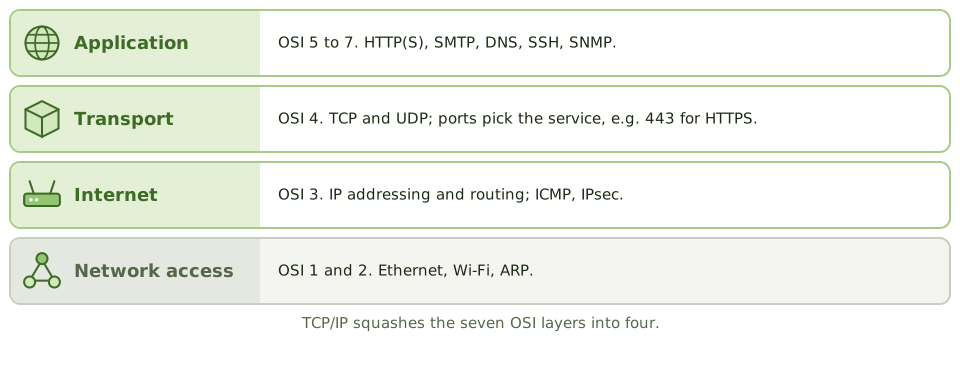
| TCP/IP layer | What it does | Examples |
|---|---|---|
| Application | Services for applications | HTTP, HTTPS, SMTP, DNS, FTP, SSH, SNMP |
| Transport | End-to-end delivery | TCP, UDP |
| Internet | Addressing and routing | IP, ICMP, IPsec |
| Network access | Getting bits across the local network | Ethernet, Wi-Fi, ARP |
TCP vs UDP
TCP is recorded delivery; UDP is a postcard. With recorded delivery, both sides confirm, every item is tracked, and anything lost is sent again. A postcard is quicker and cheaper, but if it gets lost, nobody knows.
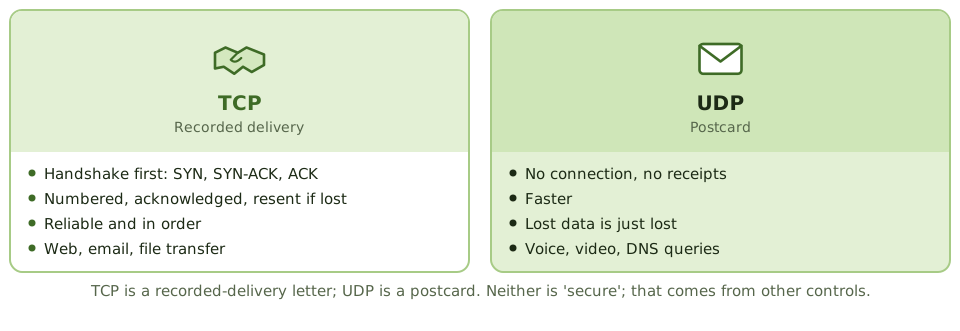
- TCP sets up a connection with a three-way handshake (SYN, SYN-ACK, ACK), numbers each segment, acknowledges what arrives and resends what doesn’t. Reliable and in order. Used for web, email and file transfer.
- UDP just sends, with no connection and no receipts. Faster. Used for voice, video and quick lookups such as DNS.
UDP isn’t “insecure” by design; it’s unreliable (no delivery guarantee). Security comes from other controls.
Ports identify the service on a machine, for example 443 for HTTPS. Firewalls filter on addresses and ports.
Addresses and NAT
- IPv4 addresses are 32-bit (like 192.168.1.10); IPv6 addresses are 128-bit.
- Private ranges (10.0.0.0/8, 172.16.0.0/12, 192.168.0.0/16) are used inside organisations.
- NAT (network address translation) swaps private addresses for a public one at the edge of the network. It hides internal addressing, but it isn’t a firewall.
- Subnetting splits a network into segments, which supports segregation.
Clear text vs secure
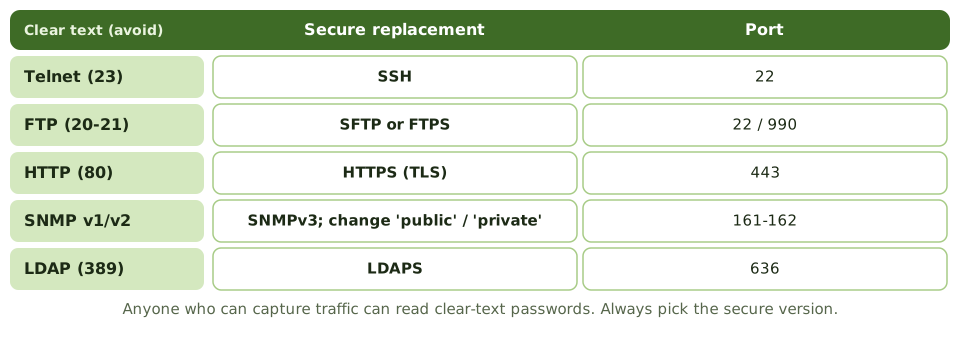
Several older protocols send everything, passwords included, in clear text. Anyone who can capture the traffic can read them.
| Protocol | Port | Use | Security note |
|---|---|---|---|
| HTTP / HTTPS | 80 / 443 | Web | Use HTTPS (TLS) |
| SMTP | 25 (587 for sending) | Use TLS; SPF, DKIM and DMARC against spoofing | |
| DNS | 53 | Turns names into addresses | DNSSEC; protect against poisoning |
| FTP / SFTP | 20-21 / 22 | File transfer | FTP is clear text |
| Telnet / SSH | 23 / 22 | Remote administration | Telnet is clear text |
| SNMP | 161-162 | Monitoring and managing devices | Use SNMPv3; change default community strings |
| LDAP / LDAPS | 389 / 636 | Directory services | Use the encrypted version |
| RDP | 3389 | Remote desktop | Never expose to the internet; use MFA |
| NTP | 123 | Clock synchronisation | Accurate time is needed to line up logs |
| DHCP | 67-68 | Hands out IP addresses | Rogue DHCP servers |
SNMP deserves a special mention: it can change device settings, not just read them. Default community strings (“public”, “private”) work like a well-known password and are a common finding.
Example. A network review finds switches and routers are managed with Telnet and SNMPv2 using the community string “public”. Anyone who can capture traffic on the management network can read device passwords and change configurations. The recommendation: SSH and SNMPv3, plus a separate management network.
How the exam asks about it
| If the question asks… | The answer is usually… |
|---|---|
| Protocol that guarantees delivery | TCP |
| Risk of using Telnet or FTP | Credentials sent in clear text |
| Secure replacement for Telnet | SSH |
| Why NTP matters for security | Accurate timestamps for log correlation |
| Risk with default SNMP settings | Unauthorised reading or changing of device configuration |
In short
- TCP/IP has four layers: network access, internet, transport and application.
- TCP is connection-oriented and reliable (handshake, acknowledgements, retransmission); UDP is connectionless and faster, without delivery guarantees.
- IP addresses identify hosts; private address ranges are used internally and translated with NAT.
- Insecure protocols (Telnet, FTP, HTTP, SNMPv1/v2) send data, including credentials, in clear text; secure alternatives are SSH, SFTP/FTPS, HTTPS and SNMPv3.
- DNS translates names to addresses; DHCP assigns addresses automatically; both are critical and attack targets.
- Network management protocols such as SNMP need strong authentication because they can change device settings.
Exam traps
- Telnet and FTP transmit passwords in clear text. Replace with SSH and SFTP.
- UDP isn't 'insecure' by design; it's unreliable (no delivery guarantee). Security comes from other controls.
- NAT hides internal addresses but isn't a substitute for a firewall.
- Default SNMP community strings ('public', 'private') are a common finding.
Slides
Click the slide and use the arrow keys. F toggles full screen.
The internet's rulebook
The OSI model is the textbook version. TCP/IP is what the internet actually runs on. It squashes the seven layers into four.
You don't need to configure it, but you do need to know what each piece does and which protocols are risky.
TCP vs UDP
Clear text vs secure