Topics in this domain
- IT Service Management
- Hardware Components and Architecture
- Operating Systems
- OSI Model
- TCP/IP and Common Protocols
- Network Devices: Switches, Routers, Gateways
- LAN/WAN Topologies
- Database Models and DBMS
- Database Controls and Normalization
- Asset Management
- Configuration Management
- Job Scheduling and Batch Processing
- Incident Management
- Problem Management
- Change Management
- Release and Patch Management
- Service Level Management
- Capacity and Performance Monitoring
- End-User Computing
- BCP Lifecycle
- Business Impact Analysis
- RTO, RPO, MTD, SDO
- Recovery Strategies
- Alternate Sites: Hot, Warm, Cold
- Backup Types: Full, Incremental, Differential
- Backup Storage and Rotation
- DRP Contents
- Testing BCP/DRP
- High Availability, RAID, Insurance
- Auditing BCP
Backup Types: Full, Incremental, Differential
Why there are different types
The simplest backup is to copy everything every night. That’s a full backup, and for a small system it’s fine. For large systems it’s a problem: copying terabytes every night takes hours, slows down the systems and fills up a lot of storage, and most of the data hasn’t changed since yesterday anyway.
So organisations usually take a full backup now and then (say, every Sunday) and in between copy only what has changed. There are two ways to decide what “changed” means, and that’s the whole difference between incremental and differential backups.
The three types
Full backup. Copies everything selected, every time. It takes the longest and uses the most storage, but restoring is easy: you need just one backup set.
Incremental backup. Copies only what changed since the last backup of any kind, whether that was a full or an incremental. Each night’s backup is small and quick. The catch is restoring: you need the last full backup plus every incremental since, applied in the right order.
Differential backup. Copies everything that changed since the last full backup. Monday’s differential holds Monday’s changes; Tuesday’s holds Monday and Tuesday’s; Wednesday’s holds Monday to Wednesday. So each one gets bigger until the next full backup. Restoring needs only the last full backup plus the most recent differential.
Think of it as notes on a long book you’re editing. A full backup is photocopying the whole book. An incremental is writing down only today’s edits. A differential is writing down every edit since the last photocopy. To rebuild the book from incrementals you need every day’s note; from differentials you only need the latest one.
One week, one crash
Here’s the example that makes it click. A full backup runs on Sunday. Nightly backups run Monday, Tuesday and Wednesday. On Thursday morning the server dies.
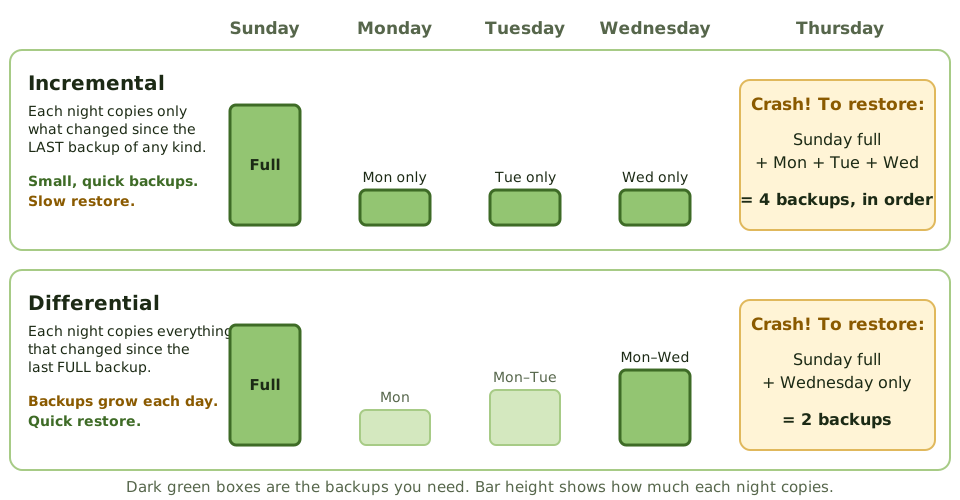
- With incrementals: restore Sunday’s full backup, then Monday’s, Tuesday’s and Wednesday’s incrementals, in that order.
- With differentials: restore Sunday’s full backup, then Wednesday’s differential. Done.
Now suppose Tuesday’s backup tape is damaged. With incrementals, everything after Monday is lost, because the chain is broken. With differentials, it doesn’t matter: Wednesday’s differential already contains Tuesday’s changes.
The trade-off
| Type | What it copies | Time to back up | Time to restore |
|---|---|---|---|
| Full | Everything | Longest | Shortest: one set |
| Incremental | Changes since the last backup of any kind | Shortest | Longest: full + every incremental, in order |
| Differential | Changes since the last full backup | Grows each day | Medium: full + latest differential |
A simple way to remember it: incremental saves backup time; differential saves restore time.
Losing less than a day of data
Nightly backups mean you could lose up to a day’s work. How much data loss the business can accept is called the recovery point objective (RPO). When the RPO is short, nightly backups aren’t enough:
| Technique | How it works | Possible data loss |
|---|---|---|
| Mirroring | Every write goes to two disks at the same time | None if one disk fails |
| Synchronous replication | A write is confirmed only when it’s saved at both sites | None, but the sites must be fairly close |
| Asynchronous replication | The second site is updated seconds or minutes later | Seconds to minutes |
| Remote journaling | Transaction logs are sent to another site as they happen | Near zero for transactions |
| Electronic vaulting | Backup data sent electronically, in bulk, to offsite storage | Hours |
| Continuous data protection | Every change is captured, so you can restore to any moment | Near zero |
| Snapshots | Quick point-in-time copies of storage | Depends on how often they’re taken |
Replication is not a backup
Replication copies everything, instantly, including mistakes. If someone deletes a table by accident, or ransomware encrypts the files, the replica is damaged a few seconds later. RAID mirroring is the same.
So replication has to be combined with point-in-time backups, and at least some copies should be offline or immutable (they can’t be changed or deleted for a set period), so attackers can’t reach them.
Example. Ransomware encrypts a company’s file servers at 2 a.m. By 2:01 the replica at the DR site is encrypted too. The backup server, joined to the same network with the same admin password, has been wiped. The only clean copy is a weekly backup on immutable cloud storage, five days old. Five days of work are lost.
Test the restore
A backup that has never been restored is a hope, not a control. “Backup completed successfully” only means the job ran, not that the data can be recovered. Restores should be tested regularly, including full system recovery, and the time they take compared with the recovery time objective.
How the exam asks about it
| If the question asks… | The answer is… |
|---|---|
| Backup that copies changes since the last full backup | Differential |
| Backup with the fastest backup time but slowest restore | Incremental |
| What’s needed to restore from differentials | Last full backup + latest differential |
| Technique sending transaction logs to another site in real time | Remote journaling |
| Technique giving zero data loss | Synchronous replication / mirroring |
| Why replication alone isn’t enough | It copies corruption, deletions and ransomware too |
| Best evidence that backups work | A successful test restore |
In short
- A full backup copies everything every time: simplest to restore, slowest and largest to take.
- An incremental backup copies only what changed since the last backup of any kind: quickest to take, slowest to restore (the full plus every incremental since).
- A differential backup copies everything changed since the last full backup: it grows each day, but restoring needs only the full plus the latest differential.
- Most organisations combine them, for example a weekly full backup with daily incrementals or differentials.
- Mirroring, replication and journaling reduce data loss to minutes or zero, and support a low RPO.
- Replication copies mistakes and ransomware too, so point-in-time and offline or immutable backups are still needed.
- A backup only counts if it can be restored, so restores must be tested.
Exam traps
- Incremental = since the LAST backup (of any kind). Differential = since the last FULL backup.
- With incrementals, one missing or damaged backup in the chain means everything after it is lost.
- Fastest backup but slowest restore: incremental. Bigger daily backups but faster restore: differential.
- Replication and RAID are not backups: delete a file and it's deleted everywhere.
- 'Backup completed successfully' messages don't prove the data can be restored.
Slides
Click the slide and use the arrow keys. F toggles full screen.
One week, one crash: what do you need?
A full backup runs on Sunday. Then nightly backups run Monday to Wednesday. On Thursday morning the server dies. Here's what each approach needs to get the data back.