Topics in this domain
- IT Service Management
- Hardware Components and Architecture
- Operating Systems
- OSI Model
- TCP/IP and Common Protocols
- Network Devices: Switches, Routers, Gateways
- LAN/WAN Topologies
- Database Models and DBMS
- Database Controls and Normalization
- Asset Management
- Configuration Management
- Job Scheduling and Batch Processing
- Incident Management
- Problem Management
- Change Management
- Release and Patch Management
- Service Level Management
- Capacity and Performance Monitoring
- End-User Computing
- BCP Lifecycle
- Business Impact Analysis
- RTO, RPO, MTD, SDO
- Recovery Strategies
- Alternate Sites: Hot, Warm, Cold
- Backup Types: Full, Incremental, Differential
- Backup Storage and Rotation
- DRP Contents
- Testing BCP/DRP
- High Availability, RAID, Insurance
- Auditing BCP
End-User Computing
The spreadsheet that runs the company
Every organisation has one: the spreadsheet only one person understands, which somehow calculates a number that ends up in the annual report.
End-user computing (EUC) covers tools created and run by business users rather than IT: spreadsheets, desktop databases, macros and scripts, user-built reports and low-code apps. They’re quick and flexible, which is exactly why they end up supporting important processes like financial reporting, pricing and regulatory returns.
A spreadsheet that feeds the financial statements is in scope for IT controls, even though IT didn’t build it.
What can go wrong
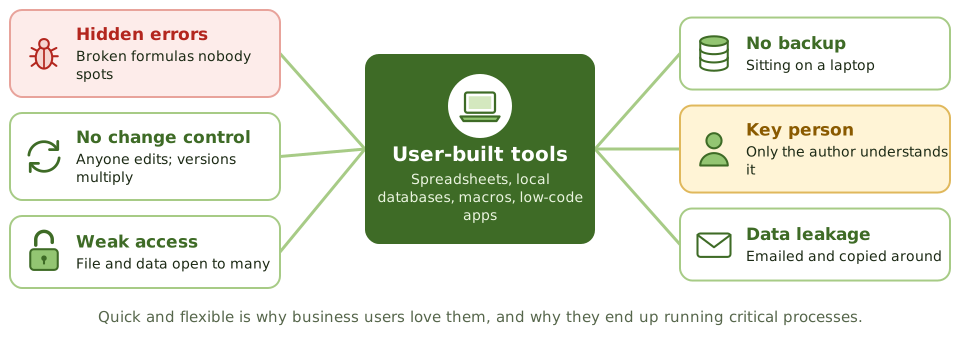
- Errors in formulas, links or logic, often never noticed
- No change control: anyone can edit, and versions multiply (“final_v3_REAL.xlsx”)
- Weak access control over the file and the data in it
- No backup when it lives on someone’s laptop
- Key person dependency: only the author understands it
- No documentation or testing
- Data leakage through email and personal storage
Password-protecting the file isn’t enough. The formulas and versions still need control.
Bringing EUC under control
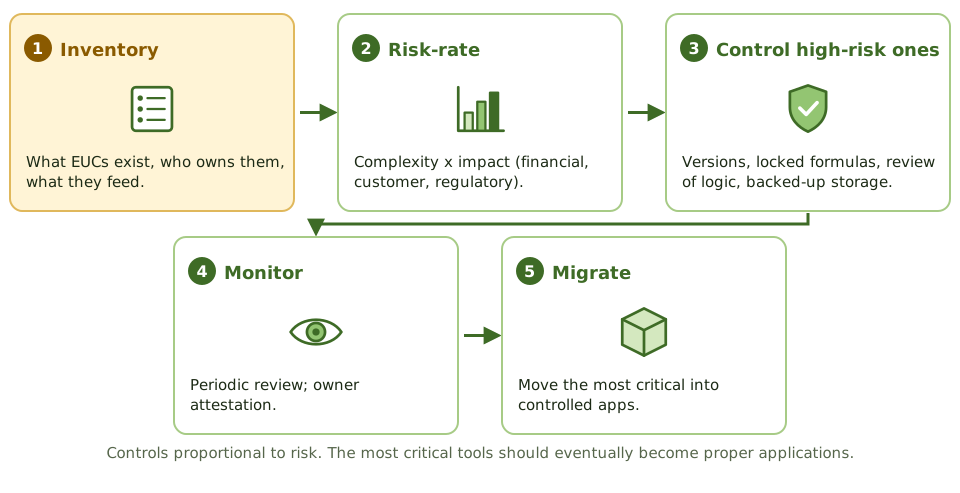
- Inventory: find the EUCs, their owners, and the processes they support. You can’t control what you don’t know about.
- Risk-rate each one by complexity and impact (financial reporting, customers, regulators).
- Control the high-risk ones, in proportion to the risk:
- version control and a change log
- restricted access, with formula cells locked
- input checks and control totals
- independent review of the logic, and reconciliation of outputs
- storage in a backed-up, access-controlled location
- documentation and a trained backup person
- Monitor through periodic review and owner sign-off.
- Migrate the most critical EUCs into properly controlled applications.
Checking the output isn’t enough
A final number can look perfectly reasonable while the formula behind it is quietly wrong.
Example. The quarterly provision for bad debts is calculated in a spreadsheet maintained by one analyst. The auditor finds a formula range that stopped including new rows two quarters ago, understating the provision. Only the final figure was ever reviewed, and it looked reasonable.
How the exam asks about it
| If the question asks… | The answer is usually… |
|---|---|
| First step in controlling EUC risk | Create an inventory of EUC applications |
| Greatest risk of spreadsheets in financial reporting | Undetected errors and unauthorised changes |
| Best control over a critical spreadsheet | Version and change control plus independent review of logic |
| Long-term solution for a critical EUC | Migrate it to a controlled application |
In short
- End-user computing (EUC) means applications built and run by business users outside IT's formal development: spreadsheets, local databases, scripts, low-code apps.
- EUC often supports critical processes such as financial reporting, pricing and regulatory returns.
- Risks: errors in formulas and logic, no change control, weak access controls, no backup, key person dependency and lack of documentation.
- Control starts with an inventory of EUC tools and a risk rating of each.
- High-risk EUCs need controls such as version control, access restrictions, input and formula checks, independent review, backup and documentation.
- Some high-risk EUCs should be migrated to controlled applications.
Exam traps
- A spreadsheet that feeds the financial statements is in scope for IT controls, even though IT didn't build it.
- Password-protecting a spreadsheet isn't enough; formulas and versions still need control.
- The first step in managing EUC risk is knowing what EUCs exist.
- Reviewing the output of a spreadsheet doesn't verify its formulas.
Slides
Click the slide and use the arrow keys. F toggles full screen.
What can go wrong
Bringing EUC under control