Topics in this domain
- Security Governance and Roles
- Data Classification and Ownership
- Security Policies
- Privacy Principles and GDPR
- Identity Management
- Authentication Factors
- Biometrics
- Access Models: DAC, MAC, RBAC
- Logical and Privileged Access
- Cryptography Basics
- Symmetric Encryption
- Asymmetric Encryption
- Hashing and Integrity
- Digital Signatures
- PKI and Certificates
- Firewalls
- IDS/IPS
- VPN, SSL/TLS, IPsec
- Wireless Security
- Endpoint and Mobile (BYOD)
- Cloud and Virtualization Security
- Physical Access Controls
- Environmental Controls: Fire, Power, HVAC
- Social Engineering
- Malware
- Network Attacks: DoS, Spoofing, Sniffing
- Application Attacks: SQLi, XSS
- Vulnerability Management and Pen Testing
- Incident Response
- Digital Forensics and Chain of Custody
- Security Awareness Training
- Logging, SIEM, and Auditing Security
Application Attacks: SQLi, XSS
Tricking the application
Imagine a bank form that says “Name: ____”. Instead of a name, someone writes “Bob, and also give the bearer all the money in the safe.” A sensible clerk ignores the extra part. A badly written program might just do it.
That’s the idea behind injection attacks: input that the application mistakes for instructions.
SQL injection
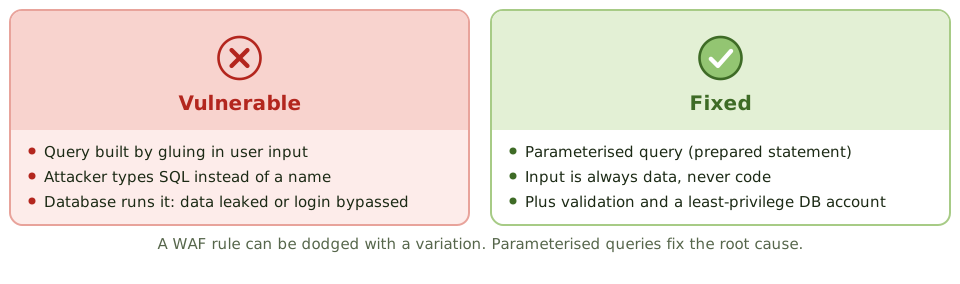
SQL injection happens when an application builds a database query by gluing user input into it. An attacker types SQL instead of normal data, and the database runs it, perhaps revealing, changing or deleting data, or skipping the login check.
Controls:
- parameterised queries (prepared statements), so input is always treated as data, never code. This is the primary fix.
- input validation (type, length, format), done on the server, because browser-side checks can be bypassed
- a least-privilege database account for the application
- stored procedures, used safely
- a web application firewall as an extra layer, not a substitute
Other injection types (operating system commands, LDAP, XML) follow the same pattern, with the same fix: never let untrusted input be treated as commands. Hiding detailed error messages reduces what attackers learn, but it doesn’t fix the hole.
Cross-site scripting (XSS)
The attacker plants a script in a web page that other users then view. The script runs in their browsers with the site’s trust, stealing session cookies or acting as them.
- Stored XSS: the script is saved on the server, in a comment or profile.
- Reflected XSS: the script is in a link and bounced back in the response.
- DOM-based XSS: the page is manipulated in the browser.
Controls: output encoding (escaping data so it’s shown as text, never run), input validation, a content security policy and HttpOnly cookies.
Other attacks
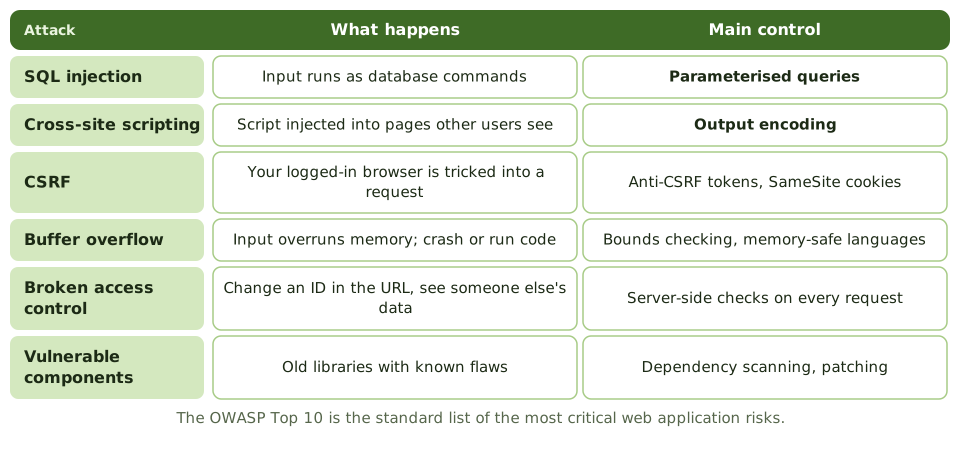
| Attack | What happens | Control |
|---|---|---|
| Cross-site request forgery (CSRF) | A logged-in user’s browser is tricked into sending a request to a site | Anti-CSRF tokens, SameSite cookies, re-authentication for sensitive actions |
| Buffer overflow | Input bigger than the space set aside overwrites nearby memory, crashing the program or running code | Bounds checking, memory-safe languages, compiler protections |
| Broken access control | Users reach data they shouldn’t, e.g. by changing an ID in the URL | Server-side authorisation on every request |
| Security misconfiguration | Default settings, chatty error messages, unneeded features | Hardening, configuration review |
| Vulnerable components | Old libraries with known flaws | Dependency scanning, patching |
| Insecure APIs | Weak authentication or too much data returned | API security testing, gateways |
The OWASP Top 10 is the standard list of the most critical web application risks.
Security across the life cycle
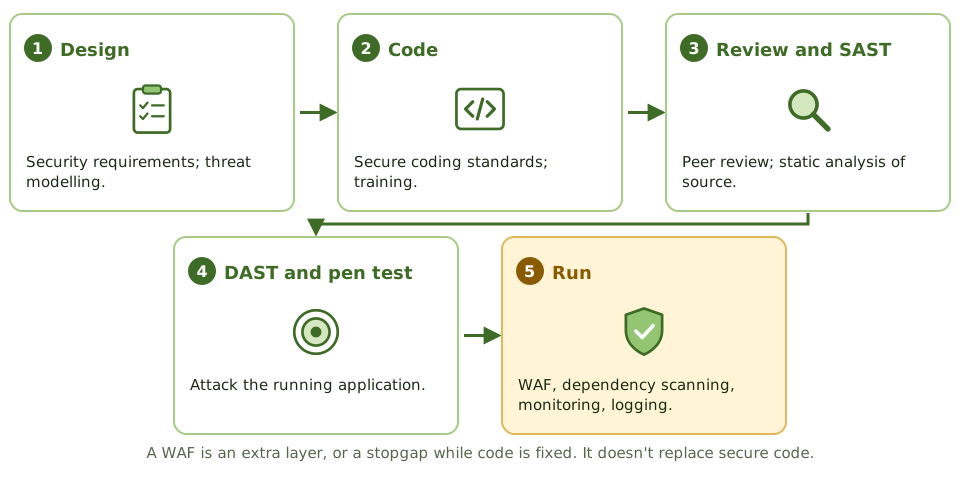
- security requirements and threat modelling in design
- secure coding standards and training
- code review and static analysis (SAST) of the source
- dynamic testing (DAST) and penetration testing of the running application
- dependency scanning
- web application firewall and runtime monitoring
- logging of security events
Example. A penetration tester logs into a customer portal by typing a crafted string in the username field, which turns the password check into something that’s always true. After a previous test, the developers had added a WAF rule, but the tester used a variation the WAF didn’t recognise. Only rewriting the query with parameters fixes the root cause.
How the exam asks about it
| If the question asks… | The answer is usually… |
|---|---|
| Best defence against SQL injection | Parameterised queries / prepared statements |
| Best defence against XSS | Output encoding (with input validation) |
| Role of a WAF | Additional layer; compensating control while code is fixed |
| Attack writing beyond allocated memory | Buffer overflow |
| Reference list of top web risks | OWASP Top 10 |
| Testing source code for vulnerabilities | Static analysis (SAST) |
In short
- SQL injection inserts SQL commands through input fields; parameterised queries (prepared statements) prevent it.
- Cross-site scripting (XSS) injects scripts into pages viewed by other users; output encoding and input validation prevent it.
- Cross-site request forgery (CSRF) tricks a logged-in user's browser into sending unwanted requests; anti-CSRF tokens prevent it.
- Buffer overflows write beyond allocated memory to crash programs or run code; bounds checking and safe languages prevent them.
- Broken access control (such as changing an ID in a URL to see someone else's data) is the most common web weakness.
- The OWASP Top 10 lists the most critical web application risks.
- Controls: secure coding, input validation, code review, security testing (SAST/DAST), and a web application firewall as an extra layer.
Exam traps
- The best defence against SQL injection is parameterised queries, not a WAF alone.
- Input validation helps, but output encoding is the key defence against XSS.
- Hiding error messages reduces information leakage but doesn't fix the vulnerability.
- Client-side validation can be bypassed; validate on the server.
- A WAF is a compensating control while code is fixed.
Slides
Click the slide and use the arrow keys. F toggles full screen.
Tricking the application
Imagine a form at the bank that says 'Name: ____'. Instead of a name, someone writes 'Bob, and also give the bearer all the money in the safe'. A sensible clerk ignores the extra bit. A badly written program might just do it.
That's the idea behind injection attacks: input that the application mistakes for instructions.
The attacks and their fixes
Security across the life cycle