Topics in this domain
- Security Governance and Roles
- Data Classification and Ownership
- Security Policies
- Privacy Principles and GDPR
- Identity Management
- Authentication Factors
- Biometrics
- Access Models: DAC, MAC, RBAC
- Logical and Privileged Access
- Cryptography Basics
- Symmetric Encryption
- Asymmetric Encryption
- Hashing and Integrity
- Digital Signatures
- PKI and Certificates
- Firewalls
- IDS/IPS
- VPN, SSL/TLS, IPsec
- Wireless Security
- Endpoint and Mobile (BYOD)
- Cloud and Virtualization Security
- Physical Access Controls
- Environmental Controls: Fire, Power, HVAC
- Social Engineering
- Malware
- Network Attacks: DoS, Spoofing, Sniffing
- Application Attacks: SQLi, XSS
- Vulnerability Management and Pen Testing
- Incident Response
- Digital Forensics and Chain of Custody
- Security Awareness Training
- Logging, SIEM, and Auditing Security
Malware
Software with bad intentions
Malware is like illness. Some types need you to pass them on (a cold), some spread on their own through the air, and some lie dormant for years until something triggers them.
Malware is any software written to cause harm. For the exam you need the names, and which control stops which.
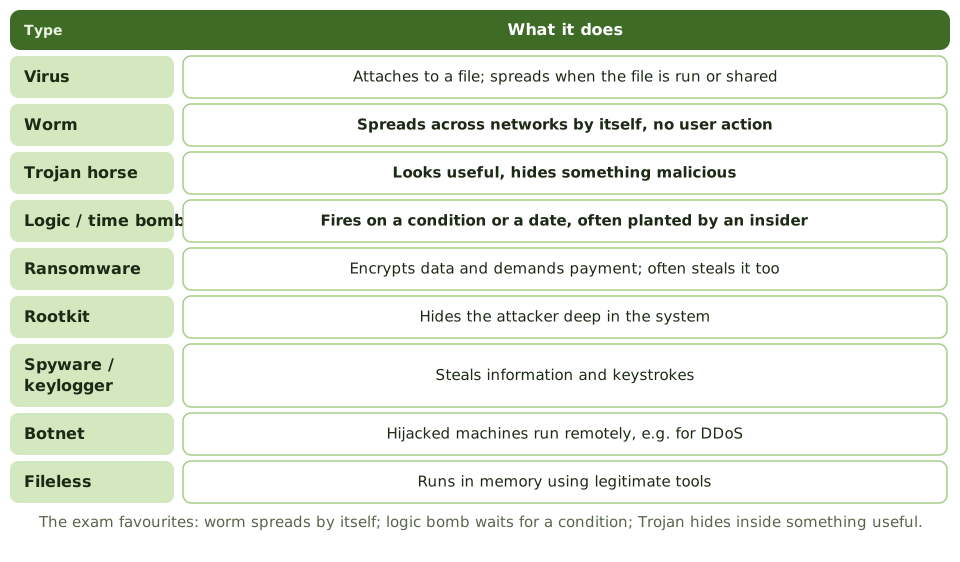
| Type | What it does |
|---|---|
| Virus | Attaches to a host program or file; spreads when that file is run or shared |
| Worm | Copies itself across networks without any user action, often through unpatched flaws |
| Trojan horse | Looks like useful software but carries hidden malicious functions |
| Logic bomb | Fires when a condition is met, such as an employee’s name disappearing from payroll. Often planted by an insider |
| Time bomb | A logic bomb triggered by a date or time |
| Ransomware | Encrypts data and demands payment; modern versions also steal the data and threaten to publish it |
| Rootkit | Hides the attacker’s activity deep in the operating system or firmware |
| Spyware and keyloggers | Collect information, browsing habits or keystrokes |
| Adware | Unwanted advertising, sometimes bundled with spyware |
| Botnet | Hijacked computers controlled remotely, used for DDoS, spam or further attacks |
| Fileless malware | Runs in memory using legitimate system tools, leaving few files behind |
The old crime terms
The Review Manual still lists some older “computer crime” techniques, and they turn up in questions:
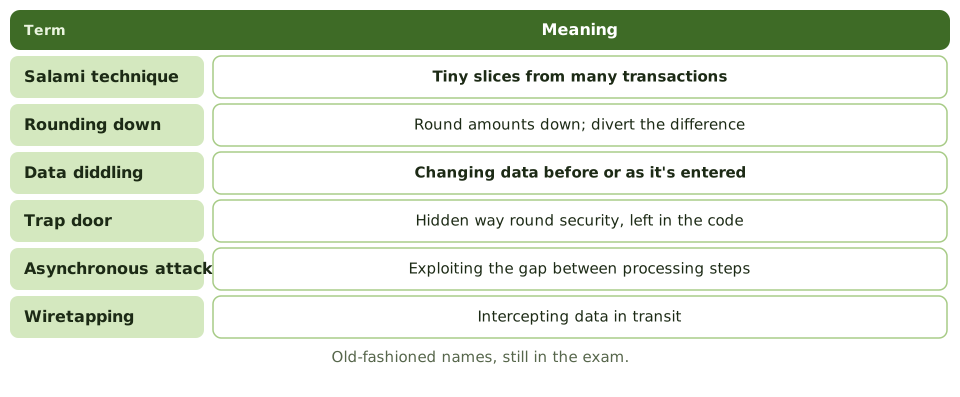
| Term | Meaning |
|---|---|
| Salami technique | Shaving very small amounts from many transactions, like slicing salami thinly, e.g. fractions of a cent into the attacker’s account |
| Rounding down | Rounding amounts down and diverting the difference |
| Data diddling | Changing data before or as it’s entered into the system |
| Trap doors | Hidden code that skips normal security, often left by programmers |
| Asynchronous attacks | Exploiting the time gap between processing steps, such as altering data during a checkpoint |
| Piggybacking | Following an authorised user’s session or physical entry |
| Wiretapping | Intercepting data in transit |
| Data leakage | Siphoning information out of the organisation |
Data diddling is caught by input controls and reconciliation. Insider threats like logic bombs and trap doors are caught by code review, segregation of duties, change management and monitoring of privileged activity.
Layers of defence
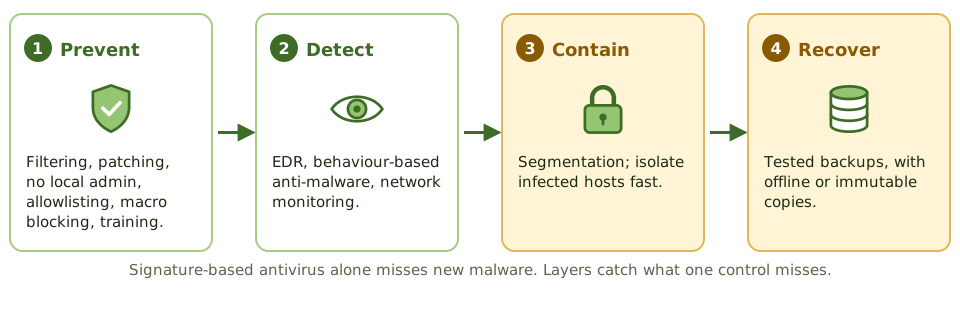
- Prevent: email and web filtering, patching, no local admin rights, application allowlisting, blocking macros from the internet, user awareness
- Detect: endpoint detection and response (EDR), behaviour-based anti-malware, network monitoring, file integrity monitoring
- Contain: network segmentation; isolate infected machines fast
- Recover: tested backups, including offline or immutable copies that ransomware can’t reach
Signature-based antivirus alone misses new variants, because there’s no signature yet. Behaviour-based detection and allowlisting fill the gap.
Ransomware goes for the backups
Backups that are online, writeable and reachable with the same administrator credentials get encrypted along with everything else.
Example. Ransomware encrypts the file servers and the backup server, which was joined to the same domain and reachable with the same admin credentials. The only usable copy is a monthly tape set stored offsite, four weeks old. Immutable backups with separate credentials would have cut the data loss to hours.
How the exam asks about it
| If the question asks… | The answer is usually… |
|---|---|
| Malware spreading without user action | Worm |
| Malicious code triggered by a condition | Logic bomb |
| Software hiding malicious functions in a useful program | Trojan horse |
| Stealing tiny amounts from many transactions | Salami technique |
| Altering data before entry | Data diddling |
| Most important recovery control for ransomware | Offline or immutable backups |
| Limitation of signature-based antivirus | Can’t detect new or unknown malware |
In short
- A virus attaches to a host file and needs user action to spread; a worm spreads by itself across networks.
- A Trojan horse hides malicious functions inside apparently legitimate software.
- A logic bomb triggers on a condition, such as a date or an event; a time bomb triggers on a date.
- Ransomware encrypts data and demands payment; offline or immutable backups are the key recovery control.
- Rootkits hide the attacker's presence; spyware and keyloggers steal information; botnets enlist compromised machines.
- Older exam terms: salami technique (shaving small amounts), data diddling (altering input), trap doors (hidden entry points), asynchronous attacks.
- Controls are layered: user awareness, patching, least privilege, EDR/anti-malware, application allowlisting, email and web filtering, and backups.
Exam traps
- Signature-based antivirus can't detect new malware; behaviour-based detection and EDR help.
- Logic bomb = condition-triggered, often planted by an insider.
- Salami technique takes tiny amounts from many transactions, such as rounding fractions of a cent.
- Data diddling changes data before or during input; input controls and reconciliation help detect it.
- Backups that are online and writeable may be encrypted by ransomware too.
Slides
Click the slide and use the arrow keys. F toggles full screen.
Software with bad intentions
Malware is any software written to cause harm. Like illnesses, the types differ in how they spread and what they do: some need you to pass them on, some spread on their own, some lie dormant until a trigger.
Knowing the names matters for the exam, but so does knowing which control stops which.
The old crime terms
Layers of defence