Topics in this domain
- Security Governance and Roles
- Data Classification and Ownership
- Security Policies
- Privacy Principles and GDPR
- Identity Management
- Authentication Factors
- Biometrics
- Access Models: DAC, MAC, RBAC
- Logical and Privileged Access
- Cryptography Basics
- Symmetric Encryption
- Asymmetric Encryption
- Hashing and Integrity
- Digital Signatures
- PKI and Certificates
- Firewalls
- IDS/IPS
- VPN, SSL/TLS, IPsec
- Wireless Security
- Endpoint and Mobile (BYOD)
- Cloud and Virtualization Security
- Physical Access Controls
- Environmental Controls: Fire, Power, HVAC
- Social Engineering
- Malware
- Network Attacks: DoS, Spoofing, Sniffing
- Application Attacks: SQLi, XSS
- Vulnerability Management and Pen Testing
- Incident Response
- Digital Forensics and Chain of Custody
- Security Awareness Training
- Logging, SIEM, and Auditing Security
Authentication Factors
Three ways to prove it’s you
Taking cash from an ATM needs your card (something you have) and your PIN (something you know). A thief with just one of them gets nothing. That’s multifactor authentication, and you use it every week without thinking.
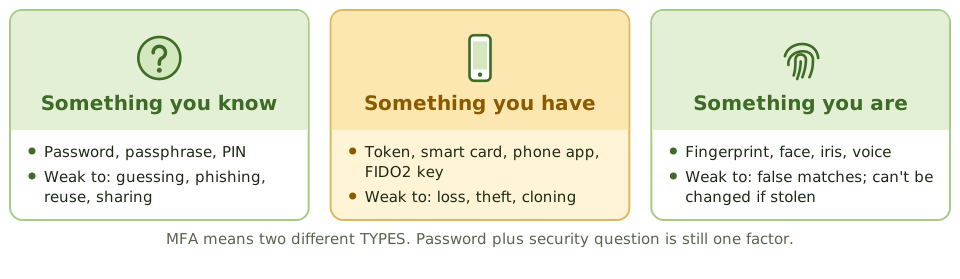
| Factor | Examples | Main weaknesses |
|---|---|---|
| Something you know | Password, passphrase, PIN, security answers | Guessing, phishing, reuse, sharing |
| Something you have | Hardware token, smart card, authenticator app, FIDO2 security key | Loss, theft, cloning of weaker tokens |
| Something you are | Fingerprint, face, iris, voice | False matches; can’t be changed if stolen; privacy |
Some systems add somewhere you are (location) or something you do (behaviour) as extra risk signals.
What counts as multifactor
Multifactor authentication (MFA) combines at least two different types of factor.
- Smart card + PIN: MFA (have + know).
- Password + hardware token: MFA.
- Password + security question: not MFA. Both are things you know.
Making passwords less bad
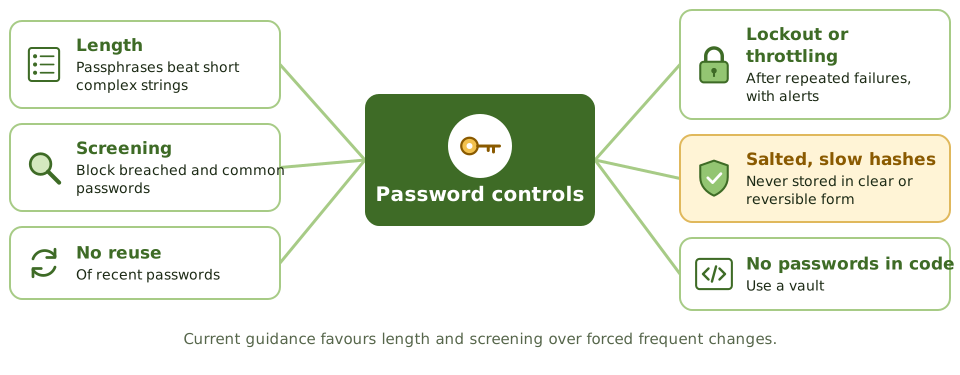
- enough length: passphrases are easier to remember and harder to crack
- screening against lists of breached and common passwords
- no reuse of recent passwords
- lockout or throttling after repeated failures, with alerts. Lockout stops online guessing, but attackers can abuse it to lock people out, so use sensible thresholds.
- stored as salted hashes using slow algorithms, never in clear text or reversible encryption
- unique initial passwords, delivered securely and changed on first use
- no passwords in scripts or code
Current guidance favours length and screening over forced frequent changes, with a change required when compromise is suspected.
Not all MFA is equal
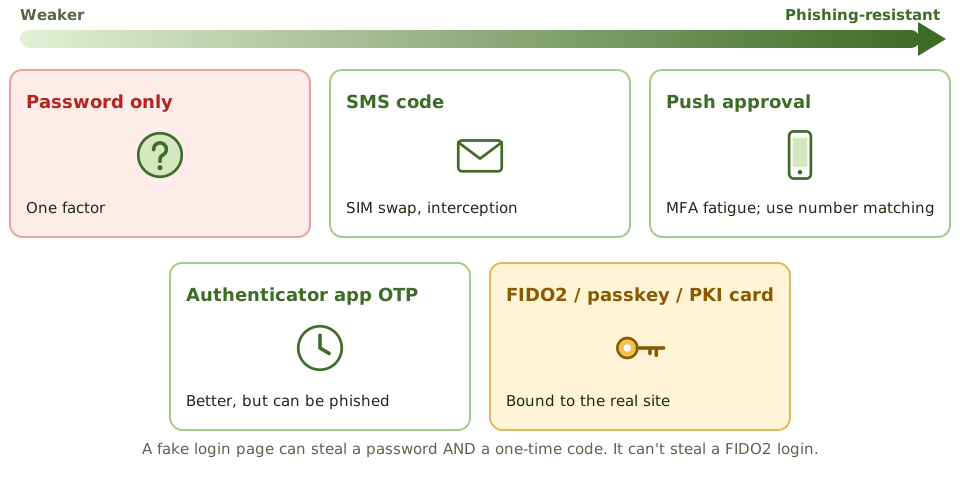
- One-time passwords (OTP) from hardware tokens or authenticator apps change every 30 to 60 seconds, or with each use.
- SMS codes beat passwords alone but are weaker than app codes, because of SIM swapping and interception.
- Push notifications are convenient, but attackers send prompt after prompt hoping the user taps “approve” (MFA fatigue). Number matching helps.
- Phishing-resistant MFA (FIDO2 security keys, passkeys, PKI smart cards) uses cryptography tied to the genuine website, so a fake login page can’t capture anything usable.
Example. An attacker phishes a finance manager’s password and one-time code through a fake login page, then logs in to the real site within seconds. The organisation had MFA, but not a phishing-resistant type. Moving privileged and finance users to FIDO2 keys closes the gap.
Where MFA goes first
- remote access (VPN, remote desktop, webmail)
- privileged and administrator accounts
- cloud administration consoles
- access to sensitive data and payment systems
How the exam asks about it
| If the question asks… | The answer is usually… |
|---|---|
| Example of two-factor authentication | Smart card plus PIN; password plus hardware token |
| Password plus security question | Single-factor (both knowledge) |
| Strongest protection against phishing | FIDO2 / passkeys / PKI-based MFA |
| Best way to store passwords | Salted hashes using a slow algorithm |
| Weakness of SMS codes | SIM swapping and interception |
| Highest priority for MFA | Remote and privileged access |
In short
- Three factor types: something you know (password, PIN), something you have (token, phone, smart card), something you are (biometric).
- Multifactor authentication combines factors of different types; two passwords are still single-factor.
- Password controls: length and complexity, no reuse, lockout after failed attempts, secure storage as salted hashes, and screening against breached passwords.
- One-time passwords from tokens or apps are stronger than static passwords; SMS codes are weaker because of SIM swapping and interception.
- Phishing-resistant MFA (FIDO2 security keys, passkeys, smart cards with PKI) binds authentication to the legitimate site.
- MFA should be applied first to remote access, privileged accounts, and access to sensitive data.
Exam traps
- A password plus a security question is two things you know: single-factor.
- Account lockout protects against online guessing but can be abused for denial of service; use thresholds and alerts.
- Passwords must be stored hashed with a salt, never in clear text or with reversible encryption.
- Push-notification MFA can be defeated by 'MFA fatigue' attacks; use number matching or phishing-resistant methods.
- Smart cards are something you have; the PIN that unlocks them is something you know.
Slides
Click the slide and use the arrow keys. F toggles full screen.
Three ways to prove it's you
Taking cash from an ATM needs your card (something you have) and your PIN (something you know). A thief with just one of them gets nothing. That's multifactor authentication.
The three factor types are something you know, something you have, and something you are.
Making passwords less bad
Not all MFA is equal