Topics in this domain
- Security Governance and Roles
- Data Classification and Ownership
- Security Policies
- Privacy Principles and GDPR
- Identity Management
- Authentication Factors
- Biometrics
- Access Models: DAC, MAC, RBAC
- Logical and Privileged Access
- Cryptography Basics
- Symmetric Encryption
- Asymmetric Encryption
- Hashing and Integrity
- Digital Signatures
- PKI and Certificates
- Firewalls
- IDS/IPS
- VPN, SSL/TLS, IPsec
- Wireless Security
- Endpoint and Mobile (BYOD)
- Cloud and Virtualization Security
- Physical Access Controls
- Environmental Controls: Fire, Power, HVAC
- Social Engineering
- Malware
- Network Attacks: DoS, Spoofing, Sniffing
- Application Attacks: SQLi, XSS
- Vulnerability Management and Pen Testing
- Incident Response
- Digital Forensics and Chain of Custody
- Security Awareness Training
- Logging, SIEM, and Auditing Security
Physical Access Controls
Layers, like an onion
A bank doesn’t rely on one locked door. There’s the street door, the counter, the back office, and finally the vault, each harder to reach than the one before.
Physical security puts layers of barriers between intruders and people, equipment and data. Every logical control can be bypassed by someone who can walk out with the server.
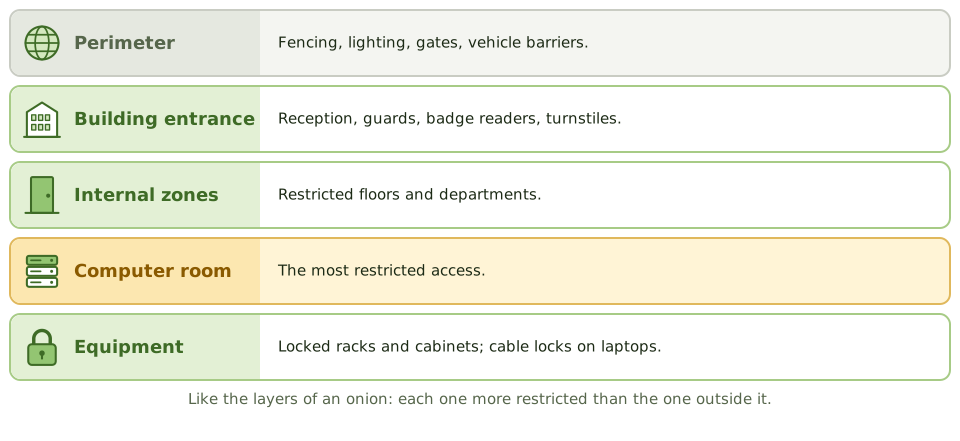
- Perimeter: fencing, lighting, gates, vehicle barriers
- Building entrance: reception, guards, badge readers, turnstiles
- Internal zones: restricted floors and departments
- Computer rooms and data centres: the most restricted access
- Equipment: locked racks and cabinets, cable locks on laptops
Locks
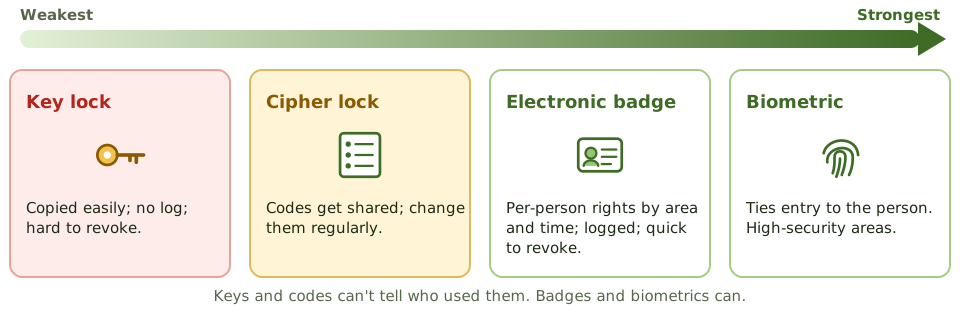
| Mechanism | Notes |
|---|---|
| Bolting door locks (keys) | Easily copied, no record of who used them, hard to revoke |
| Combination (cipher) locks | Keypads. Codes get shared and watched over shoulders, so change them regularly and when people leave |
| Electronic badge systems | Individual rights by area and time; every use logged; badges switched off instantly |
| Biometric locks | Tie entry to the actual person; used for high-security areas |
| Mantraps / access vestibules | Two interlocking doors; one person through at a time |
| Dead-man doors | A pair of doors where the second opens only once the first has closed |
Stopping tailgating
Tailgating (or piggybacking) is following an authorised person through a controlled door, often helped by politeness: people hold doors open.
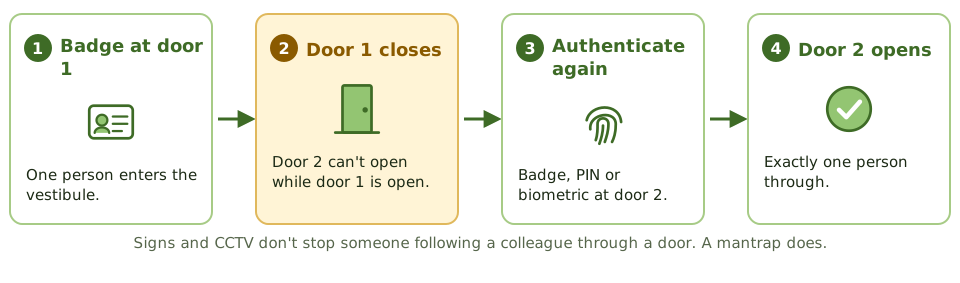
The most effective control is a mantrap or turnstile. Awareness training and guards help; signs and CCTV alone don’t prevent it.
Example. An auditor watches staff holding the data centre door open for colleagues carrying equipment. Badge logs show one entry for groups of four, so the logs don’t show who was really inside. A mantrap and a door-held-open alarm fix it.
Guards, cameras and visitors
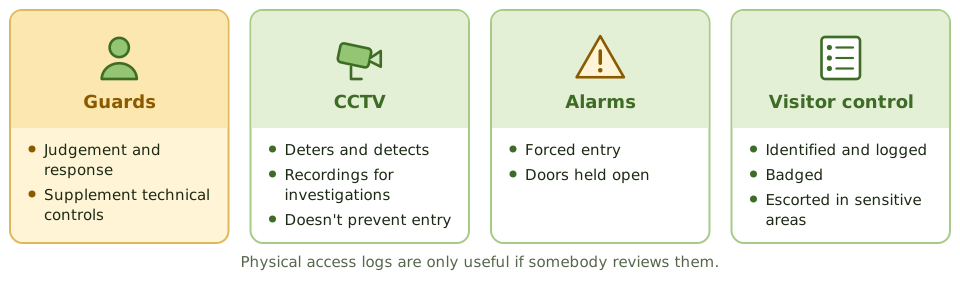
- Security guards bring judgement and can respond; they supplement the technical controls.
- CCTV deters and detects, and recordings support investigations. It doesn’t stop anyone getting in.
- Alarms detect forced entry and doors held open.
- Visitors are identified, logged, given a visitor badge and escorted in sensitive areas.
Managing access
- The area owner approves access to sensitive areas, based on need.
- Badge rights are removed promptly when people leave or change role.
- Access lists are reviewed regularly.
- Access logs and alarms are monitored, especially for computer rooms. A log nobody reviews detects nothing.
Where to put the data centre
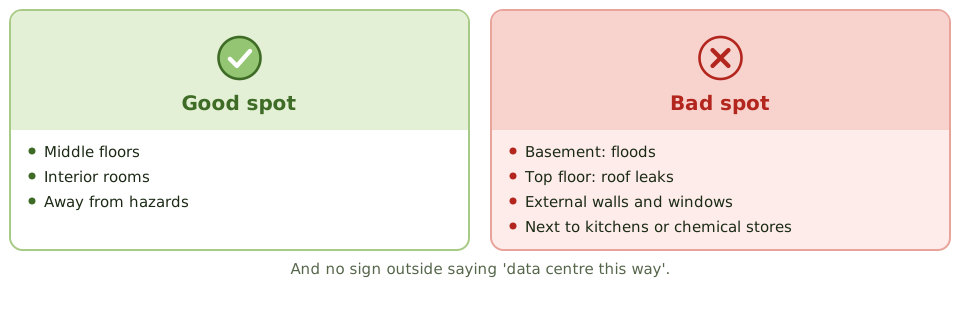
- away from external walls and windows
- not in the basement (flooding) or on the top floor (roof leaks, weather)
- away from hazards such as kitchens, chemical stores and flight paths
- no sign outside advertising it
How the exam asks about it
| If the question asks… | The answer is usually… |
|---|---|
| Best control against tailgating | Mantrap / access vestibule or turnstile |
| Advantage of electronic badge systems over keys | Individual rights, logging, quick revocation |
| Visitors in the data centre | Logged, badged and escorted |
| Best location for a data centre within a building | Middle floors, away from exterior walls, no signage |
| Weakness of cipher locks | Shared codes; need regular changes |
In short
- Physical security uses layers: site perimeter, building entrance, internal zones and the computer room itself.
- Access to sensitive areas should be restricted to authorised people, logged, and reviewed periodically.
- Mantraps (access vestibules) and turnstiles prevent tailgating and piggybacking.
- Electronic badge systems allow individual access rights, logging and quick revocation; key locks and combination locks don't.
- Visitors should be identified, logged, badged and escorted in sensitive areas.
- CCTV is mainly detective and deterrent; guards add judgement and response.
- Computer rooms are best located away from external walls, ground floors and basements (flooding), and top floors (roof leaks), without signage.
Exam traps
- Best control against tailgating: a mantrap, not a sign or CCTV.
- Combination (cipher) locks need regular code changes and are weak if codes are shared.
- Badge access lists must be updated when people leave or change roles; review them periodically.
- Dead-man (two-door) systems only let one person through at a time.
- Logs of physical access are only useful if reviewed.
Slides
Click the slide and use the arrow keys. F toggles full screen.
Layers, like an onion
A bank doesn't rely on one locked door. There's the street door, the counter, the back office, and finally the vault, each harder to reach than the last.
Physical security uses the same layers to keep people away from equipment and data. Every logical control can be bypassed by someone who can pick up the server.
Locks
Stopping tailgating
Guards, cameras and visitors
Where to put the data centre