Topics in this domain
- Security Governance and Roles
- Data Classification and Ownership
- Security Policies
- Privacy Principles and GDPR
- Identity Management
- Authentication Factors
- Biometrics
- Access Models: DAC, MAC, RBAC
- Logical and Privileged Access
- Cryptography Basics
- Symmetric Encryption
- Asymmetric Encryption
- Hashing and Integrity
- Digital Signatures
- PKI and Certificates
- Firewalls
- IDS/IPS
- VPN, SSL/TLS, IPsec
- Wireless Security
- Endpoint and Mobile (BYOD)
- Cloud and Virtualization Security
- Physical Access Controls
- Environmental Controls: Fire, Power, HVAC
- Social Engineering
- Malware
- Network Attacks: DoS, Spoofing, Sniffing
- Application Attacks: SQLi, XSS
- Vulnerability Management and Pen Testing
- Incident Response
- Digital Forensics and Chain of Custody
- Security Awareness Training
- Logging, SIEM, and Auditing Security
Wireless Security
A network that leaks through the walls
A cable network is like a conversation in a closed room. Wi-Fi is like shouting across a car park: anyone in range can listen, from outside the building or the office next door.
Radio doesn’t stop at the walls, so locked doors and physical security aren’t enough. Wireless security depends on encryption and on checking who’s connecting.
Protocols
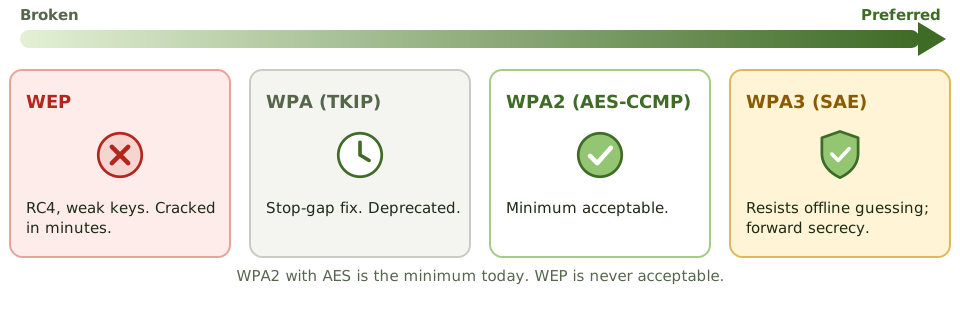
| Protocol | Notes |
|---|---|
| WEP | RC4 with weak key handling; cracked in minutes. Never acceptable. |
| WPA | A stop-gap fix using TKIP; deprecated |
| WPA2 | AES-based CCMP encryption; the minimum acceptable today |
| WPA3 | Stronger handshake (SAE) that resists offline password guessing; forward secrecy; preferred |
Personal vs enterprise mode
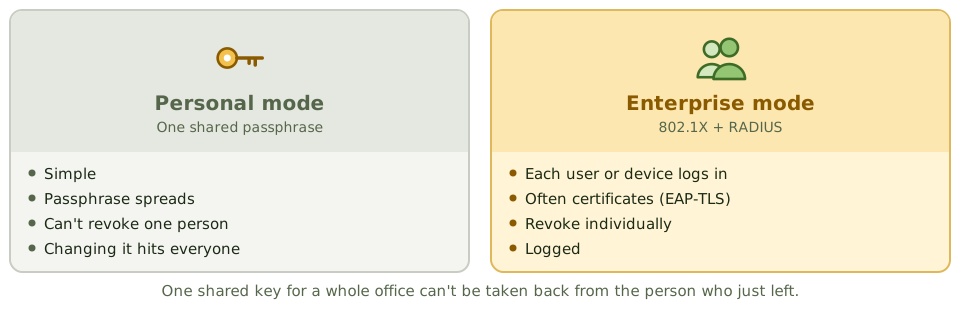
- Personal mode uses one shared passphrase for everyone. Simple, but the passphrase spreads, you can’t take it back from one person who left, and changing it affects everybody.
- Enterprise mode uses 802.1X with a RADIUS server to check each user or device individually, often with certificates (EAP-TLS). Access can be revoked person by person, and it’s logged. This is the expected answer for corporate networks.
Wireless threats
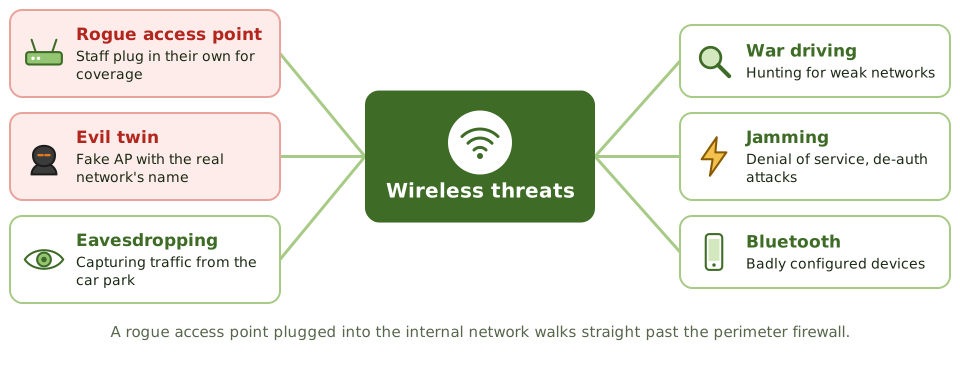
- Rogue access points: unauthorised access points plugged into the internal network, often by staff wanting better coverage. They walk straight past the perimeter firewall.
- Evil twins: attacker-run access points broadcasting a real network’s name to capture passwords.
- Eavesdropping and war driving: capturing traffic, or hunting for weakly protected networks, from outside.
- Denial of service: jamming, or forcing devices to disconnect.
- Bluetooth attacks on badly configured devices. Short-range wireless needs controls too.
Example. A wireless survey finds an access point called “Finance-Fast” in the finance department. A staff member bought it for better coverage and plugged it into a network port. It uses a weak passphrase and gives direct access to the internal network. Port security and regular surveys would have prevented or found it.
Strong and weak controls
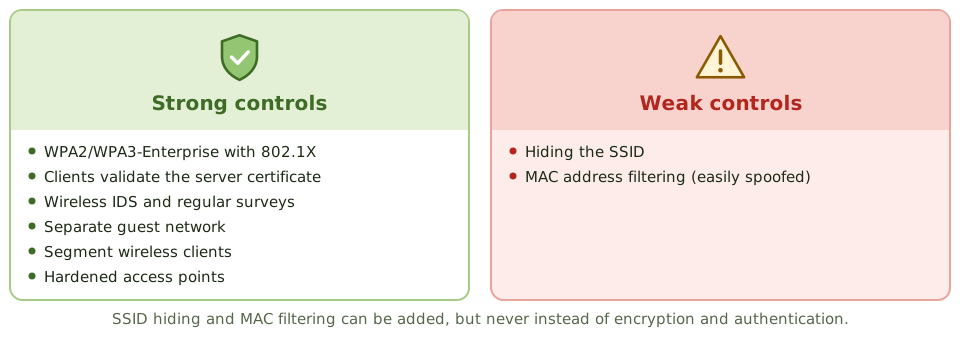
Strong controls
- WPA2-Enterprise or WPA3-Enterprise with 802.1X for corporate access
- clients that check the network’s certificate, which defeats evil twins
- wireless intrusion detection/prevention and regular wireless surveys to find rogue access points
- a separate, isolated guest network
- segmentation, so wireless users reach only what they need
- hardened access points: default passwords changed, current firmware, management access restricted
Weak controls (fine as extras, never instead of the above)
- hiding the network name (SSID): attackers find it easily
- MAC address filtering: MAC addresses are easy to fake
How the exam asks about it
| If the question asks… | The answer is usually… |
|---|---|
| Most secure Wi-Fi configuration for corporate devices | WPA3 (or WPA2)-Enterprise with 802.1X |
| Protocol that must not be used | WEP |
| Weak wireless controls | MAC filtering, SSID hiding |
| Best way to detect rogue access points | Wireless IDS and regular site surveys |
| Guest Wi-Fi requirement | Separated from the corporate network |
In short
- Wireless signals travel beyond physical boundaries, so encryption and strong authentication are essential.
- WEP is broken and must not be used; WPA2 with AES (CCMP) is the minimum; WPA3 is preferred.
- Enterprise mode (802.1X with RADIUS) authenticates each user or device individually; personal mode uses a shared passphrase.
- Rogue access points and evil twins are major threats; wireless intrusion detection and regular surveys detect them.
- Hiding the SSID and filtering MAC addresses are weak controls that are easily bypassed.
- Guest wireless should be separated from the corporate network.
Exam traps
- MAC filtering isn't strong security; MAC addresses can be spoofed.
- A shared passphrase can't be revoked for one person; enterprise mode can.
- SSID hiding doesn't stop a determined attacker.
- A rogue access point plugged into the internal network bypasses the perimeter firewall.
- Bluetooth and other short-range wireless also need controls.
Slides
Click the slide and use the arrow keys. F toggles full screen.
A network that leaks through the walls
A cable network is like a conversation in a closed room. Wi-Fi is like shouting across a car park: anyone within range can listen, from outside the building or next door.
Locked doors don't help. Wi-Fi security depends on encryption and on checking who's connecting.
Personal vs enterprise
Wireless threats
Strong and weak controls