Topics in this domain
- Security Governance and Roles
- Data Classification and Ownership
- Security Policies
- Privacy Principles and GDPR
- Identity Management
- Authentication Factors
- Biometrics
- Access Models: DAC, MAC, RBAC
- Logical and Privileged Access
- Cryptography Basics
- Symmetric Encryption
- Asymmetric Encryption
- Hashing and Integrity
- Digital Signatures
- PKI and Certificates
- Firewalls
- IDS/IPS
- VPN, SSL/TLS, IPsec
- Wireless Security
- Endpoint and Mobile (BYOD)
- Cloud and Virtualization Security
- Physical Access Controls
- Environmental Controls: Fire, Power, HVAC
- Social Engineering
- Malware
- Network Attacks: DoS, Spoofing, Sniffing
- Application Attacks: SQLi, XSS
- Vulnerability Management and Pen Testing
- Incident Response
- Digital Forensics and Chain of Custody
- Security Awareness Training
- Logging, SIEM, and Auditing Security
Asymmetric Encryption
The problem it solves
Ordinary encryption, called symmetric encryption, uses one secret key. The same key locks and unlocks the data. That works well, but it has an awkward chicken-and-egg problem: before you can send anything secretly, you have to get the key to the other person secretly. If you could do that safely, you probably wouldn’t need encryption.
Asymmetric encryption (also called public-key encryption) gets around this. There’s nothing secret to send.
Two keys that belong together
Each person gets a key pair:
- a public key, which they can give to anyone, publish on a website or put in an email signature
- a private key, which they keep to themselves and never share
The two keys are mathematically linked: whatever one key locks, only the other key of the same pair can unlock. And you can’t work out the private key from the public one, which is why it’s safe to publish the public key.
Think of padlocks. Bob buys a hundred identical padlocks that all open with one key. He leaves the padlocks open in a bowl at the front desk for anyone to take: those are his public key. He keeps the only key in his pocket: that’s his private key. Anyone can snap one of Bob’s padlocks shut on a box, but only Bob can open it.
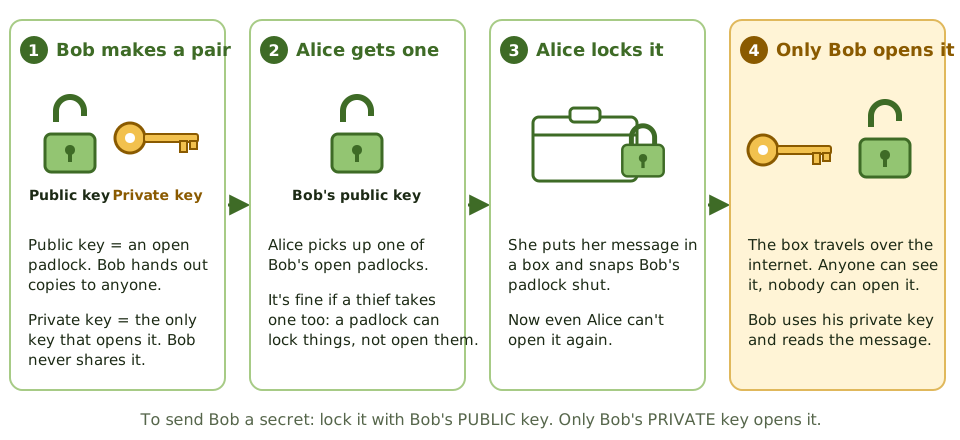
Notice something in step 3: once Alice snaps the padlock shut, even she can’t reopen the box. That’s fine, because the message was only meant for Bob.
Whose key? The rule to remember
There are two reasons to use the keys, and each one has its own answer.
1. Keeping something secret (confidentiality). The sender encrypts with the receiver’s public key. Only the receiver’s private key can decrypt it.
2. Proving who sent it (a digital signature). This works the other way round. The sender signs with their own private key. Since nobody else has that key, a valid signature proves it came from them. Anyone can check the signature with the sender’s public key.
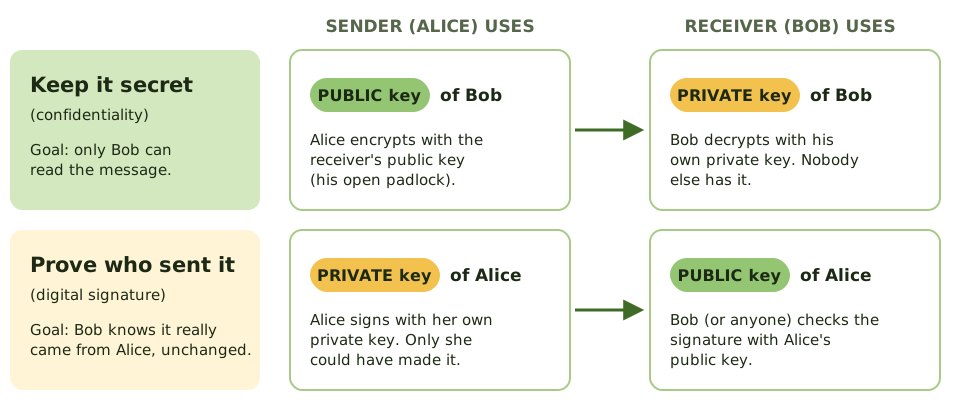
| Goal | Sender uses | Receiver uses |
|---|---|---|
| Keep it secret | Receiver’s public key to encrypt | Their own private key to decrypt |
| Prove who sent it | Their own private key to sign | Sender’s public key to verify |
| Both | Own private key to sign, then receiver’s public key to encrypt | Own private key to decrypt, then sender’s public key to verify |
Quick check. Alice wants a message that only Bob can read. Which key does she use? Bob’s public key. Alice wants Bob to be sure it came from her. Which key? Alice’s private key.
A common wrong answer is “encrypt with your own private key to keep it secret”. That doesn’t keep anything secret: your public key is public, so anyone can undo it. (That’s exactly why it works as a signature instead.)
Why not use it for everything?
Asymmetric encryption is slow, often hundreds of times slower than symmetric encryption. Using it on a big file or a video stream would take far too long.
So real systems combine both. This is called hybrid encryption:
- Create a random symmetric session key just for this conversation.
- Encrypt that small session key with the receiver’s public key.
- Encrypt the actual data with the fast session key.
- The receiver uses their private key to unlock the session key, then uses the session key to read the data.
Everyday example. When you open a banking website, your browser and the bank do exactly this. Public-key cryptography sets up a session key in a fraction of a second, and from then on everything is protected with fast symmetric encryption. That’s what the padlock icon in your browser means.
Symmetric and asymmetric side by side
| Symmetric | Asymmetric | |
|---|---|---|
| Keys | One shared secret key | A public and private pair |
| Speed | Fast | Slow |
| Sharing keys | Hard: must be delivered secretly | Easy: public keys can be published |
| Keys needed for 100 people | 4,950 (one per pair of people) | 200 (one pair each) |
| Can prove who sent it | No, both sides have the same key | Yes, through digital signatures |
| Examples | AES | RSA, ECC, Diffie-Hellman |
One catch: is that really Bob’s key?
If an attacker can trick Alice into using a public key that they made, pretending it’s Bob’s, the attacker can read her messages. So we need a way to trust that a public key really belongs to its owner. That’s the job of digital certificates and PKI, covered in their own topic.
Algorithms you’ll see named
- RSA: the classic, used for both encryption and signatures. Keys should be 2,048 bits or longer.
- Elliptic curve cryptography (ECC): the same strength with much shorter keys, so it suits phones and small devices.
- Diffie-Hellman: lets two parties agree a shared secret over an open network. It’s used to set up session keys, not to encrypt messages directly.
- DSA / ECDSA: used for digital signatures.
How the exam asks about it
| If the question asks… | The answer is… |
|---|---|
| Which key encrypts a message only the receiver can read? | The receiver’s public key |
| Which key creates a digital signature? | The sender’s private key |
| Which key verifies a signature? | The sender’s public key |
| Why is asymmetric combined with symmetric? | Asymmetric is slow, so it’s used to exchange the symmetric key |
| Which algorithm is used for key agreement? | Diffie-Hellman |
| What links a public key to its owner? | A digital certificate issued by a trusted CA |
In short
- Asymmetric encryption uses a pair of keys: a public key you can give to anyone, and a private key only you keep.
- What one key of the pair locks, only the other key can unlock.
- To send someone a secret, encrypt with THEIR public key. Only their private key can decrypt it.
- To prove a message came from you (a digital signature), sign with YOUR private key. Anyone can check it with your public key.
- It solves the key-sharing problem of symmetric encryption, because public keys can be shared openly.
- It's slow, so real systems use it to swap a symmetric key, then use the fast symmetric key for the data (hybrid encryption).
- Common algorithms: RSA, elliptic curve cryptography (ECC), and Diffie-Hellman for agreeing keys.
Exam traps
- Secret message: RECEIVER's PUBLIC key. Signature: SENDER's PRIVATE key. Most wrong answers swap one of these.
- Encrypting with your own private key doesn't keep anything secret: anyone with your public key can undo it.
- Secret AND signed: sign with the sender's private key, then encrypt with the receiver's public key.
- If a private key leaks, everything it protects is exposed and its certificate must be revoked.
- Diffie-Hellman is for agreeing a shared key, not for encrypting messages directly.
Slides
Click the slide and use the arrow keys. F toggles full screen.
Sending a secret, step by step
Alice wants to send Bob something only Bob can read. Bob has handed out copies of his open padlock (public key) and kept the key (private key).
Whose key? The rule to remember
Exam questions love to ask which key is used. There are only two situations, and each has one answer.